Cloud PMS vs On-Premise PMS: A Complete Comparison For Hotels
A cloud PMS is hosted by the vendor and used through a browser or app from any device. An on-premise PMS is installed on servers at your hotel and run by your own IT team. Here is how they compare on cost, access and control.
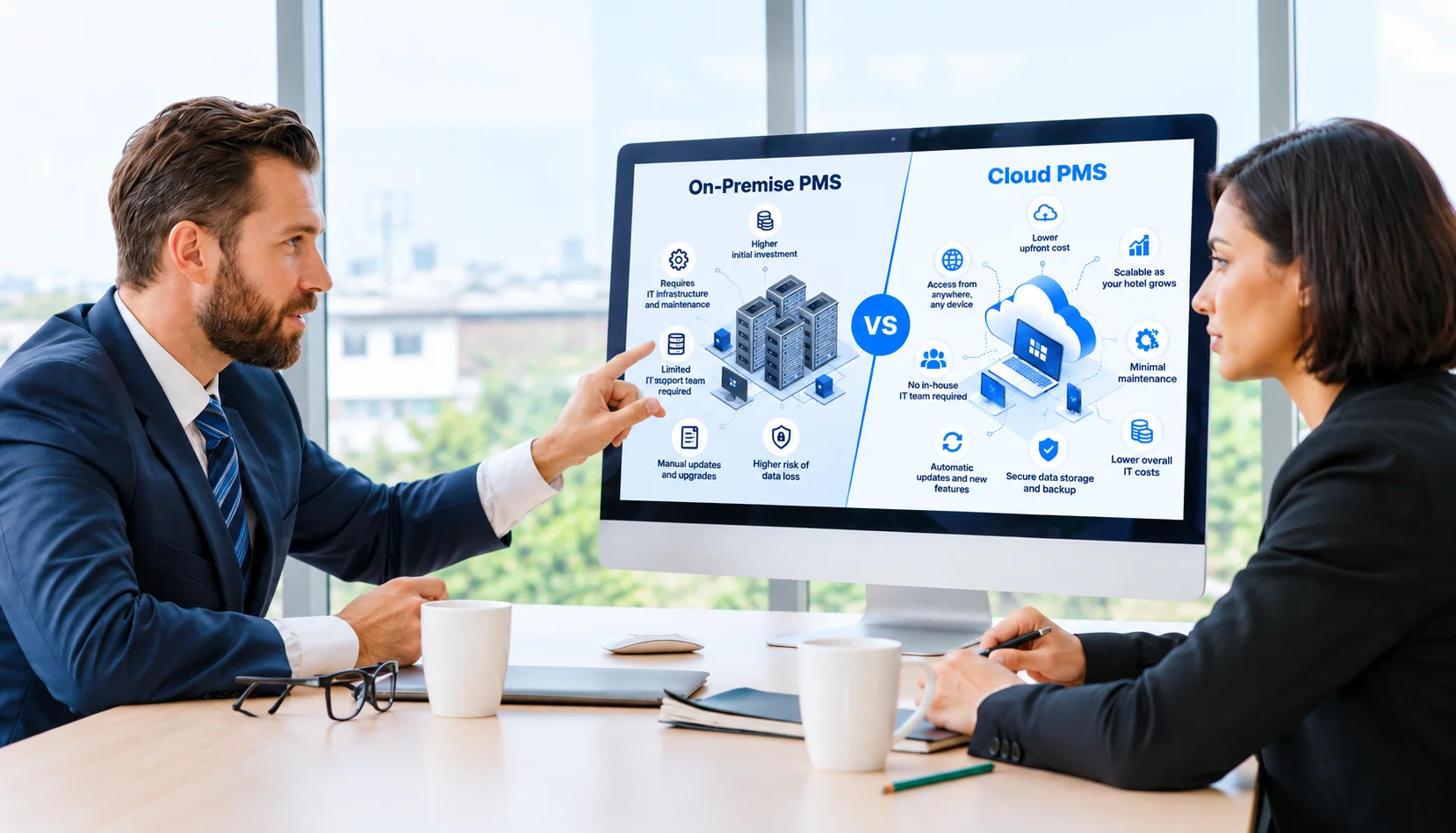
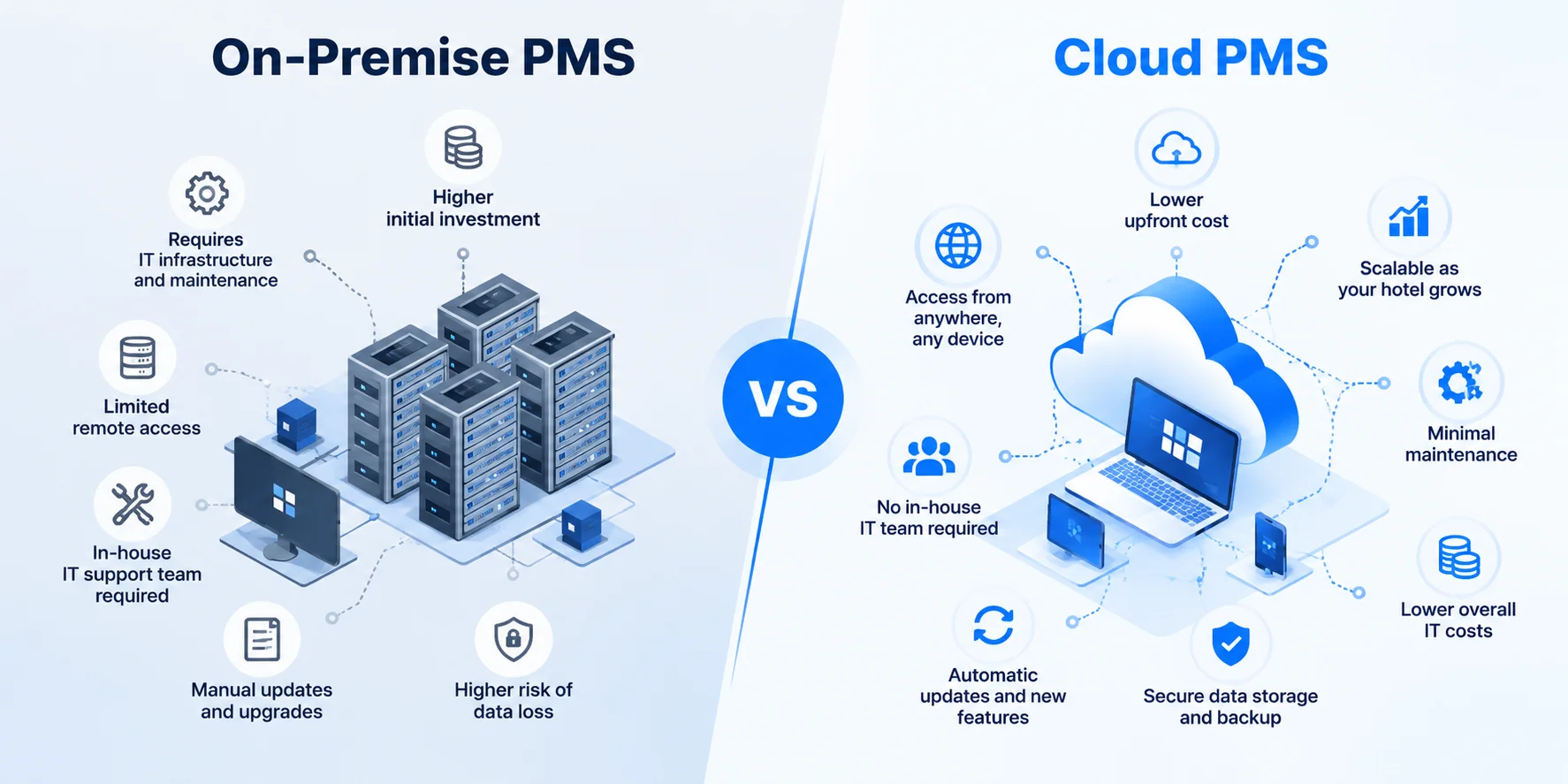
A cloud PMS runs on the vendor's servers and is used online from any device. An on-premise PMS runs on servers inside your hotel and is maintained by your own team.
Cloud is an operating expense paid by subscription. On-premise is a capital expense: a large upfront license and hardware purchase, plus upkeep and a server refresh every few years.
Cloud wins on remote access, automatic updates, integrations, disaster recovery, multi-property management and guest-facing features.
On-premise wins on working without the internet and on full physical control of your data, and it allows deeper custom changes.
For most independent hotels, motels, resorts and small groups, a cloud PMS costs less over time and needs far less IT work. On-premise still suits properties with unreliable internet or strict in-house data rules.
Cloud PMS Vs On-Premise PMS: The Key Difference
The difference between a cloud and an on-premise PMS is where the software runs and who maintains it. A cloud PMS is hosted by the vendor and used online from any device. An on-premise PMS is installed on servers at your hotel and maintained by your own staff or IT contractor.
That one difference shapes everything else: how you pay, where staff can work, who installs updates, who protects your data and what happens when something breaks. Both systems handle the same core jobs of a hotel property management system, such as reservations, check-in, housekeeping, billing and reports. What changes is the setup around them.
What Is A Cloud PMS?
A cloud PMS is hotel property management software hosted on the vendor's secure servers and accessed through a web browser or mobile app.
You pay a subscription, and the vendor runs the servers, installs updates, backs up your data and handles most of the security work. Staff can log in from a front desk computer, a tablet in the lobby or a phone at home. Most PMS products released in the last decade are cloud-based. For a deeper look at how it works, read our complete guide to cloud-based hotel PMS.
What Is An On-Premise PMS?
An on-premise PMS is hotel property management software installed on servers and computers physically located at your property.
You usually buy a software license upfront, then pay for the server hardware, installation and an annual maintenance contract. The data lives on your own server, and your staff or an IT contractor handles updates, backups and security. On-premise was the standard for decades, and some hotels still run long-standing systems this way. Some vendors also offer a "hosted" option, where they run the same on-premise software in a data center for you. That improves backups and remote access, but it isn't the same as a cloud-native PMS built for the web.
Cloud Vs On-Premise PMS: Comparison Table
Here is how cloud and on-premise PMS compare across 22 factors that matter to hotels.
Factor
Cloud-based PMS
On-premise PMS
Deployment
Hosted by the vendor in secure data centers and accessed online
Installed on physical servers at the property
Cost structure
Operating expense (OPEX): a predictable subscription
Capital expense (CAPEX): a large upfront purchase plus ongoing upkeep
Upfront cost
Low: setup and onboarding fees
High: software license, server hardware and installation
Ongoing cost
Monthly or annual subscription
Maintenance contract, hardware refreshes and IT support
Implementation time
Typically weeks
Often months
Remote access
Any device with a browser or app, on or off property
Limited to on-site terminals, or needs a VPN or remote desktop setup
IT requirement
Minimal: the vendor manages servers, security and backups
Dedicated in-house or contracted IT staff
Maintenance
Automatic background updates and off-site backups by the vendor
Manual patches, upgrades and backups handled by the hotel
Support
Remote support, often 24/7; the vendor can fix most issues directly
Often needs an on-site technician or local IT contractor
Uptime and reliability
Redundant data centers, with uptime committed in a service level agreement (SLA)
Depends on one on-site server; a hardware failure can stop operations
Disaster recovery
Data backed up off site and restorable quickly after a fire, flood or theft
Backups are the hotel's job; data can be lost if they aren't kept off site
Internet need
Needs a stable, reliable connection, ideally with a backup line
Runs on the local network and keeps working during internet outages
Data control
Data hosted by the vendor, protected by vendor security, with ownership and export set by contract
Full physical control of the servers and data on site
Security work
Shared: the vendor secures the platform, the hotel manages users and devices
Mostly the hotel's responsibility
PCI compliance scope
Smaller when card data is tokenized through integrated payments
Larger, because card data may be stored or processed on local systems
Integrations
API connections, often through a partner marketplace
Custom interfaces, often slower and more expensive
Customization
Settings, custom fields and reports on a shared platform, with no code changes
Can be customized deeply, but changes are expensive and make upgrades harder
Scaling
Add rooms, users or properties in the same account
New licenses and sometimes new hardware
Multi-property management
Every property in one login, with consolidated reports and shared guest profiles
Usually a separate system per property, which is hard to link
Guest-facing features
Built for online check-in, mobile keys, messaging and upsells
Hard or costly to add modern digital guest features
Staff training
Modern visual screens that new staff learn quickly
Older interfaces that often rely on codes and commands, so training takes longer
Switching and lock-in
Depends on the contract's data export and exit terms
Hotel keeps its data, but it's tied to aging hardware and software licenses
{{pms-one}}
Cloud Vs On-Premise PMS Explained Factor By Factor
A cloud property management software (cloud PMS) is hosted by the vendor and used online from any device, paid as a subscription, with the vendor handling servers, updates, and backups. An on-premise PMS is installed on servers at your hotel, bought upfront, maintained by your own team, and it keeps working without the internet. For most independent hotels, motels, resorts, and small groups, cloud costs less over five years and needs far less IT work, while on-premise still suits properties with unreliable internet or strict in-house data rules.
1. Deployment And Hosting
With a cloud PMS, the software and database run in the vendor's data centers, usually on a major cloud provider's infrastructure. Your hotel needs only computers, tablets or phones and an internet connection. With an on-premise PMS, you need a dedicated server, often a backup server, networked workstations, a secure room to keep the hardware in, and power protection such as a UPS. Deployment decides who owns the hardware, and that drives almost every other difference in this comparison.
2. Cost Structure, Upfront Cost And Ongoing Cost
A cloud PMS is an operating expense. You pay a monthly or annual subscription, usually based on room count, with low setup fees, so costs are predictable and scale with your property. An on-premise PMS is a capital expense. You pay upfront for the software license, servers and installation, then keep paying for annual maintenance, IT support, electricity and cooling, and a server replacement every few years. The cost comparison section below breaks this down in full.
3. Implementation Time
Cloud systems can be set up remotely. The vendor configures room types, rates and users with you, trains staff online, and many independent hotels go live in a few weeks. On-premise rollouts often take months, because hardware must be bought, delivered and installed, software loaded onto each workstation, and interfaces built by technicians, sometimes on site.
4. Remote Access
A cloud PMS works anywhere there's internet. General managers can check occupancy from home, front desk agents can check guests in from a tablet in the lobby, and housekeepers can update room status from their phones. An on-premise PMS is tied to terminals on the hotel's network. Remote access usually requires a VPN or a remote desktop setup, which costs extra, can be slow and adds security risk if it isn't configured well.
5. IT Requirement And Maintenance
With a cloud PMS, the vendor patches the software, updates the operating systems, monitors the servers and runs backups, so your team doesn't need technical skills to keep the system running. With an on-premise PMS, someone at your hotel or a contracted IT firm must install updates, apply security patches, check that backups actually ran and replace failing hardware. For small properties without IT staff, this is often the biggest hidden burden of on-premise.
6. Support
Cloud vendors can see the platform directly, so their support teams can investigate and fix most issues remotely, often during the same call or chat. Many offer support around the clock. With on-premise systems, many problems sit on your own hardware or network, so you may need a technician on site or a local IT contractor, which slows the fix, especially at night or on weekends.
7. Uptime And Reliability
Cloud PMS platforms run in data centers with redundant power, cooling, network links and servers, and good vendors commit to an uptime level in a service level agreement. An on-premise PMS depends on one server in your building. If its hard drive fails, the power goes out or the server overheats, the PMS stops until it's repaired. The flip side is internet dependency, covered next.
8. Internet Need
This is the main operational advantage of on-premise. Because the system runs on your local network, staff can keep checking guests in and out even when the internet is down. A cloud PMS needs a stable connection. Most hotels manage this with a backup line, such as a second internet provider or a 4G or 5G failover router, and some cloud vendors offer limited offline access to arrival lists and reports. For properties in remote areas with unreliable internet, this factor can decide the choice on its own.
9. Disaster Recovery
A cloud PMS stores your data in professional data centers with automatic off-site backups. If a fire, flood, theft or ransomware attack hits your property, you can log in from another location and keep operating. With an on-premise PMS, disaster recovery depends on your own backup routine. If backups are kept on the same server, or not tested, a single incident can wipe out reservations, folios and guest history.
10. Data Control, Security Work And PCI Compliance Scope
On-premise gives you full physical control: the data sits on hardware you own, inside your building. That appeals to some large hotels and groups with strict internal data policies. But control also means responsibility for encryption, access control, patching, monitoring and breach response.
With a cloud PMS, security is shared. The vendor secures the platform and data centers, and your hotel manages user accounts, passwords, multi-factor login and staff devices. Your contract should confirm that you own your data and can export it.
Card payments are a big part of this. Cloud PMS platforms with integrated, tokenized payments keep full card numbers out of your systems, which shrinks your PCI DSS compliance scope. On-premise systems that store or process card data locally put more of that compliance work on your hotel.
11. Integrations
Modern hotels connect their PMS to a channel manager, booking engine, payment gateway, POS, door locks, guest messaging and revenue tools. Cloud PMS platforms use open APIs and partner marketplaces, so many connections are ready to switch on. On-premise systems often need custom interfaces, extra hardware or middleware for each connection, which raises cost and slows projects. Our guide to hotel PMS integration explains these connections in more detail.
12. Customization
On-premise systems can sometimes be modified deeply for one property, but custom code is expensive and often breaks or blocks future upgrades. Cloud PMS platforms run one version for every customer, so you can't rewrite the software. Instead, you tailor it through settings, custom fields, rate rules, report builders and integrations. For most hotels, configuration covers what they need without the long-term cost of custom code.
13. Scaling And Multi-Property Management
Adding rooms, users or a new property to a cloud PMS is usually a plan change. Groups can manage every property from one login, view consolidated reports, share guest profiles and set rates centrally. On-premise systems usually need new licenses and sometimes new servers for growth. Running several properties often means separate systems that are hard to report across.
14. Guest-Facing Features
Cloud PMS platforms are built to work with online check-in, digital registration cards, mobile keys, two-way messaging, guest apps and automated upsells. These features depend on real-time internet connections between the PMS and the guest's phone. Adding them to an on-premise system is often expensive, limited or not possible.
15. Staff Training
Cloud PMS products tend to have modern, visual screens, such as drag-and-drop tape charts and color-coded room status, that new hires pick up quickly. Many on-premise systems date from earlier software generations and rely on codes, menus and keyboard commands. In an industry with high staff turnover, faster training saves time and money with every new hire.
16. Switching And Lock-In
Every system creates some lock-in. With a cloud PMS, your ability to leave depends on the contract, so check data ownership, export formats and notice periods before signing. With an on-premise PMS, you keep your data on your own server. But you're tied to aging hardware, licenses and a vendor whose upgrades may be costly, and moving off a legacy system can be just as hard.
{{pms-two}}
Cost Comparison: Cloud Vs On-Premise PMS
The cost difference isn't only the price tag. It's when you pay, what you pay for and who carries the risk.
What You Pay For With Each Model
Cost item
Cloud-based PMS
On-premise PMS
Software
Included in the subscription
Upfront license fee
Servers and hardware
None for the PMS itself; you use existing devices
Server, backup server, workstations, network gear and power protection
Installation and setup
Remote onboarding and configuration fees
On-site installation, often by technicians
Updates and upgrades
Included and automatic
Annual maintenance fee, plus paid major version upgrades
IT support
Included vendor support
In-house IT staff or an IT contract
Backups and disaster recovery
Included
Backup hardware, off-site storage and staff time
Electricity and cooling
Included
Paid by the hotel for the server room
Hardware refresh
Not needed for the PMS
Servers replaced every few years
Integrations
Often ready-made, sometimes with fees
Custom interfaces, often expensive
Why Total Cost Of Ownership Matters
Comparing a monthly subscription to a one-time license is misleading. To compare fairly, add up every cost over five years: subscription, setup, training, integrations and payment fees for cloud, and license, hardware, installation, maintenance, IT support, energy, upgrades and the next server refresh for on-premise. For most independent properties, the cloud comes out lower over five years and spreads costs evenly instead of in large jumps. On-premise can make sense for very large properties that already employ IT staff and have recently invested in hardware.
Benefits Of Cloud PMS Vs Benefits Of On-Premise PMS
Each model has real strengths. Here is where each one comes out ahead.
Benefits Of A Cloud PMS
Lower upfront cost: no servers or large license fees, just a predictable subscription.
Work from anywhere: managers, front desk and housekeeping can use the property management software (PMS) on any device, on or off property.
No server upkeep: the vendor handles updates, patches, backups and monitoring.
Faster setup: go live in weeks with remote onboarding.
Easier integrations: open APIs connect your channel manager, booking engine, POS and payment tools in real time, which reduces overbookings.
Built-in disaster recovery: off-site backups keep your data safe if something happens at the property.
Simple growth: add rooms or properties without new hardware.
Modern guest experience: online check-in, mobile keys, messaging and upsells.
Benefits Of An On-Premise PMS
Works offline: operations continue during internet outages because the system runs on your local network.
Full data control: data stays on hardware you own, which can help meet strict internal policies.
Deep customization: some systems can be modified extensively for one property.
No ongoing subscription for the license: after the upfront purchase, you pay maintenance rather than a monthly fee.
Fast local performance: the system doesn't depend on internet speed for daily tasks.
{{pms-three}}
Limitations Of Cloud PMS Vs On-Premise PMS
Neither option is perfect. Knowing the weak points helps you plan around them.
Limitations Of A Cloud PMS
Internet dependency: an outage blocks access to the live system unless you have a backup connection or offline tools.
Recurring cost: subscriptions continue for as long as you use the system, and add-ons can raise the bill.
Less deep customization: you configure the platform rather than rewrite it.
Vendor dependency: uptime, support and the product roadmap are in the vendor's hands, so check the SLA and contract.
Data location rules: some regions require guest data to stay in specific countries, so confirm where data is hosted.
Limitations Of An On-Premise PMS
High upfront investment: license, servers and installation before you go live.
IT burden: patches, backups, security and hardware failures are your responsibility.
Limited remote access: off-site use needs a VPN or remote desktop setup.
Single point of failure: one server problem can stop operations.
Costly upgrades and integrations: new versions and connections often need paid projects.
Ageing technology: many systems struggle to support mobile and digital guest features.
Cloud Or On-Premise: Which PMS Is Right For Your Hotel?
The right choice depends on your connectivity, team, budget and growth plans.
Choose A Cloud PMS If:
You run an independent hotel, motel, inn, resort or small group without dedicated IT staff.
You want low upfront cost and predictable monthly spending.
Managers or owners need to see the property remotely.
You sell on several OTAs and want real-time sync to prevent overbookings.
You plan to add rooms or properties.
You want online check-in, mobile keys and guest messaging.
An On-Premise PMS May Still Fit If:
Your property is in a remote area with unreliable internet and no practical backup connection.
Your organization has strict policies requiring all data to stay on hardware you own.
You already employ IT staff and have recently invested in servers.
You depend on deep custom changes that no cloud platform can replicate.
Questions To Ask Before You Decide
How reliable is our internet, and can we add a backup connection?
What will each option cost over five years, including IT time and hardware?
Which systems must the PMS connect to, and are those integrations available?
Who will handle updates, backups and security on our side?
Where will our data be stored, and can we export it if we leave?
When you're ready to compare cloud PMS vendors, our roundup of the best hotel management software lists features, ideal property types and ratings side by side.
{{pms-four}}
Common Myths About Cloud PMS
Some hoteliers stay on on-premise systems because of outdated ideas about the cloud. Here are the most common myths.
Myth 1: Data Is Less Secure In The Cloud
Established cloud vendors invest in encryption, monitoring, testing and patching at a level few individual hotels can match. Many security problems at hotels come from unpatched local servers, shared passwords and missing backups, which are exactly the risks a well-run cloud platform reduces.
Myth 2: The Hotel Loses Ownership Of Its Data
A good cloud PMS contract states that the hotel owns its data and can export it. Read the data ownership and exit terms before you sign, and choose vendors that put them in writing.
Myth 3: Cloud Is Always More Expensive Over Time
Subscriptions continue, but so do on-premise costs: maintenance contracts, IT support, energy, upgrades and server replacements. When you compare five-year total cost, the cloud is usually lower for small and mid-sized properties.
Myth 4: An Internet Outage Will Shut Down The Hotel
Outages are a real risk, but they're manageable. A backup internet connection, a failover router and printed or downloadable arrival lists keep the front desk working until service returns.
How To Move From An On-Premise PMS To The Cloud
Switching is easier than most hotels expect when it's planned well.
Choose a low-occupancy go-live date, clean up duplicate profiles and old folios before export, and work with the vendor to recreate room types, rates and taxes. Connect and test your channel manager, payments and other integrations before go-live, train each team on its own tasks, and run a short parallel test before switching off the old system. Our guide to hotel PMS implementation walks through each step, and the cloud-based hotel PMS guide covers what to look for in a cloud vendor.
Make The Move To Cloud With roommaster
roommaster is a cloud-based hotel PMS built for independent hotels, motels, resorts and small groups that want to leave servers and manual updates behind. Its property management system brings reservations, front desk, housekeeping, billing and reporting together with a built-in channel manager, booking engine,revenue management and guest tools in one platform you can use from any device. With more than 25 years in hospitality technology and thousands of properties worldwide, roommaster helps hotels move from legacy on-premise systems with guided data migration, onboarding and training.
{{cta-strip}}
Frequently Asked Questions
1. What is the main difference between a cloud PMS and an on-premise PMS?
A cloud PMS is hosted by the vendor and used online from any device, while an on-premise PMS is installed on servers at your hotel. That difference decides how you pay, who maintains the system, where staff can work and what happens during an outage.
2. Why do hotels choose cloud instead of on-premise?
Hotels choose cloud for lower upfront cost, remote access, automatic updates, easier integrations and built-in backups. It also removes the need for in-house IT staff to maintain servers, which matters most for independent and small properties.
3. Is a cloud PMS cheaper than an on-premise PMS?
Usually, yes, when you compare total cost over five years. A cloud PMS replaces the license, server hardware, IT support, energy and hardware refresh costs of on-premise with one predictable subscription. Very large hotels with existing IT teams and recent hardware may see a smaller difference.
4. Is a cloud PMS safer than an on-premise PMS?
For most hotels, yes. Established cloud vendors provide encryption, continuous monitoring, regular security testing, automatic patching and off-site backups. An on-premise system is only as secure as the hotel's own patching, backups and access controls.
5. Can an on-premise PMS work without the internet?
Yes. An on-premise PMS runs on the hotel's local network, so core front desk tasks keep working during an internet outage. However, connections to OTAs, channel managers and online payments still need the internet.
6. Is a hosted PMS the same as a cloud PMS?
Not exactly. A hosted PMS is usually traditional on-premise software that the vendor runs in a data center for you. A cloud-native PMS is built for the web from the start, with browser access, frequent automatic updates and open APIs.
7. Can I move my data from an on-premise PMS to a cloud PMS?
Yes. Most cloud PMS vendors import guest profiles, future reservations, rates and open balances from your current system during onboarding. Clean up duplicates and old folios before export so the new system starts with accurate data.
Mayela Lozano is a content strategist with a passion for hospitality and technology. She collaborates with roommaster on content creation, highlighting how technology can streamline hotel operations and enhance guest satisfaction. When she’s not creating content, Mayela loves to travel and spend time with her two little ones, discovering new adventures and making memories along the way.
Join Thousands of Hotels Thriving with roommaster
The transition to roommaster is straightforward and efficient. Our implementation team handles data migration including reservations, guest profiles, and historical information.
The transition to roommaster is straightforward and efficient. Our implementation team handles data migration including reservations, guest profiles, and historical information.
How Hotel PMS Software Transforms Hospitality Management
September 23, 2026
Cloud PMS
Hotel Management
Clarity PMS Alternatives: 6 Best Cloud PMS Options for APAC Hotels
July 31, 2026
Cloud PMS
Hotel Management
How Hotels Can Maximize Revenue During the 2026 FIFA World Cup with the Right PMS
June 9, 2026
Cloud PMS
Hotel Management
Best PMS Software For Independent Hotels: A Practical Buying Guide For 2026
May 29, 2026
Cloud PMS
Hotel Management
Channel Manager vs PMS vs CRS: What Hotels Really Need
May 26, 2026
Hotel Management
Hospitality Technology
Cloud PMS
8 Best Multi-Property Hotel Management Software Platforms For Hotel Groups (2026)
May 22, 2026
Cloud PMS
Hotel Management
Clarity PMS Vs roommaster: Feature Comparison
May 10, 2026
Cloud PMS
Hotel Management
Moving Off Clarity PMS: A Side-By-Side Comparison Of Replacement Options
May 9, 2026
Join Thousands of Hotels Thriving with roommaster
See how roommaster's unified platform can work for your property. Our team will walk you through features tailored to your specific needs and operations.

.png)
.png)
.png)