Choose Your Fee Model: Vrbo offers annual subscription ($499/year) or pay-per-booking (8% commission)—subscription profitable after 6 bookings.
Meet Requirements: Verify identity, prove property ownership, ensure safety compliance, and check local short-term rental laws.
Optimize for Bookings: Upload 20-40 professional photos, use dynamic pricing, respond within one hour, and enable Instant Book.
Avoid Common Mistakes: Never misrepresent your property, maintain competitive pricing, respond quickly, and avoid canceling bookings.
Scale With Technology: Use Roommaster to sync calendars across Vrbo, Airbnb, and other platforms, preventing double bookings.
Listing your property on Vrbo connects you with millions of travelers searching for whole-home vacation rentals, turning vacant properties into revenue generators while reaching families and groups who prefer private accommodations over hotels. The platform's integration with Expedia Group extends your visibility across multiple travel booking sites, but success requires understanding subscription models, compliance standards, and optimization strategies that separate fully-booked properties from those struggling for attention.
This guide walks you through creating a Vrbo listing from account setup through advanced optimization techniques, managing costs effectively, and scaling your operations when hosting one property evolves into managing several across multiple booking platforms.
Why List on Vrbo Instead of Other Platforms?
1. Whole-Home Rental Focus
Vrbo built its platform specifically for entire properties rather than shared spaces. While Airbnb accommodates everything from private rooms to entire homes, Vrbo exclusively features whole-property rentals. This specialization attracts travelers who want complete privacy and aren't interested in scrolling through shared room options. If you own a vacation home, cabin, beach house, or any property guests can have entirely to themselves, Vrbo's focused marketplace puts you in front of your ideal audience.
2. Expedia Group Distribution Network
Your Vrbo listing doesn't just appear on Vrbo.com. As part of Expedia Group, your property automatically shows up across Hotels.com, Expedia, Travelocity, Orbitz, and other partner sites within the network. This distribution amplifies your reach without creating separate listings on each platform. One property profile generates exposure across multiple high-traffic booking sites, bringing more potential guests to your calendar.
3. Family and Extended Stay Travelers
Vrbo's typical guest demographic skews toward families planning vacations and travelers booking longer stays. These guests generally respect properties better, generate fewer complaints, and book for multiple nights rather than single overnight stays. The platform's focus on whole-home rentals naturally attracts this audience—parents coordinating family reunions, groups planning ski trips, or remote workers seeking month-long stays all turn to Vrbo first.
What Are the Vrbo Listing Requirements All Hosts Must Meet?
A. Property Ownership or Management Rights
You need legal authority to rent the property short-term before Vrbo approves your listing. Homeowners provide proof of ownership through property deeds or mortgage statements. Property managers submit management agreements showing they have permission to list and rent the space. Renters need explicit written consent from their landlord, and Vrbo may request documentation proving you have authorization to operate a short-term rental in the space.
B. Accurate Property Information Standards
Your listing must truthfully represent what guests will experience when they arrive. The bedroom count, bathroom count, sleeping arrangements, square footage, and amenities you list need to match physical reality. Misrepresenting your property—claiming three bedrooms when you actually have two, or advertising ocean views from a landlocked location—violates Vrbo's terms and gets your listing suspended when guests report discrepancies.
C. Local Law Compliance Requirements
Short-term rental regulations vary dramatically between jurisdictions, and you're responsible for understanding and following local laws regardless of what Vrbo's platform allows. Some cities require business licenses or special permits. Others cap the number of rental days per year. Certain neighborhoods prohibit short-term rentals entirely. Research your local regulations thoroughly, obtain necessary permits, register with tax authorities if required, and maintain documentation proving compliance.
D. Guest Communication Expectations
Vrbo expects hosts to respond to inquiries within 24 hours and maintain clear communication throughout each guest's stay. You need reliable methods for guests to reach you before, during, and after their reservation. Providing accurate check-in instructions, sharing important property details, and addressing guest questions promptly aren't optional—they're fundamental hosting requirements that affect your account standing and search visibility.
E. Safety and Cleanliness Standards
Every property must have working smoke detectors, carbon monoxide detectors where applicable, fire extinguishers, and first aid kits. Your listing needs to meet basic cleanliness standards before each guest arrives, with fresh linens, sanitized surfaces, and functional plumbing and electrical systems. Properties that consistently fail safety or cleanliness expectations face listing removal and account suspension.
F. Liability Insurance Coverage
While Vrbo offers limited protection through their Host Guarantee program, the platform requires hosts to maintain adequate liability insurance. Standard homeowner's insurance typically doesn't cover short-term rental activities, so you'll need either a separate short-term rental policy or a rider on your existing insurance. Vrbo can request proof of coverage, and operating without proper insurance exposes you to significant financial risk if accidents occur.
Must-Have Property Features:
Functional locks on all exterior doors and bedroom doors where appropriate
Working heating and cooling systems suitable for the climate
Hot and cold running water with adequate water pressure
Fully functioning kitchen if advertised (stove, refrigerator, sink, basic cookware)
Reliable internet connection if Wi-Fi is listed as an amenity
Adequate sleeping accommodations that match your stated capacity
Clean towels, linens, and bedding for all sleeping spaces
Proper waste disposal and recycling options
Emergency contact information posted visibly
Clear directions for operating appliances and systems
Nice-to-Have Features That Increase Bookings:
Smart locks for keyless entry convenience
Streaming service subscriptions (Netflix, Hulu, Disney+)
Coffee makers with provided coffee and filters
Beach chairs, umbrellas, or ski equipment for relevant locations
Board games, books, and entertainment options
Outdoor furniture and grilling equipment
High-quality mattresses and premium bedding
Workspace with desk and ergonomic seating
Washer and dryer in-unit rather than shared facilities
Garage parking or covered parking spaces
What Are the Costs and Fees of Hosting on Vrbo?
- Annual Subscription Model
Vrbo offers an annual subscription option where you pay a flat fee upfront to list your property for the entire year. The standard subscription costs $499 annually and includes unlimited bookings with no commission on reservations. You pay the same amount whether you receive five bookings or fifty, making this model financially attractive for properties that book frequently. The subscription renews automatically unless you cancel, and Vrbo doesn't offer refunds if you decide to stop hosting mid-year.
- Pay-Per-Booking Commission Model
If you prefer avoiding upfront costs, Vrbo's commission-based model charges a percentage of each booking instead of an annual fee. The platform deducts approximately 8% from your payout for each reservation, covering the same platform features and support as the subscription model. This option works better for hosts testing the market, properties in seasonal locations with limited rental periods, or anyone preferring to pay only when they earn income.
Vrbo processes guest payments when bookings are confirmed and holds those funds until 24 hours after the guest's scheduled check-in time. Once that window passes, Vrbo releases your payout minus applicable fees. This delay protects against fraudulent bookings and gives guests time to address problems at check-in, but it means you receive payment several days after guests arrive rather than immediately when they book.
Additional Charges You Control
Beyond Vrbo's platform fees, you set optional charges that guests pay separately. Cleaning fees typically range from $50 to $300 depending on property size and local service costs. Security deposits (usually $200-$1,000) discourage property damage, though Vrbo doesn't automatically charge this amount—you must file a claim if damage occurs. Pet fees compensate for additional cleaning and wear when you allow animals. Extra guest fees apply when occupancy exceeds your base guest count. These optional charges increase your effective nightly rate while keeping your advertised base price competitive in search results.
Taxes and Legal Obligations
Vrbo automatically collects and remits occupancy taxes in many jurisdictions, handling tourist taxes, lodging taxes, and similar obligations on your behalf. However, this automation doesn't cover everywhere, and you're responsible for understanding which taxes apply in your location. Income tax on rental earnings remains your responsibility regardless of Vrbo's tax collection—report all rental income on your tax returns and keep detailed records of expenses you can deduct.
Step-By-Step Guide: How to List a Property on Vrbo
Follow these steps to list your hotel on Vrbo and start accepting bookings from a global customer base.
Step 1: Set up your account
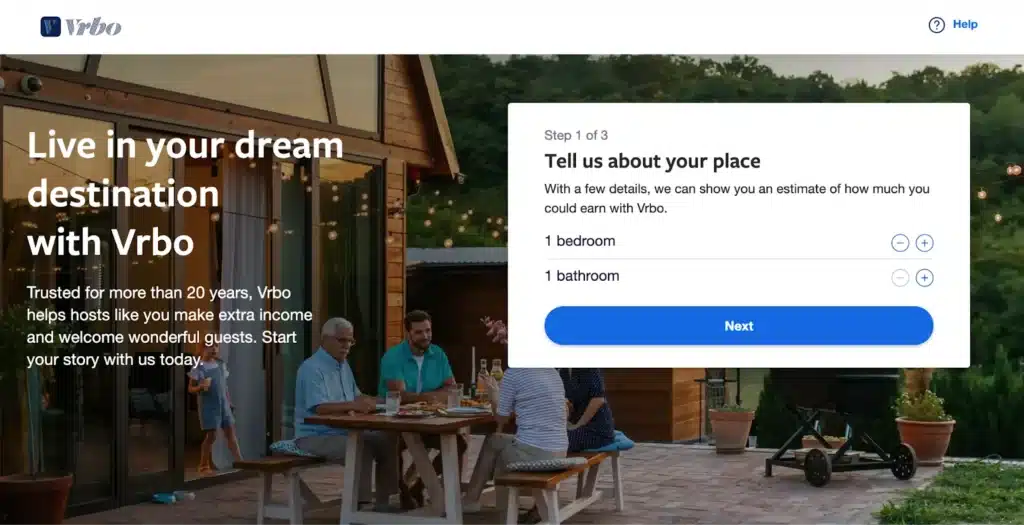
Go to the Vrbo website and click “List your property” at the top right corner of the page. You’ll see a box that says “Tell us about your place” with fields asking for the number of bedrooms and bathrooms.
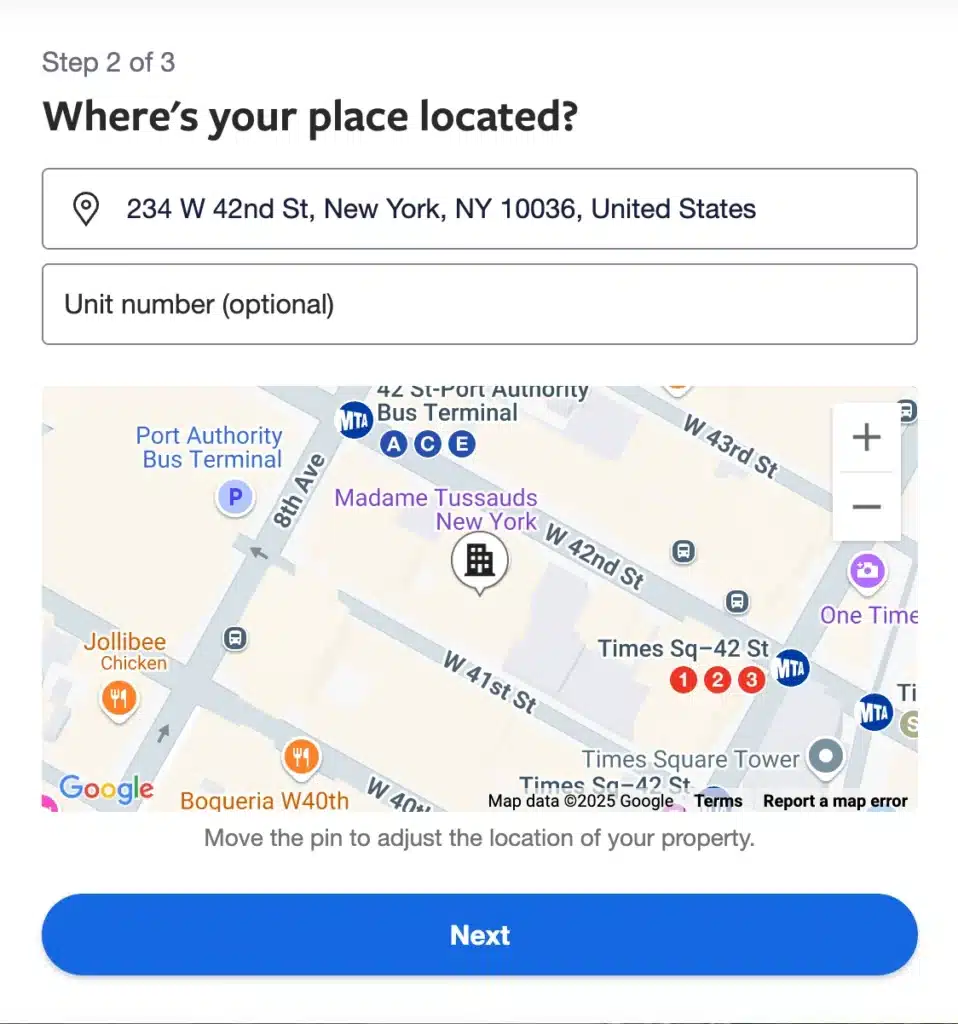
After entering that, Vrbo will ask for your property’s address so it can calculate an estimated earning potential.
Next, fill out details about your property, including its layout, location, and the type of space you offer.
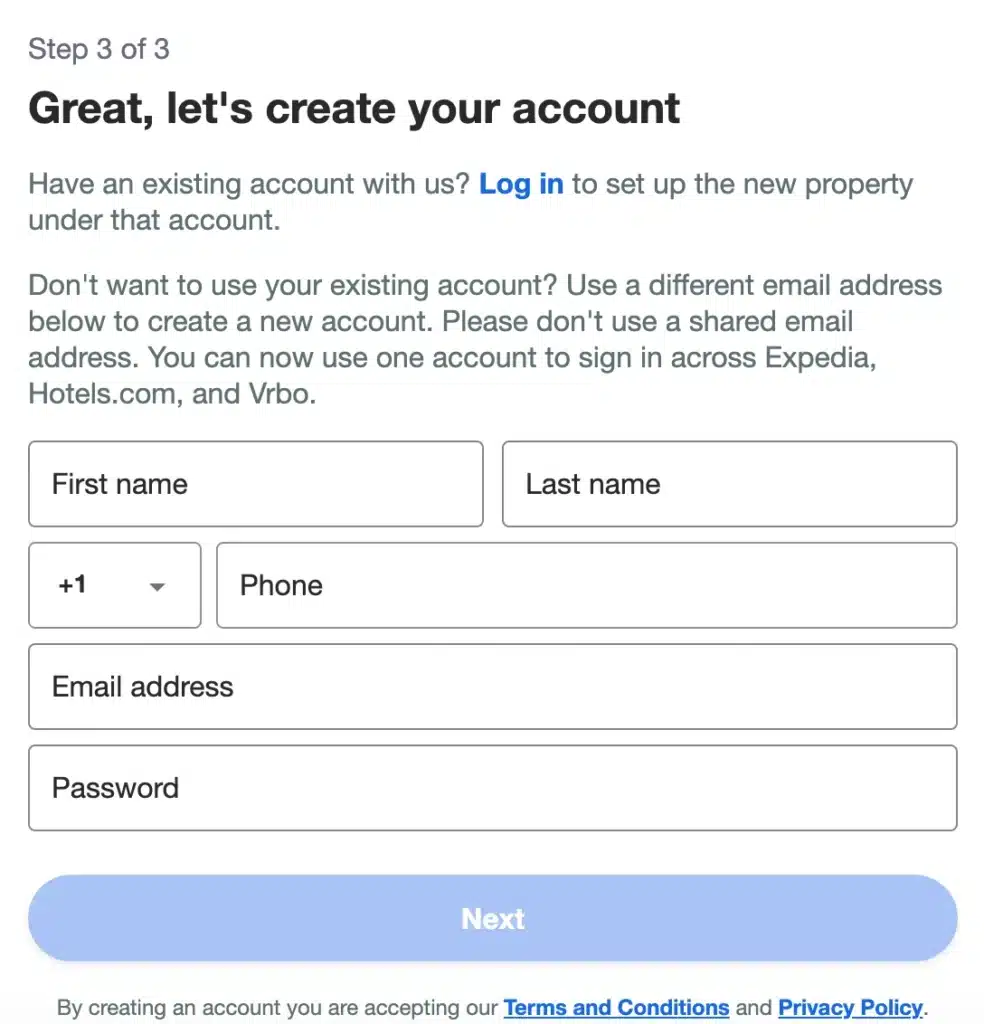
Once you complete that section, the site will direct you to the sign-up page to create your Vrbo account. Create your account using your email address or sign in with your Google or Facebook account without any delay.
Once your account goes live, start building your property listing without waiting for extra confirmations or emails.
Step 2: Complete your verification
Once you’ve created your account, Vrbo asks you to verify your identity before you publish your property listing to keep the platform credible. Submit a valid government-issued photo ID and a recent utility bill or bank statement to confirm your address.Vrbo usually reviews your documents and approves your account within 24 to 48 hours of submission.
Step 3: Create your listing
While creating your listing, here’s what you need to do:
Start with a strong description that highlights your property’s features, layout, amenities, and nearby attractions in detail
Use clear, descriptive language that helps travelers picture the experience they will have during their stay
Upload high-resolution photos that show every room, outdoor space, and feature your guests will want to see
Hire a professional photographer if you want to capture your property with the best angles and lighting
List every available amenity, including Wi-Fi, kitchen appliances, laundry access, parking, air conditioning, or heating
Mention special perks like a pool, hot tub, beach access, mountain views, or proximity to restaurants and shops
Step 4: Set your pricing
Research similar properties in your local area to get a sense of competitive nightly prices and price your property accordingly. Next, use Vrbo's rate calculator to discover a suggested rate according to property type, location, and seasonal factors. If it applies, include any other charges such as cleaning fees, pet fees, or additional guest fees directly into your listing.
Step 5: Review guest profiles
Check each potential guest’s profile and booking history before you approve any reservation on your property. Look for verified identification, strong reviews from other hosts, and clarity in their communication and expectations. Make sure guests understand your house rules before confirming their stay to avoid surprises or misunderstandings.
Step 6: Publish your listing
Lastly, check your listing once more and ensure that all details are correct, clear, and understandable. Then, click “Go Live” to make your property visible to travelers across Vrbo and its partner sites instantly.
How Does Vrbo Work for Owners After You Publish?
1. Guest Discovery and Inquiry Process
Travelers searching Vrbo for accommodations in your area see your listing in search results alongside competitors. They filter results by price, bedroom count, amenities, and location. Your listing title, primary photo, and nightly rate determine whether travelers click to view your full listing or continue scrolling.
When someone views your detailed listing, they can send you an inquiry asking questions about your property, availability, or policies before booking. These inquiries don't guarantee bookings—guests might be comparing several properties—but responding quickly and professionally increases your conversion rate.
Alternatively, if you enable Instant Book, guests can reserve your property immediately without sending inquiries first. This feature increases booking volume by reducing friction but means you'll host guests without pre-booking conversations. Most hosts eventually enable Instant Book once they've established clear house rules and feel confident managing various guest types.
2. Booking Confirmation and Payment Collection
When guests book your property, Vrbo sends you an immediate notification by email and through the Vrbo app. Review the booking details including guest names, check-in/check-out dates, guest count, and total amount paid. Vrbo collects the full payment from guests at booking time for reservations within 14 days or collects a deposit immediately for bookings further out with the balance due 14 days before check-in.
You don't handle payment processing—Vrbo manages all financial transactions and remits your payment (minus fees) 24 hours after the guest's scheduled check-in time. This delay allows time to address any check-in problems or immediately apparent property issues before you receive funds.
3. Guest Communication Through the Platform
All communication between you and guests occurs through Vrbo's messaging system, creating a documented record of every interaction. Vrbo requires keeping conversations on-platform rather than moving to personal email or phone until after booking confirmation. This policy protects both parties by maintaining transparent communication records if disputes arise.
Send guests a welcome message immediately after their booking confirmation, providing check-in instructions, directions to your property, Wi-Fi passwords, and any important property details. Follow up with a reminder message 2-3 days before arrival confirming everything is ready for their stay.
Monitor your Vrbo inbox regularly—ideally checking multiple times daily—to maintain the fast response times that improve your search ranking. Set up the Vrbo mobile app with push notifications so you receive immediate alerts when guests message you.
4. Calendar Management and Availability Updates
Your Vrbo calendar displays availability in color-coded blocks: white for available dates, gray for blocked/unavailable dates, and various colors indicating booked reservations. Update your calendar regularly to reflect when your property is available for new bookings.
Block dates when you need the property for personal use, maintenance work, or periods when you're simply not accepting guests. Vrbo doesn't penalize you for blocking dates—it's your property and you control when it's available for rent.
Sync your Vrbo calendar with calendars from other booking platforms using iCal links to prevent double bookings when listing on multiple sites. However, iCal syncing updates every few hours rather than instantly, creating potential windows where double bookings can occur. More robust channel management solutions provide real-time synchronization for hosts managing multiple platforms seriously.
5. Host Dashboard Performance Tracking
Your host dashboard shows key performance metrics including:
Total booking value and nights booked
Average nightly rate and occupancy percentage
Response rate and response time averages
Review scores across different categories
Calendar availability percentages
Listing view counts and search ranking position
Monitor these metrics regularly to identify trends, spot problems early, and understand what's working well. Declining view counts might indicate you're priced too high or competitors have updated their listings with better photos. Dropping response rates suggest you need to check messages more frequently or set up better notification systems.
How Can You Optimize Your Vrbo Listing and Boost Bookings?
1. Use Data-Driven Dynamic Pricing
Static pricing leaves money on the table during high-demand periods and reduces occupancy during slower seasons. Implement dynamic pricing that adjusts your nightly rates based on market demand, competitor pricing, seasonality, local events, and booking lead time.
Several dedicated pricing tools integrate with Vrbo to automate these adjustments:
Beyond Pricing analyzes your local market and adjusts rates based on over 60 demand factors
PriceLabs uses machine learning to optimize your pricing strategy based on your occupancy goals
Wheelhouse customizes pricing recommendations specific to your property and market dynamics
These tools typically cost $20-50 monthly but often pay for themselves by identifying revenue opportunities you'd otherwise miss. They can automatically increase rates when local demand spikes or decrease prices to fill last-minute availability gaps.
Monitor competitor pricing manually if you prefer keeping direct control. Search Vrbo weekly for properties similar to yours, note their rates for upcoming dates, and adjust your pricing to remain competitive while reflecting your property's relative advantages.
2. Update Calendar Daily and Enable Instant Booking
Stale calendars hurt your search visibility. Vrbo's algorithm favors listings with recently updated calendars, interpreting updates as signals that active hosts are managing their properties attentively. Even if nothing has changed, simply logging into your calendar daily and confirming availability maintains algorithmic favor.
Enable Instant Book once you're comfortable with your house rules and screening standards. This feature allows guests to book immediately without waiting for your approval, removing friction from the reservation process and capturing spontaneous travelers who'll book the first available property meeting their needs.
Instant Book typically increases booking volume by 20-40% because many travelers filter search results to show only instantly bookable properties. You can still decline bookings from guests who don't meet Vrbo's standards or who raise red flags in their profiles, but the default is immediate confirmation.
If you list on multiple platforms simultaneously, ensure your channel synchronization is robust before enabling Instant Book. Double bookings frustrate guests, damage your reputation, and often force you to cancel confirmed reservations—an action that significantly hurts your account standing and search ranking.
3. Respond to Inquiries Within One Hour
Vrbo's algorithm heavily weights response time when ranking search results. Hosts who consistently respond within one hour rank significantly higher than those taking several hours or days to reply. This fast response requirement continues 24/7—inquiries arriving at midnight expect responses just as quickly as those sent during business hours.
Set up push notifications through the Vrbo mobile app so you receive immediate alerts when guests message you. Keep your phone nearby and check notifications promptly, even if you can only send a quick acknowledgment promising a detailed response soon.
Create template responses for common questions to speed up your reply process:
Check-in procedure questions: Saved templates with complete arrival instructions
Local area questions: Saved responses about nearby restaurants, attractions, and activities
Pet or special request questions: Templates explaining your policies with friendly wording
Personalize these templates slightly for each guest—replace generic greetings with their actual name and reference specific details from their inquiry—so responses feel genuine rather than automated.
Maintain a 90% or higher response rate by responding to every inquiry even if it's just to politely decline bookings that don't work for your property. Ignored inquiries damage your metrics and make guests feel dismissed.
4. Collect and Leverage Guest Reviews
Guest reviews directly influence your search ranking, booking conversion rate, and ability to charge premium pricing. Properties with numerous positive reviews book more frequently and command higher rates than identical properties with fewer or lower-rated reviews.
Follow up with every guest 1-2 days after checkout requesting a review. Timing matters—guests who had positive experiences are most willing to write reviews while memories are fresh, but you want to wait until they've returned home and unpacked. Vrbo's automated review request feature handles this timing, but you can also send personal follow-up messages thanking guests for staying and mentioning you'd appreciate their feedback.
When negative reviews appear, respond professionally and constructively. Address legitimate concerns by explaining what you've done to resolve the issue. Correct factual inaccuracies politely without being defensive. Future guests read your responses and evaluate whether you handle problems reasonably—hosts who respond professionally to criticism often maintain strong booking rates despite occasional negative reviews.
Leave honest reviews for your guests as well. Vrbo's reciprocal review system encourages guests to review hosts after hosts review them first. Many guests wait to see your review before posting theirs, so submitting your guest review promptly increases the likelihood you'll receive one in return.
5. Join the Vrbo Premier Host Program
Premier Host status provides enhanced visibility in search results, a distinctive badge on your listing, and access to dedicated host support. Earning this designation requires meeting specific performance thresholds:
Maintain an overall rating of 4.3 stars or higher
Achieve at least 90% response rate to inquiries
Complete at least 5 bookings or 15 nights booked in the past year
Keep cancellation rate below 10%
Maintain 100% accuracy on listing details (no misrepresentations)
Premier Hosts receive priority placement in search results, especially when travelers filter for "Premier Host" properties. This increased visibility generates more bookings without increasing marketing costs or dropping rates. The program also provides access to experienced host support representatives who can help troubleshoot account issues or optimize your listing strategy.
Once you achieve Premier Host status, maintain it by continuing to meet performance standards. The designation is reviewed quarterly, and hosts who fall below thresholds lose their status and associated benefits until performance improves.
6. Test and Refine Your Listing Performance
Your listing title and description significantly impact click-through rates from search results. Testing different approaches helps identify what resonates most with travelers searching your area.
Monitor your listing performance metrics in Vrbo's host dashboard to understand what's working. Track view counts, inquiry rates, and booking conversion percentages. If you're getting many views but few inquiries, your photos or pricing may need adjustment. If inquiries don't convert to bookings, your description or house rules might raise concerns.
7. Consider testing different elements over time:
Title approaches: Try emphasizing location one month ("Downtown Loft Near Convention Center") versus amenities the next ("Modern Loft with Rooftop Deck & Parking")
Description opening: Start with property highlights versus location benefits and measure which generates more inquiries
Amenity emphasis: Highlight entertainment features during leisure travel seasons, then emphasize work-from-home capabilities during business travel periods
Ask guests during checkout what made them choose your property over others they researched. This direct feedback reveals which aspects of your listing proved most compelling and helps you emphasize the right features in your presentation.
Review competitor listings regularly to see how top-performing properties in your area present themselves. Note which photos they lead with, how they structure descriptions, what amenities they emphasize, and what makes their listings stand out. Adapt successful approaches to your own listing while maintaining your property's unique character.
How Do You Manage Your Vrbo Listing Number, Calendar and Co-Hosts?
- Find and Share Your Vrbo Listing Number
Your Vrbo listing number appears in several locations within your host account. Log into your host dashboard and click on your property listing. The listing number displays at the top of the listing management page, typically formatted as a 7-8 digit number. You'll also find it in the URL when viewing your published listing—it appears as the numerical sequence after "vrbo.com/" in your listing's web address.
This unique identifier becomes essential when contacting Vrbo customer support about listing-specific issues. Support representatives locate your account faster and provide more accurate assistance when you reference your listing number immediately. Keep this number saved in your records for quick reference.
Share your listing number with property managers, co-hosts, or maintenance coordinators who need to reference your property in their work. They can use it to find your specific listing when managing multiple properties or coordinating service schedules across different vacation rentals.
- Sync Your Vrbo Calendar With Airbnb or iCal
Listing on multiple platforms simultaneously maximizes your exposure but creates calendar coordination challenges. Manual calendar updates across multiple sites waste time and increase double booking risk when you forget to block dates after accepting a reservation elsewhere.
Vrbo offers calendar synchronization through iCal feeds—calendar URLs you can export from Vrbo and import into other booking platforms. Access your calendar settings in Vrbo's host dashboard, locate the "Calendar Sync" or "iCal" section, and copy your unique iCal export URL. This URL allows other platforms to read your Vrbo bookings and automatically block corresponding dates on their calendars.
Similarly, import iCal feed URLs from Airbnb, Booking.com, or other platforms into your Vrbo calendar so bookings from those sites automatically block your Vrbo availability. Navigate to your Vrbo calendar settings, find "Import Calendar," paste the iCal URL from your other platform, and save.
Important limitation: iCal synchronization updates every few hours rather than instantly. A guest might book your property on Airbnb at 2:00 PM, but that booking won't reflect in your Vrbo calendar until the next sync cycle runs—potentially 2-12 hours later depending on each platform's sync frequency. During this gap, another traveler could book the same dates on Vrbo, creating a double booking you must resolve by canceling one reservation.
For hosts managing multiple platforms seriously, this iCal limitation makes professional channel management software essential rather than optional. These systems provide instant two-way synchronization, updating all platforms within seconds when any booking occurs.
- Add or Remove a Co-Host or Property Manager
Vrbo allows adding co-hosts or property managers to help manage your listing without sharing your account password. This feature works well when hiring property management companies, delegating tasks to family members, or collaborating with business partners on vacation rental operations.
To add a co-host, navigate to your listing settings and locate the "Co-hosts" or "Property Manager" section. Click "Add Co-host" and enter their email address. Vrbo sends an invitation to that address, and they must create or log into their Vrbo account to accept access to your property.
Define permission levels when adding co-hosts. You can grant full access (allowing them to make any changes including pricing and calendar), limited access (allowing communication with guests but not financial settings), or custom permissions matching their specific role and responsibilities.
Remove co-host access anytime by returning to the co-host settings and clicking "Remove" next to their name. They immediately lose access to your listing and can no longer make changes or view guest information. Remove access promptly when working relationships end or when team members transition to other roles.
Establish clear responsibilities and communication protocols with co-hosts before granting access. Define who handles guest inquiries, who manages check-in coordination, who adjusts pricing, and who resolves problems. Confusion about responsibilities leads to missed messages, duplicate responses, or important tasks falling through cracks.
Should You List on Vrbo and Airbnb at the Same Time?
Pros and Cons of Dual Listing
Listing your property on multiple platforms simultaneously expands your potential guest pool and reduces dependence on any single booking source. Different travelers prefer different platforms, and capturing bookings from both Vrbo and Airbnb significantly increases your overall occupancy compared to single-platform listing.
Advantages of multi-platform hosting:
Broader guest reach accessing different traveler demographics and booking preferences
Diversified revenue streams reducing risk if one platform changes policies or fees
Competitive hedge protecting against algorithm changes on any single platform
Higher overall occupancy rates without needing to drop prices on one platform
Better market positioning reaching both family-focused and diverse traveler segments
Disadvantages creating operational complexity:
Calendar management challenges tracking availability across multiple platforms
Increased risk of double bookings without robust synchronization systems
Different fee structures requiring separate financial tracking and analysis
Varying cancellation policies potentially confusing guests who research both platforms
Multiple platform policies and rule changes requiring ongoing attention
Higher administrative burden managing separate inboxes and dashboards
Potential pricing conflicts when platforms display different rates to the same guests
Evaluate your management capacity honestly before committing to multi-platform hosting. If you struggle to keep one platform's calendar updated and respond to messages promptly, adding another platform compounds rather than solves problems.
Avoid Double-Bookings With Channel Managers
Professional channel management software prevents the double booking disaster that ruins guest experiences and damages your host reputation permanently. These systems connect to all your booking platforms and synchronize calendars in real-time—when a guest books on Vrbo, your Airbnb calendar updates within seconds, not hours.
Channel managers also centralize your pricing control. Update your nightly rate in one place and that change propagates to all connected platforms simultaneously. Apply last-minute discounts or seasonal adjustments without logging into multiple sites separately.
Leading channel management solutions for vacation rentals include:
Hostfully: Comprehensive property management with automated messaging and digital guidebooks
Guesty: Enterprise-grade system handling large property portfolios across multiple platforms
Lodgify: All-in-one solution including website builder and direct booking engine
OwnerRez: Robust channel management with detailed financial reporting and owner statements
roommaster: Unified platform managing Vrbo, Airbnb, and other channels alongside PMS integration
Most channel managers charge $30-100 monthly per property, but this investment quickly pays for itself through prevented double bookings, saved administrative time, and increased bookings from better availability accuracy. The larger your property portfolio or the more platforms you list on, the more valuable these systems become.
{{channel-manager-one}}
Request demonstrations from several providers to understand their feature sets and identify which system best matches your specific needs and technical comfort level. Most offer free trials letting you test functionality before committing to monthly subscriptions.
Align Pricing and Policies Across Platforms
Maintain rate parity across Vrbo and Airbnb to avoid guest confusion and platform policy violations. When travelers research properties, they often check multiple booking sites. Discovering your property at different prices on different platforms creates negative impressions and reduces trust in your listing.
Some hosts intentionally price higher on the platform with higher fees to achieve similar net payouts, but this practice violates most platform's rate parity policies. Platforms can penalize listings showing inconsistent pricing by reducing search visibility or suspending accounts.
Coordinate your house rules across platforms to prevent conflicting expectations. If you allow pets on Vrbo but prohibit them on Airbnb, guests might book through the pet-friendly platform and arrive with animals you didn't expect based on the Airbnb reservation. Maintain identical policies across all platforms where your property appears.
Align cancellation policies similarly. While Airbnb and Vrbo offer different policy structures, choose options on each platform that provide similar guest flexibility and host protection. This consistency ensures you're not more vulnerable to cancellation revenue loss on one platform versus another.
What Common Mistakes Should You Avoid When You List on Vrbo?
1. Inaccurate Photos or Descriptions
Nothing damages your listing's success faster than photos or descriptions that don't match reality. Travelers book based on what they see and read in your listing. When they arrive and discover your "spacious master bedroom" is actually a cramped space with a full bed instead of the king shown in photos, they leave negative reviews and sometimes request refunds.
2. Common misrepresentation problems:
Using photos from before renovations that removed amenities or changed layouts
Photographing only flattering angles while hiding problem areas
Describing views that don't actually exist or are blocked by new construction
Claiming amenities you no longer offer or that don't function properly
Overstating bedroom counts by including spaces without doors or proper beds
Exaggerating proximity to attractions or travel times
Update your photos whenever you make significant changes to your property. New furniture, fresh paint, or remodeled rooms deserve updated photography reflecting current conditions. Remove old photos showing features you've changed or removed.
Refresh your description annually to ensure accuracy. Neighborhoods change, nearby construction affects access or views, and amenity conditions evolve over time. Read your description as a first-time visitor and verify every claim remains truthful.
3. Non-Competitive Pricing
Pricing too high leaves your calendar empty while competitors book consistently. Travelers comparison shop, and they'll choose similar properties offering better value when your rates exceed what they're willing to pay. Even one property with superior pricing can capture the majority of bookings in your immediate area.
Conversely, pricing too low leaves money on the table and can actually hurt bookings. Travelers associate very low prices with quality problems, questioning why your property costs significantly less than similar listings. They assume you're hiding issues or that the property doesn't meet basic standards.
Research your competition thoroughly and regularly. Search Vrbo for properties in your area matching your bedroom count, amenities, and location. Analyze their pricing across different dates, noting seasonal adjustments and special event premiums. Position your pricing within this competitive range, adjusting up or down based on your property's relative advantages or limitations.
Monitor your booking pace compared to your calendar availability. If you're getting lots of inquiries but few bookings, you're probably priced too high. If you book solid months in advance with minimal calendar gaps, you're potentially underpriced and could increase rates without significantly hurting occupancy.
Adjust pricing for local events proactively. Concerts, festivals, sporting events, conferences, and holidays drive temporary demand spikes where travelers accept and expect higher rates. Put these events on your calendar and implement premium pricing before travelers start searching for accommodations.
4. Slow Response to Guest Messages
Every hour you delay responding to inquiries costs you potential bookings. Travelers contact multiple hosts when planning trips, and they often book the first property that responds helpfully rather than waiting to hear from everyone. By the time you respond to an inquiry six hours after receiving it, the guest has frequently already booked a competitor's property.
Vrbo's algorithm penalizes slow response times by reducing your search ranking. Properties consistently responding within one hour rank significantly higher than those taking several hours or days. This ranking difference translates directly to booking volume—higher-ranked listings appear at the top of search results where travelers click first.
Set up mobile notifications through the Vrbo app so you receive immediate alerts when messages arrive. Enable sound notifications, vibrations, and lock screen alerts so you don't miss inquiries during busy days. Check messages multiple times throughout each day even if you haven't received notification alerts—notification systems occasionally fail and you don't want to discover missed inquiries hours later.
Create template responses for frequently asked questions so you can reply quickly without crafting unique responses for every inquiry. Maintain templates covering check-in procedures, parking details, Wi-Fi information, pet policies, and local attractions. Personalize each template slightly before sending so guests don't receive obviously generic responses.
If you genuinely can't respond immediately—during flights, meetings, or overnight hours in different time zones—set up automated responses acknowledging receipt and promising detailed replies within a specific timeframe. This maintains your response time metrics while setting realistic expectations for when guests will receive complete answers.
5. Cancelling Confirmed Bookings
Host-initiated cancellations severely damage your account standing and often result in permanent search ranking penalties or account suspension. Vrbo implements strict policies penalizing hosts who cancel confirmed bookings, recognizing that cancellations disrupt guest travel plans and undermine platform reliability.
Penalties for host cancellations typically include:
Immediate payment of cancellation fees to affected guests
Permanent notation on your listing visible to future guests
Temporary or permanent search ranking suppression
Loss of Premier Host status if you held this designation
Blocking the canceled dates on your calendar so you can't rebook them
Potential account suspension for repeated cancellations
Legitimate emergencies occasionally require canceling confirmed bookings—natural disasters, serious property damage, or family emergencies. Vrbo evaluates these situations individually, but you'll still face penalties even when circumstances are beyond your control. Document emergency situations thoroughly with photos, repair estimates, or other evidence supporting your cancellation reason.
Prevent unnecessary cancellations by managing your calendar diligently. Block personal use dates immediately so bookings don't overlap with your plans. Confirm maintenance schedules and block those dates before accepting reservations. Communicate clearly with co-hosts or property managers about calendar updates so everyone knows when the property should be available.
Double bookings caused by poor calendar management force one guest's cancellation even though both bookings were legitimate. This situation is entirely preventable through proper calendar synchronization—another reason why channel management software becomes essential when listing on multiple platforms.
Never cancel bookings just because you received a better offer at a higher rate. Beyond violating Vrbo's policies and damaging your host reputation, this practice is unethical and sometimes illegal depending on contract law in your jurisdiction.
What Are Your Next Steps to Scale Your Vrbo Operations?
1. Unified Multi-Channel Management
Once you're successfully hosting on Vrbo, the natural next step is expanding to additional booking platforms to maximize your property's exposure. However, managing Vrbo alongside Airbnb, Booking.com, and other channels manually quickly becomes overwhelming. Logging into multiple dashboards daily, updating calendars separately on each platform, and tracking bookings across different systems wastes hours and increases error risk.
A property management system consolidates all your channels into a single unified dashboard. Update your rates once and those changes propagate to Vrbo, Airbnb, and every other connected platform instantly. Accept a booking on any channel and your availability automatically updates everywhere else, preventing double bookings without manual intervention.
2. Guest Communication Across All Platforms
Managing guest messages becomes exponentially more complex when hosting across multiple platforms. Each platform has its own inbox, notification system, and messaging requirements. Missing a time-sensitive inquiry because you checked Airbnb but not Vrbo costs you bookings and hurts your response rate metrics.
Centralized communication systems aggregate messages from all your booking channels into one inbox. You see every guest inquiry regardless of booking source, respond from a single interface, and maintain fast response times across all platforms. Automated messaging templates handle routine communications—confirmations, check-in instructions, checkout reminders—consistently across every channel while freeing you to focus on questions requiring personal attention.
3. Direct Booking Capabilities
Vrbo's 8% commission on the pay-per-booking model or $499 annual subscription represents significant costs, especially as your booking volume grows. While these platforms provide valuable guest discovery, encouraging repeat guests to book directly through your own channels eliminates these fees entirely.
Property management systems with integrated booking engines let you capture commission-free reservations through your own website. First-time guests discover your property through Vrbo and experience your hospitality. Satisfied guests receive follow-up communications encouraging them to book directly next time through your website, where you keep 100% of the booking revenue minus minimal payment processing fees.
4. Real-Time Performance Analytics
Understanding which marketing channels generate the best returns, which seasons drive highest occupancy, and which properties in your portfolio perform strongest requires unified data analysis. When your booking data lives in disconnected systems, extracting these insights becomes nearly impossible.
Comprehensive reporting consolidates revenue, occupancy rates, average daily rates, and booking source performance across your entire operation. You'll identify underperforming periods where dynamic pricing adjustments could increase revenue, spot maintenance issues affecting guest satisfaction scores, and make data-driven decisions about where to focus improvement efforts.
5. Housekeeping and Operations Workflow
Coordinating cleaning between back-to-back reservations across multiple properties and booking platforms requires precise timing and clear communication. Manual coordination through phone calls, text messages, and separate calendar systems leads to missed turnovers, inconsistent cleaning quality, and frustrated cleaning staff.
Integrated task management systems automatically notify housekeepers when guests check out, provide standardized cleaning checklists ensuring consistency, and confirm completion before new guests arrive. Digital systems track cleaning time per property, identify inefficiencies, and provide photo documentation when issues arise.
Request a Free Demo From roommaster
Property management systems become essential when you're ready to list on multiple platforms, manage several properties, or operate hotels, inns, or bed & breakfasts requiring professional-grade operations tools. roommaster's cloud-based platform unifies Vrbo with Airbnb, Booking.com, and over 300 other booking channels, automating guest communications, coordinating housekeeping workflows, and providing revenue management capabilities that help independent properties compete effectively.
The system synchronizes your inventory in real-time across all connected channels, preventing overbookings and eliminating manual calendar updates. You maintain rate parity across platforms, track performance data from all booking sources, and manage everything from one centralized dashboard.
{{channel-manager-two}}
Request a free demo to see how roommaster helps hospitality professionals streamline operations, increase direct bookings, and deliver experiences that earn five-star reviews across every platform.
Frequently Asked Questions About Listing on Vrbo
How long does Vrbo listing approval take after submission?
Vrbo typically reviews and approves new listings within 48-72 hours of submission. The review process verifies that your listing meets platform standards, includes required safety information, and doesn't violate policies. Complex properties with unusual features, listings missing required documentation, or properties in jurisdictions with special regulations may extend this timeline to 5-7 business days. Complete all verification requirements before submitting your listing to avoid delays.
Does Vrbo provide liability insurance coverage for hosts?
Vrbo offers limited liability protection through their $1 million Host Guarantee program, covering property damage and liability claims during guest stays. However, this protection supplements rather than replaces proper insurance coverage. Host Guarantee has significant exclusions and may not cover all incidents. Purchase dedicated short-term rental insurance or add a landlord policy rider to your homeowner's insurance for comprehensive protection. Most mortgage lenders and local regulations require proper insurance regardless of Vrbo's supplemental coverage.
Can I temporarily deactivate my Vrbo listing without losing guest reviews?
Yes, you can pause your listing by marking your calendar completely unavailable or using Vrbo's listing deactivation feature in your host dashboard. Pausing removes your property from search results while preserving all accumulated reviews, ratings, and host history. When you reactivate, your listing returns with all previous reviews intact and your performance metrics resume where they left off. Use this feature during off-seasons, extended personal use periods, or when making major renovations without permanently closing your listing.
How does Vrbo's payment processing timeline work?
Vrbo collects payment from guests when they book your property. For bookings made more than 14 days before check-in, Vrbo charges guests a deposit at booking and collects the remaining balance 14 days before arrival. Vrbo releases your payout 24 hours after the guest's scheduled check-in time, minus applicable fees. This timing allows you to verify guests have checked in successfully and address any immediate problems before receiving payment. Payouts arrive via direct deposit to your bank account or PayPal, typically processing within 3-5 business days depending on your financial institution.
What happens if I receive a double booking on Vrbo and Airbnb?
Double bookings require canceling one reservation, which damages your host reputation and potentially violates platform policies. Contact both guests immediately explaining the situation honestly. Offer alternatives like helping them find comparable nearby properties or providing partial refunds for their trouble. Cancel the later booking if possible to minimize impact, though this still results in penalties. File support tickets with both platforms explaining the technical failure that caused the overlap. Implement proper channel management software immediately to prevent future double bookings—these situations severely damage your business and cost significantly more than preventative technology investments.
Do I need special permits to list my property on Vrbo?
Permit and licensing requirements vary dramatically by location. Many cities require short-term rental permits, business licenses, or special zoning approvals before you can legally operate vacation rentals. Some jurisdictions cap rental days per year or prohibit short-term rentals entirely in certain neighborhoods. Research your specific location's regulations through your city's planning department, tourism office, or housing authority. Vrbo doesn't verify permit compliance during listing approval—you're responsible for understanding and following all local laws. Operating without required permits risks fines, forced listing removal, and potential legal action from local authorities.
How do I handle guest damage to my Vrbo property?
Document damage immediately with clear photos showing the extent and nature of the problem. Take photos before guests check out if you discover damage during their stay. Contact guests through Vrbo's messaging system to inform them about the damage and your intention to file a claim. Gather repair estimates or replacement cost documentation for damaged items. File your damage claim through Vrbo's Resolution Center within 14 days of guest checkout or before your next guest checks in, whichever comes first. Upload all documentation including photos, receipts, and communication records. Vrbo reviews claims and either charges guests' payment methods or processes claims through Host Guarantee coverage depending on circumstances.
Can I increase my rates for existing confirmed bookings?
No, you cannot change rates for confirmed bookings. The price guests paid at booking time represents a binding contract, and you must honor that rate regardless of subsequent market changes. If you discover you made pricing errors or significantly underpriced upcoming dates, you cannot cancel bookings to rebook at higher rates. This policy protects guests from arbitrary price increases and maintains platform trust. Adjust your future pricing to prevent similar situations, but confirmed bookings are locked at original rates until guests cancel voluntarily.
Mayela Lozano is a content strategist with a passion for hospitality and technology. She collaborates with roommaster on content creation, highlighting how technology can streamline hotel operations and enhance guest satisfaction. When she’s not creating content, Mayela loves to travel and spend time with her two little ones, discovering new adventures and making memories along the way.
Join Thousands of Hotels Thriving with roommaster
The transition to roommaster is straightforward and efficient. Our implementation team handles data migration including reservations, guest profiles, and historical information.
The transition to roommaster is straightforward and efficient. Our implementation team handles data migration including reservations, guest profiles, and historical information.
Hotel Check-In Kiosk: Enhance the Guest Experience
October 5, 2026
Hospitality Technology
Hotel Management
Hospitality Trends
Hotel Self Check-In: How It Works, Types, Benefits And Setup
October 1, 2026
Hotel Management
Hospitality Trends
Hotel Check-In & Check-Out Times Explained
October 1, 2026
Hospitality Trends
Hotel Management
Cloud-Based Property Management System: Hotel PMS
October 1, 2026
Hotel Management
Cloud PMS
Hotel Management System (HMS): A Complete Guide
September 23, 2026
Hospitality Trends
Hospitality Technology
Hotel PMS
Hotel Management
Cloud PMS
How Hotel PMS Software Transforms Hospitality Management
September 23, 2026
Marketing
Online Bookings
Hotel Metasearch Strategy: 8 Tactics That Drive Direct Bookings
September 22, 2026
Hotel Management
Marketing
Pet-Friendly Hotel Amenities & Package Ideas That Drive Revenue
September 22, 2026
Hotel Management
Hotel PMS
Hotel Food And Beverage (F&B): The Complete Guide
September 22, 2026
Hotel Management
Marketing
Hotel Pet Fees: How Much Should You Charge?
September 22, 2026
Join Thousands of Hotels Thriving with roommaster
See how roommaster's unified platform can work for your property. Our team will walk you through features tailored to your specific needs and operations.



.png)
.png)
.png)