How To List Your Hotel On Trivago In X Easy Steps?

"roommaster makes running Nuvo Suites so much easier, everything’s in one place, from bookings to housekeeping. It’s extremely customisable – they customised everything according to our needs."
Mayela lozano
June 27, 2025
17
min. read
how-to-list-hotel-on-trivago

TL;DR

  • Understand the Model: Trivago uses Cost-Per-Click pricing ($0.30-$5.00 per click)—more cost-effective than 15-25% OTA commissions.
  • Meet Requirements: Need an active OTA listing or direct booking engine, business licenses, commercial insurance, and rate parity across channels.
  • Optimize for Clicks: Upload 20-40 professional photos, write keyword-rich descriptions, set competitive CPC bids at 70-80% of market average.
  • Automate Operations: Use roommaster to sync rates and availability across Trivago and 200+ channels in real-time, preventing double bookings.
  • Scale Strategically: Monitor conversions daily, adjust bids based on performance, respond to reviews within 48 hours, and upgrade to PMS when needed.

Trivago drives over 120 million visits per month from travelers actively comparing hotel prices—but simply having rooms available isn't enough to capture these bookings. Your hotel needs strategic visibility on this metasearch platform where travelers make their final booking decisions.

This comprehensive guide walks you through everything you need to list your hotel on Trivago in 2025: understanding how Trivago's metasearch model works, meeting listing requirements, setting up your profile, optimizing for maximum visibility, and managing your presence across multiple booking channels efficiently.

Whether you're an independent property owner or managing multiple hotels, you'll learn how to leverage Trivago's platform to increase your direct bookings while maintaining rate parity across all distribution channels.

how-to-list-hotel-on-trivago

What Is Trivago and How Does Hotel Listing Work?

Trivago is not a booking platform—it's a metasearch engine that aggregates hotel prices from hundreds of booking sites, allowing travelers to compare rates and click through to their preferred booking channel.

How Trivago Differs From OTAs

Unlike Online Travel Agencies (OTAs) like Booking.com or Expedia that handle the entire booking process, Trivago operates as a comparison tool:

  • Metasearch Model: Displays your hotel rates from multiple sources (your website, OTAs, wholesalers) side-by-side
  • Cost-Per-Click (CPC) Pricing: You pay only when a traveler clicks through to your booking page
  • No Booking Management: Trivago doesn't process reservations—users book through your chosen channel
  • Increased Direct Bookings: Strategic bidding can drive traffic to your website, reducing OTA commission costs

Key Statistic: Hotels using Trivago's CPC model report an average 15-25% increase in direct website bookings when properly optimized.

Trivago's Business Model for Hotels

Trivago generates revenue through a Cost-Per-Click (CPC) auction system:

  1. Rate Display: Your hotel appears in search results with rates from multiple sources
  2. CPC Bidding: You set maximum CPC bids for clicks to your direct booking engine or OTA listings
  3. Pay Only for Clicks: Unlike commission models, you're charged only when users click your rate
  4. Visibility Based on Bid + Quality: Higher bids and better engagement rates improve your position

Average CPC Costs (2025):

  • Budget hotels: $0.30 - $0.80 per click
  • Mid-range hotels: $0.60 - $1.50 per click
  • Luxury properties: $1.00 - $3.50 per click
  • High-competition destinations: $2.00 - $5.00+ per click

The actual cost depends on your destination, competition, seasonality, and bid strategy.

Who Controls Your Trivago Listing?

Your Trivago presence can be managed in several ways:

Direct Participation:

  • You create and manage your own Trivago Hotel Manager account
  • Set your own CPC bids and budget
  • Control which booking channels appear for your property
  • Recommended for: Independent hotels, small chains, properties with in-house revenue management

Connectivity Partner Integration:

  • OTAs (Booking.com, Expedia) automatically display your rates on Trivago
  • Channel managers like roommaster can push your direct booking rates
  • Multiple sources create healthy competition, potentially lowering CPC costs
  • Recommended for: Properties already using channel management systems

Important: Even if OTAs list your hotel on Trivago, creating your own Hotel Manager account gives you control over your direct booking presence and CPC strategy.

Why Should Hotels List on Trivago?

Trivago offers unique advantages in the highly competitive hotel distribution landscape:

1. Access to High-Intent Travelers

Trivago users are in the final stages of the booking journey:

  • 95% of Trivago users are ready to book within 48 hours of searching
  • Average session duration: 9-12 minutes (indicating serious research)
  • Users typically compare 15-20 hotels before clicking through
  • Higher conversion rates compared to general search engine traffic

2. Cost-Effective Compared to OTA Commissions

Commission Comparison:

Channel Cost Structure Average Cost
Booking.com 15-25% commission per booking $30-50 per $200 booking
Expedia 15-30% commission per booking $30-60 per $200 booking
Trivago CPC (pay per click) $0.50-2.00 per click

Example ROI Calculation:

  • 100 clicks at $1.50 CPC = $150 cost
  • Conversion rate of 8% = 8 bookings
  • Average booking value $200 × 8 = $1,600 revenue
  • Cost per acquisition: $18.75 per booking vs. $30-50 in OTA commissions

Multiple Booking Channel Integration

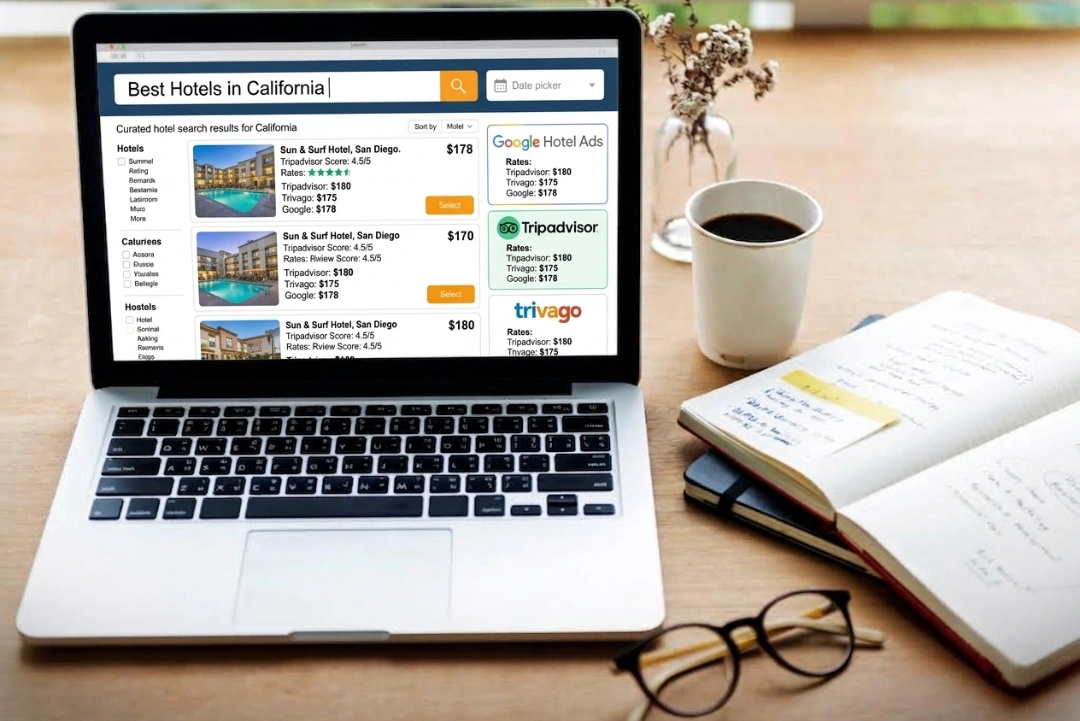
Trivago displays rates from multiple sources simultaneously:

  • Your direct booking engine
  • Major OTAs (Booking.com, Expedia, Hotels.com)
  • Wholesalers and bed banks
  • Niche booking sites

This transparency creates competition that can work in your favor:

  • Guests see if your direct rate matches or beats OTA prices
  • You can strategically bid higher on your direct channel to capture commission-free bookings
  • Multiple rate sources increase overall visibility

3. Global Reach With Local Relevance

Trivago operates in 55 countries with localized versions:

  • 33 language options
  • Currency conversion for international travelers
  • Localized content and search preferences
  • Mobile-first design (72% of traffic from mobile devices)

What Are the Requirements to List Your Hotel on Trivago?

Before creating your Trivago listing, ensure your property and booking infrastructure meet these requirements:

1. Property Eligibility Criteria

Minimum Requirements:

  •  Physical property with a verifiable address (hotels, resorts, inns, B&Bs, vacation rentals)
  •  Legal operation with proper business licenses and permits
  •  Commercial lodging insurance coverage
  •  Minimum of 3 rooms/units for hotels (single-unit vacation rentals accepted)
  •  Compliance with local short-term rental and hotel regulations

Property Types Accepted:

  • Hotels (all categories: budget, mid-range, luxury)
  • Resorts and all-inclusive properties
  • Bed & Breakfasts and guesthouses
  • Serviced apartments and aparthotels
  • Vacation rentals (through connectivity partners)
  • Boutique and independent properties

Not Typically Accepted:

  • Private home stays without proper licensing
  • Properties without commercial insurance
  • Listings that violate local regulations
  • Properties with consistent negative safety reports

2. Booking Engine or OTA Connection Required

Trivago doesn't process bookings directly, so you need at least one of these:

Option 1: Direct Booking Engine

  • Secure, mobile-responsive booking system on your website
  • Real-time availability and instant confirmation
  • SSL certificate (HTTPS) for secure transactions
  • Payment processing capability

Recommended Booking Engines:

Option 2: OTA Connectivity

  • Active listings on Booking.com, Expedia, or Hotels.com
  • These OTAs automatically feed your rates to Trivago
  • No additional setup required beyond maintaining OTA listings

Option 3: Channel Manager Integration

  • Best option for multi-channel distribution
  • roommaster's channel manager connects your PMS to Trivago and 200+ booking channels
  • Real-time rate and availability synchronization
  • Prevents overbookings across all platforms

3. Rate Parity and Availability Management

Rate Parity Requirements: Trivago displays rates from multiple sources side-by-side. To maintain credibility:

  • Match or beat OTA rates on your direct booking channel
  • Don't offer significantly higher rates on your website (guests will choose OTA)
  • Identical room types should have identical base rates across channels
  • You can offer exclusive perks (free breakfast, late checkout) on direct bookings

Rate Parity Best Practices:

  • Use dynamic pricing to maintain competitive rates
  • Offer "Best Rate Guarantee" on your website
  • Add value instead of discounting (upgrades, flexible cancellation)
  • Monitor competitor rates in your market

Availability Management:

  • Real-time synchronization prevents double bookings
  • If using manual updates, sync availability within 24 hours
  • Close dates on all channels simultaneously to avoid overselling
  • Using a channel manager like roommaster automates this process

4. Business Verification Documents

Trivago may request documentation during account setup:

Typically Required:

  • Business registration or incorporation documents
  • Hotel operating license
  • Tax identification number (EIN, VAT number, etc.)
  • Proof of property ownership or management agreement
  • Valid contact information (email, phone, address)

For Chain or Franchise Properties:

  • Franchise agreement or chain affiliation documentation
  • Authorization to list property independently (if applicable)

Important: Have digital copies of these documents ready before starting the Trivago Hotel Manager registration process.

How Do You Set Up Your Trivago Hotel Manager Account Step-by-Step?

Creating your Trivago Hotel Manager account is your gateway to controlling your property's presence on the platform. Follow these detailed steps:

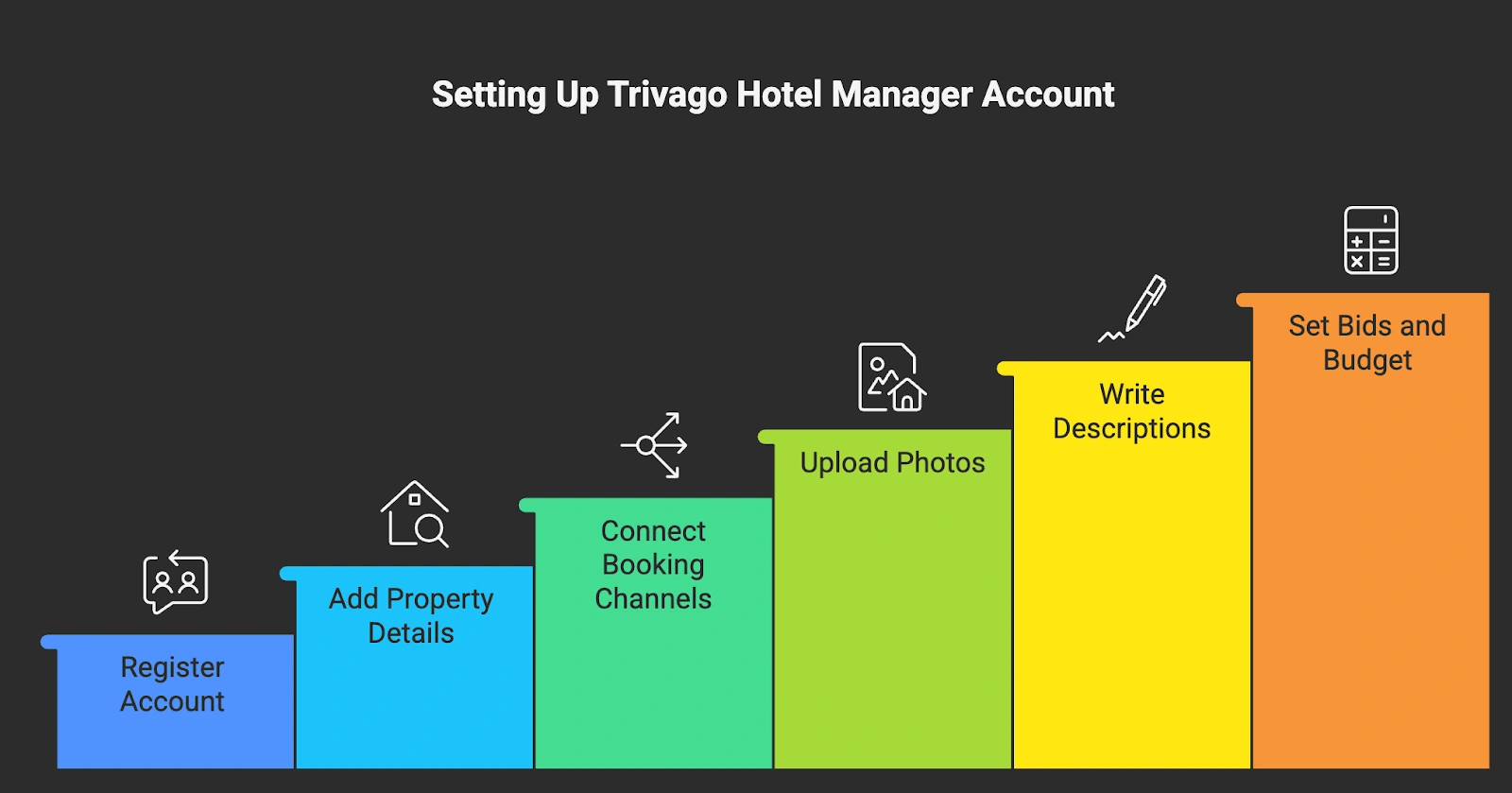
Step 1: Register for Trivago Hotel Manager

Registration Process:

  1. Visit: Navigate to business.trivago.com
  2. Click "Sign Up" in the top-right corner
  3. Enter Business Email: Use your hotel's official email domain (not personal Gmail/Yahoo)
  4. Create Strong Password: Minimum 8 characters with uppercase, lowercase, and numbers
  5. Verify Email: Check inbox for verification link and click to activate

What to Prepare:

  • Official business email address
  • Property name exactly as it appears legally
  • Complete physical address
  • Direct phone number for property
  • Website URL with active booking engine

Account Setup Time: 10-15 minutes for initial registration, 24-72 hours for verification and approval.

Step 2: Add Your Property Details

After email verification, you'll enter your property information:

Basic Property Information:

  • Exact Property Name: Must match official business name and other listings
  • Complete Address: Street address, city, state/province, postal code, country
  • GPS Coordinates: Trivago auto-populates this; verify accuracy on the map
  • Phone Number: Primary contact number with country code
  • Website URL: Your official booking website (must have functioning booking engine)

Property Classification:

  • Property Type: Hotel, Resort, B&B, Inn, Serviced Apartment, Vacation Rental
  • Star Rating: Official rating if applicable (1-5 stars)
  • Hotel Class: Budget, Mid-range, Upscale, Luxury
  • Chain Affiliation: Independent or specify chain/brand name

Amenities and Facilities (select all that apply):

  • Core amenities: Wi-Fi, parking, restaurant, pool, gym
  • Room features: Air conditioning, kitchenette, balcony, sea view
  • Services: 24-hour reception, room service, concierge, laundry
  • Accessibility features: Wheelchair access, elevator, accessible rooms
  • Family amenities: Kids' club, playground, family rooms

Pro Tip: List ALL available amenities. Trivago's search filters heavily weight amenity availability, and comprehensive listings appear in more relevant searches.

Step 3: Connect Your Booking Channels

This is the most critical step—connecting where travelers will complete their reservations:

Connecting Your Direct Booking Engine:

  1. Navigate to "Booking Links" section in Hotel Manager
  2. Select "Add Direct Booking Link"
  3. Enter Your Booking URL: The exact URL where guests land to book (e.g., https://yourhotel.com/book)
  4. Test the Link: Trivago verifies the page is accessible and has booking functionality
  5. Set as Primary Channel (optional): Prioritize direct bookings in display rankings

Technical Requirements for Direct Links:

  •  Secure HTTPS connection (SSL certificate required)
  •  Mobile-responsive design
  •  Real-time availability display
  •  Functional "Book Now" button
  •  Clear pricing without hidden fees until final step

Connecting OTA Channels:

If you're listed on major OTAs, they'll automatically appear in your Trivago listing:

  1. Verify OTA Connection: Check that Booking.com, Expedia, Hotels.com appear
  2. Rate Accuracy: Ensure OTA rates are current and match your rate parity strategy
  3. Booking Link Redirect: Test that OTA links direct to correct property page

Using Channel Manager Integration:

For automated, real-time rate updates across all channels:

  1. Connect Your PMS: If using roommaster's property management system
  2. Enable Trivago Integration: Activate Trivago connectivity in your channel manager settings
  3. Map Room Types: Match your PMS room categories to Trivago's room type standards
  4. Set Rate Plans: Connect BAR (Best Available Rate), package rates, and special offers
  5. Test Synchronization: Make a test rate change in your PMS and verify it updates on Trivago within 15 minutes

Benefits of Channel Manager Integration:

  • Automatic rate updates across Trivago and 200+ booking channels
  • Real-time availability synchronization prevents overbookings
  • Centralized management from single dashboard
  • Reduced manual work and human error

Step 4: Upload High-Quality Property Photos

Visual content is crucial—properties with 20+ professional photos receive 45% more clicks than those with fewer images.

Photo Requirements and Best Practices:

Minimum Requirements:

  • At least 10 photos (20-40 recommended)
  • Minimum resolution: 1200 × 800 pixels
  • Format: JPEG or PNG
  • Maximum file size: 15MB per image
  • Professional quality (no phone snapshots, good lighting)

Essential Photo Categories:

  1. Exterior (3-5 photos):
    • Front entrance during day
    • Nighttime exterior with lighting
    • Aerial or elevated view if available
    • Parking area and surrounding neighborhood
  2. Lobby/Reception (2-3 photos):
    • Wide-angle reception area
    • Seating/waiting areas
    • Unique design features
  3. Guest Rooms (10-15 photos):
    • Every room category you offer
    • Multiple angles per room type
    • Bed detail shots
    • Bathroom facilities
    • In-room amenities and technology
    • Window views from rooms
  4. Amenities (5-10 photos):
    • Pool (multiple angles, day and evening)
    • Fitness center
    • Restaurant/dining areas
    • Spa/wellness facilities
    • Meeting rooms
    • Outdoor spaces/gardens
  5. Special Features (3-5 photos):
    • Unique selling points
    • Local attractions visible from property
    • Themed rooms or suites
    • Event spaces

Photography Tips:

  • Hire a Professional: ROI on professional photography is 3-5x the investment
  • Natural Lighting: Shoot during golden hour (morning/late afternoon)
  • Stage Rooms: Remove personal items, straighten linens, ensure cleanliness
  • Show Scale: Include furniture to help guests visualize room size
  • Avoid Filters: Use minimal editing—accurate representation builds trust
  • Update Seasonally: Refresh photos after renovations or seasonal changes

Photo Upload Process:

  1. Navigate to "Property" → "Photos" in Hotel Manager
  2. Click "Upload Photos"
  3. Drag and drop or select files from computer
  4. Add descriptive captions (optional but recommended)
  5. Organize by category (Exterior, Rooms, Amenities)
  6. Set featured/primary image (appears first in search results)

Step 5: Write Compelling Property Descriptions

Your property description influences booking decisions. Trivago allows up to 2,000 characters—use them strategically.

Description Structure:

Opening Statement (100-150 characters): Lead with your unique selling proposition and location benefit.

Example: "Boutique beachfront resort offering panoramic ocean views, farm-to-table dining, and direct beach access, just 10 minutes from downtown Cancún."

Property Overview (300-400 characters):

  • Number of rooms and room types
  • Key amenities and facilities
  • Property style and atmosphere
  • Target guest type (families, couples, business travelers)

Location Highlights (200-300 characters):

  • Distance to major attractions
  • Transportation access
  • Neighborhood characteristics
  • Nearby restaurants, shopping, entertainment

Amenities and Services (400-500 characters):

  • Detailed amenity descriptions
  • Operating hours for key facilities
  • Special services (concierge, airport shuttle, etc.)
  • Technology features (smart TVs, high-speed Wi-Fi)

Room Features (300-400 characters):

  • Room sizes and layouts
  • Bedding configurations
  • Bathroom amenities
  • Views and balcony options

Policies and Information (200-300 characters):

  • Check-in/check-out times
  • Cancellation policy summary
  • Pet policy
  • Parking information

Closing Call-to-Action (50-100 characters): Encourage booking with a benefit statement.

Example: "Book directly for best rate guarantee and complimentary room upgrade upon availability."

Writing Best Practices:

  •  Use specific numbers ("500-square-foot rooms" vs. "spacious rooms")
  •  Mention unique features competitors lack
  •  Include keywords travelers search for (beachfront, city center, airport shuttle)
  •  Write in active voice and present tense
  •  Proofread for grammar and spelling errors
  •  Avoid superlatives without proof ("best hotel" claims)
  •  Don't make promises you can't keep
  •  Avoid ALL CAPS or excessive exclamation points!!!

Step 6: Set Your CPC Bids and Budget

Your Cost-Per-Click strategy determines visibility and acquisition costs.

Understanding CPC Bidding:

Trivago uses an auction system where higher bids (combined with quality metrics) improve placement:

  • Bid Amount: Maximum you'll pay per click to your booking channel
  • Quality Score: Based on click-through rate, conversion rate, and guest reviews
  • Position: Higher bid + better quality = better placement

Initial Bid Strategy:

Start Conservative:

  1. Set Initial Budget: Begin with $100-300/month to test performance

  2. Default Bid: Start at market average for your property type:
    • Budget: $0.40-0.60
    • Mid-range: $0.80-1.20
    • Upscale: $1.50-2.50
    • Luxury: $2.00-3.50
  3. Monitor Performance: Track clicks, conversions, and cost-per-acquisition daily

  4. Adjust Gradually: Increase bids by 10-20% if conversion rate is strong

Advanced Bidding Tactics:

Time-Based Bidding:

  • Increase bids during high-demand periods (weekends, holidays, events)
  • Reduce bids during low-occupancy periods
  • Adjust seasonally based on historical booking patterns

Device-Specific Bidding:

  • Mobile users often convert at different rates than desktop
  • Test separate bid adjustments for mobile vs. desktop traffic

Geographic Targeting:

  • Bid higher for clicks from high-value source markets
  • Reduce bids from low-converting geographic regions

Channel Prioritization:

  • Bid Higher for Direct Bookings: If direct booking rate is $1.20 on OTA channel, bid $1.40-1.60 on direct booking engine
  • This strategy captures more commission-free bookings while maintaining OTA visibility as backup

Budget Management:

Daily Budget Setup:

  1. Navigate to "Billing" → "Budget Settings"
  2. Set daily maximum spend (e.g., $20/day = ~$600/month)
  3. Enable notifications when 75% of budget is reached
  4. Choose "Uniform Distribution" or "Maximize Clicks" pacing

Budget Calculation Formula:

Monthly Budget = (Average CPC × Desired Clicks) ÷ Expected Conversion Rate

Example:

- Average CPC: $1.50

- Desired Bookings: 30/month

- Conversion Rate: 10%

- Required Clicks: 300

- Monthly Budget: $1.50 × 300 = $450

How Do You Optimize Your Trivago Listing for Maximum Visibility?

Simply being listed isn't enough—optimization determines whether travelers click your rate or a competitor's.

A. Understanding Trivago's Ranking Algorithm

Trivago ranks properties based on multiple factors:

Ranking Factors (estimated weight):

  1. CPC Bid Amount (30-35%): Higher bids improve position, but not linearly
  2. Quality Score (25-30%): Click-through rate, conversion rate, time-on-site
  3. Guest Review Ratings (20-25%): Overall rating, review recency, review volume
  4. Rate Competitiveness (10-15%): How your rate compares to market average
  5. Booking Availability (5-10%): Real-time availability increases relevance

Quality Score Components:

  • Click-Through Rate (CTR): % of impressions that result in clicks
  • Conversion Rate: % of clicks that become bookings
  • Guest Satisfaction: Review ratings from completed stays
  • Listing Completeness: Photos, descriptions, amenities accuracy

Improving Quality Score:

  •  High-quality, accurate photos increase CTR
  •  Competitive pricing improves conversion rate
  •  Complete amenity listings increase relevant impressions
  •  Excellent guest service generates positive reviews

B. Pricing Strategies That Work

Dynamic Pricing Implementation:

Trivago rewards rate competitiveness. Use these strategies:

Competitive Rate Analysis:

  1. Research Competitor Rates: Monitor 5-10 comparable properties weekly
  2. Identify Rate Gaps: Find opportunities where you can offer better value
  3. Adjust Strategically: Match or slightly undercut competitors during low-demand periods

Dynamic Pricing Best Practices:

  • Increase Rates During High Demand: Events, weekends, holidays
  • Offer Early Booking Discounts: 7-30 days advance purchase rates
  • Last-Minute Rate Adjustments: Increase discounts within 48 hours of check-in for unsold inventory
  • Length-of-Stay Pricing: Offer better nightly rates for 3+ night stays

Rate Parity Across Channels:

Maintain consistent base rates but differentiate through value-adds:

Channel Rate Strategy Value-Add
Direct Website Match OTA base rate Free breakfast, late checkout, room upgrade
Booking.com Market rate Standard booking terms
Expedia Market rate Standard booking terms
Trivago Display Show direct rate prominently Highlight exclusive perks

Using Property Management Systems for Pricing:

Manual rate updates across multiple channels is inefficient and error-prone. roommaster's property management system offers:

  • Automated Rate Distribution: Update rates once, sync everywhere instantly
  • Dynamic Pricing Engine: AI-powered rate recommendations based on demand
  • Competitor Rate Tracking: Monitor market rates and adjust automatically
  • Revenue Optimization: Maximize revenue per available room (RevPAR)

C. Review Management Strategy

Reviews directly impact your Trivago ranking and booking conversion rate.

Review Sources on Trivago:

Trivago aggregates reviews from multiple platforms:

  • Booking.com ratings and reviews
  • TripAdvisor ratings and reviews
  • Google Hotel reviews
  • Hotel's direct booking site reviews (if integrated)

Average Visible Review Count: 150-300 reviews across platforms

Review Response Best Practices:

Respond to Every Review:

  • Positive Reviews: Thank guest, mention specific experience details, invite return visit
  • Negative Reviews: Acknowledge concern, apologize if appropriate, explain resolution, offer offline follow-up

Response Time Guidelines:

  • Positive reviews: Within 48-72 hours
  • Negative reviews: Within 24 hours
  • Critical issues: Within 12 hours

Review Response Template (Negative Review):

Dear [Guest Name],

Thank you for sharing your feedback about your recent stay. I sincerely apologize for [specific issue]. This does not reflect the experience we strive to provide.

We have [action taken to resolve] and [long-term improvement implemented]. I would welcome the opportunity to discuss this further. Please contact me directly at [email/phone].

We hope to have the chance to welcome you back for an improved experience.

Best regards,

[Your Name]

[Title]

Generating More Positive Reviews:

  1. Request Reviews Post-Stay: Email guests 24-48 hours after checkout
  2. Make It Easy: Provide direct links to review platforms
  3. Staff Training: Empower staff to create memorable experiences
  4. Address Issues Immediately: Resolve problems during stay, not after
  5. Incentivize Honestly: Never offer compensation for positive reviews (violates platform policies)

Target Review Metrics:

  • Overall Rating: 4.0+ out of 5.0
  • Review Volume: 100+ reviews across all platforms
  • Review Recency: 10+ reviews within past 90 days
  • Response Rate: 90%+ response rate to all reviews

D. Photo and Description Refresh Schedule

Stale listings lose competitive edge. Maintain freshness:

Photo Update Schedule:

  • Quarterly Review: Assess photo performance, replace underperforming images
  • Annual Refresh: Professional photo shoot to capture seasonal changes
  • Immediate Updates: After renovations, new amenities, or design changes
  • Event-Based: Special seasonal decorations (holiday lights, summer poolside)

Description Updates:

  • Monthly Review: Ensure all information is current and accurate
  • Seasonal Adjustments: Highlight relevant seasonal amenities (heated pool in winter, rooftop bar in summer)
  • New Amenity Additions: Update within 24 hours of new facility opening
  • Keyword Optimization: Quarterly keyword research to incorporate trending search terms

Testing and Optimization:

  • A/B Test Photos: Try different primary images, track which generates higher CTR
  • Description Variations: Test benefit-focused vs. feature-focused descriptions
  • Headline Testing: Experiment with different opening statements
  • Measure Results: Track CTR and conversion rate changes after updates

How Do You Avoid Common Trivago Listing Mistakes?

Learn from others' costly errors and avoid these common pitfalls:

1. Rate Parity Violations

The Mistake: Displaying significantly higher rates on your direct booking site than on OTAs.

Why It Hurts:

  • Guests choose OTA bookings, costing you 15-25% commission
  • Trivago may suppress your direct booking link visibility
  • Damages trust and brand reputation

The Solution:

  • Monitor Rate Parity: Check rates across all channels weekly
  • Use Channel Managers: roommaster's channel manager ensures rate consistency across 200+ channels
  • Add Value, Don't Discount: Offer perks on direct bookings rather than lower prices
  • Best Rate Guarantee: Promise to match or beat any lower rate found elsewhere

2. Inconsistent Availability

The Mistake: Showing availability on Trivago but rooms are actually sold out, or vice versa.

Why It Hurts:

  • Lost bookings when guests click through and find no availability
  • Wasted CPC spend on clicks that can't convert
  • Poor quality score reduces future ranking
  • Negative guest experiences and reviews

The Solution:

  • Real-Time Synchronization: Use technology that updates availability instantly
  • Channel Manager Integration: roommaster automates availability updates across all booking channels
  • Manual Update Frequency: If not using automation, update availability at least twice daily
  • Close-Out Dates: Block dates on all channels simultaneously when fully booked

Technology Recommendation: Manual calendar management becomes impossible at scale. Channel managers eliminate this risk entirely by syncing your PMS inventory across Trivago, OTAs, and direct booking in real-time.

3. Poor Quality Photos

The Mistake: Using low-resolution, poorly lit, or unrepresentative photos.

Why It Hurts:

  • 67% lower click-through rate compared to professional photography
  • Guests question credibility and property quality
  • Competitive disadvantage—similar properties look more appealing
  • Increased bounce rate after click-through

The Solution:

  • Professional Photography: Investment of $500-1,500 pays for itself in increased bookings
  • Minimum Requirements: Follow Trivago's technical specifications exactly
  • Variety and Volume: 20-40 photos covering all areas and room types
  • Accurate Representation: Photos must match current property condition

ROI Example:

  • Professional photography cost: $1,000
  • Improvement in CTR: 30% increase
  • Additional monthly bookings: 5
  • Average booking value: $200
  • Monthly additional revenue: $1,000
  • Payback period: 1 month

4. Ignoring Mobile Optimization

The Mistake: Direct booking engine isn't mobile-friendly or has poor mobile user experience.

Why It Hurts:

  • 72% of Trivago traffic is mobile
  • High bounce rate reduces quality score
  • Lost bookings—frustrated users choose competitor or OTA
  • Google penalizes non-mobile-friendly sites in search rankings

The Solution:

  • Mobile-Responsive Design: Booking engine must adapt to all screen sizes
  • Speed Optimization: Page load time under 3 seconds on mobile networks
  • Simplified Booking Flow: Minimal steps from landing to confirmation
  • Easy Navigation: Large buttons, readable text without zooming
  • Test Regularly: Use different devices and browsers monthly

Mobile Booking Engine Checklist:

  •  One-thumb navigation (no precision taps required)
  •  Auto-fill support for forms
  •  Guest checkout option (no forced registration)
  •  Clear pricing with no hidden fees until final step
  •  Multiple payment options (credit cards, digital wallets)
  •  Instant booking confirmation

5. Neglecting Review Management

The Mistake: Not responding to reviews or addressing recurring negative feedback themes.

Why It Hurts:

  • Lower overall ratings reduce ranking and bookings
  • Unresolved issues compound and create pattern of complaints
  • Demonstrates lack of care to potential guests
  • Negative reviews remain visible without your perspective

The Solution:

  • Daily Review Monitoring: Check all review platforms daily
  • Response Protocol: Respond to all reviews within 48 hours
  • Issue Resolution System: Track common complaints and implement fixes
  • Staff Training: Address root causes of negative feedback
  • Follow-Up: Contact dissatisfied guests directly to resolve offline

Review Monitoring Tools:

  • Set up email alerts for new reviews on TripAdvisor, Google, Booking.com
  • Use roommaster's integrated review dashboard to monitor all platforms in one place
  • Schedule weekly review team meetings to discuss trends and action items

How Do You Integrate Trivago With Your Multi-Channel Strategy?

Trivago is most effective as part of a comprehensive distribution strategy:

- Using Channel Managers to Sync Trivago

Manual management of rates and availability across Trivago, OTAs, and your direct booking site is time-consuming and error-prone.

The Channel Manager Solution:

A channel manager like roommaster acts as a central hub connecting your property management system to all distribution channels:

How It Works:

  1. Update Once: Change rates or availability in your PMS
  2. Automatic Distribution: Changes push to Trivago, Booking.com, Expedia, Airbnb, etc. within minutes
  3. Two-Way Sync: Bookings from any channel update inventory everywhere
  4. Prevents Overbooking: Real-time synchronization eliminates double bookings

Benefits of Channel Manager Integration:

  •  Time Savings: Manage 20+ channels from single dashboard vs. logging into each separately
  •  Error Reduction: Eliminate manual data entry mistakes
  •  Revenue Optimization: Dynamic rate updates across all channels simultaneously
  •  Overbooking Prevention: Instant inventory updates prevent costly mistakes
  •  Reporting: Unified analytics across all booking sources

roommaster Channel Manager Advantages:

  • 200+ Channel Integrations: Including Trivago, major OTAs, niche booking sites, and metasearch engines
  • Real-Time Synchronization: Updates within 1-15 minutes depending on channel
  • Rate Parity Management: Set rules to maintain consistent pricing strategy
  • Bulk Updates: Change rates across all channels with single action
  • Custom Rate Plans: Different rates for different channels if strategic

{{channel-manager-two}}

- Multi-Channel Distribution Strategy

Distribution Channel Mix (recommended allocation):

Channel Type % of Inventory Purpose Cost Structure
Direct Bookings (via Trivago) 30-40% Highest margin bookings CPC (lowest cost)
Major OTAs 40-50% Volume and market reach 15-25% commission
Niche/Specialty OTAs 5-10% Targeted audiences 10-20% commission
Wholesalers 5-10% Fill low-occupancy periods 30-40% discount
Direct (Non-Trivago) 10-15% Repeat guests, email marketing Minimal cost

Channel Strategy by Property Type:

Independent Hotels:

  • Prioritize direct bookings via Trivago and website
  • Maintain presence on top 3-4 OTAs
  • Use channel manager to manage efficiently

Chain/Franchise Properties:

  • Leverage brand website traffic
  • Use Trivago to compete locally with independents
  • Supplement with OTA presence for broader reach

Boutique/Luxury Properties:

  • Focus on direct bookings (higher margins essential)
  • Bid aggressively on Trivago for direct channel
  • Selective OTA presence (Tablet Hotels, Mr & Mrs Smith)
  • Emphasize exclusive booking perks on direct channel

- Tracking Performance Across Channels

Key Metrics to Monitor:

Trivago-Specific Metrics:

  • Click-through rate (CTR): Target 2-5% depending on competitiveness
  • Cost-per-click (CPC): Track trends and adjust bids
  • Conversion rate: % of clicks that become bookings (target 5-10%)
  • Cost-per-acquisition (CPA): Total Trivago spend ÷ bookings from Trivago

Channel Comparison Metrics:

  • Revenue per channel
  • Cost per booking by channel
  • Profit margin by channel (revenue - costs)
  • Guest lifetime value by acquisition source

Overall Performance Metrics:

  • Total occupancy rate
  • Average daily rate (ADR)
  • Revenue per available room (RevPAR)
  • Distribution costs as % of revenue

Reporting Tools:

Trivago Hotel Manager Analytics:

  • Built-in dashboard showing impressions, clicks, bookings
  • Date range comparisons
  • Geographic source analysis
  • Device performance breakdown

Integrated PMS Reporting: roommaster's property management system provides:

  • Unified reporting across all channels
  • Custom date ranges and filters
  • Comparative channel performance
  • Forecasting and predictive analytics
  • Automated report scheduling

Optimization Based on Data:

  1. Identify Best Performers: Allocate more inventory to highest-margin channels
  2. Test and Learn: Run A/B tests on pricing and descriptions
  3. Seasonal Adjustments: Shift channel mix based on historical trends
  4. ROI Monitoring: Calculate return on ad spend (ROAS) monthly
  5. Competitive Benchmarking: Compare your metrics to market averages

When Should You Upgrade to a Property Management System?

As your Trivago presence grows and you add more distribution channels, manual management becomes unsustainable.

Signs You Need a PMS

Operational Indicators:

  •  Managing 2+ properties or 20+ rooms
  •  Listed on 3+ booking channels (Trivago, Booking.com, Airbnb, etc.)
  •  Spending 10+ hours/week on manual calendar updates
  •  Experienced 1+ double booking incidents
  •  Unable to respond to inquiries within 1 hour
  •  Losing bookings due to slow rate updates
  •  Difficulty tracking which channels generate profit

Growth Indicators:

  •  Planning to expand to additional properties
  •  Wanting to increase direct bookings
  •  Need for detailed performance analytics
  •  Considering dynamic pricing implementation
  •  Want to automate guest communication
  •  Need centralized review management

Benefits of roommaster for Trivago-Listed Properties

roommaster's property management system offers comprehensive solutions specifically valuable for Trivago-participating hotels:

{{pms-one}}

Channel Management Benefits:

  • Trivago Integration: Direct connectivity pushes your rates and availability to Trivago in real-time
  • 200+ Channel Connections: Manage Trivago alongside all major and niche OTAs from single dashboard
  • Instant Updates: Rate changes sync across all channels within 1-15 minutes
  • Bulk Operations: Update rates across all channels with one click
  • Rate Strategy Tools: Set rules for maintaining rate parity and channel-specific pricing

Revenue Optimization:

  • Dynamic Pricing Engine: AI-powered rate recommendations based on demand, events, and competition
  • Yield Management: Optimize revenue per available room automatically
  • Reporting & Analytics: Track performance by channel, identify highest-margin sources
  • Forecasting: Predict demand and adjust rates proactively

Operational Efficiency:

  • Centralized Inbox: Manage guest inquiries from Trivago, OTAs, and direct bookings in one place
  • Automated Messaging: Set up templates for booking confirmations, pre-arrival info, post-stay follow-ups
  • Housekeeping Management: Coordinate cleaning schedules across all booking sources
  • Task Automation: Reduce manual work by 60-70%

Guest Experience:

  • Unified Guest Profiles: Track guest history regardless of booking source
  • Personalized Communication: Automated yet personalized messaging at scale
  • Review Management: Monitor and respond to reviews from all platforms in single dashboard
  • Loyalty Programs: Encourage repeat bookings with integrated loyalty features

Booking Engine Integration:

  • Seamless Direct Bookings: roommaster's integrated booking engine connects directly to Trivago
  • Mobile-Optimized: Responsive design ensures mobile conversion
  • Commission-Free: Capture direct bookings without OTA commissions
  • Best Rate Guarantee: Display lowest rates to encourage direct over OTA bookings

ROI of Property Management Systems

Cost vs. Benefit Analysis:

Typical PMS Investment:

  • Setup/onboarding: $500-2,000 (one-time)
  • Monthly subscription: $50-500 depending on property size and features
  • Training time: 10-20 hours initial setup

Quantifiable Benefits (annual):

Time Savings:

  • Manual calendar management: 520 hours/year saved @ $25/hour = $13,000
  • Review monitoring and responses: 200 hours/year saved @ $25/hour = $5,000
  • Guest communication: 300 hours/year saved @ $25/hour = $7,500

Revenue Gains:

  • Prevented double bookings: 5 instances @ $200/booking = $1,000
  • Reduced OTA dependency (shift to direct): 50 bookings @ 18% commission saved = $1,800
  • Dynamic pricing optimization: 3% revenue increase on $200,000 = $6,000
  • Increased occupancy from better distribution: 2% increase on $200,000 = $4,000

Total Annual Benefit: $38,300 Annual PMS Cost: ~$4,000 Net ROI: 858% return on investment

Break-Even Point: Most properties see ROI within 2-3 months of implementation.

Next Steps: Scale Your Hotel's Digital Presence

You've now learned how to successfully list and optimize your hotel on Trivago—but efficient growth requires the right technology foundation.

Streamline Your Multi-Channel Strategy

Managing Trivago alongside direct bookings, OTAs, and other channels manually creates operational bottlenecks. As your business grows, these challenges multiply:

  • Hours spent updating calendars across platforms
  • Risk of costly double bookings
  • Missed revenue opportunities from delayed rate updates
  • Difficulty tracking which channels drive profitability
  • No time for strategic growth initiatives

The Solution: Integrate your operations with a comprehensive property management system.

Why roommaster for Trivago-Listed Hotels

roommaster provides the technology infrastructure to manage your Trivago presence alongside your entire distribution strategy:

Seamless Trivago Integration:

  • Direct API connectivity pushes rates to Trivago in real-time
  • Synchronized availability prevents wasted CPC spend
  • Centralized bid management across all metasearch channels
  • Performance tracking with channel attribution

200+ Channel Connections:

  • Manage Trivago, Booking.com, Expedia, Airbnb, and 196+ other channels
  • Single rate/availability update syncs everywhere
  • Prevent double bookings with automated inventory management
  • Optimize channel mix based on profitability

Revenue Optimization Tools:

  • AI-powered dynamic pricing recommendations
  • Competitive rate intelligence
  • Yield management automation
  • Forecasting and demand prediction

Operational Efficiency:

  • Unified inbox for all booking channels
  • Automated guest communication
  • Housekeeping and maintenance management
  • Review monitoring and response tools

Booking Engine Included:

  • Commission-free direct bookings through Trivago
  • Mobile-optimized, secure checkout
  • Integrated with your PMS for seamless operations
  • Best Rate Guarantee tools to reduce OTA dependency

Take the Next Step

Ready to scale your hotel operations beyond manual Trivago management?

Request a personalized demo to see how roommaster can transform your distribution strategy and increase profitability through automation and intelligence.

What You'll Learn in Your Demo:

  • How roommaster integrates with Trivago and your existing systems
  • ROI projection specific to your property
  • Channel strategy optimization recommendations
  • Implementation timeline and onboarding process
  • Pricing tailored to your property portfolio

Frequently Asked Questions About Listing on Trivago

How much does it cost to list a hotel on Trivago?

Listing on Trivago is free with no setup or monthly fees. You only pay Cost-Per-Click (CPC) when travelers click your rates—typically $0.30-$5.00 per click depending on property type, location, and competition. Unlike OTAs charging 15-25% commission per booking, you control costs through daily budget limits and only pay for clicks, making it cost-effective for driving direct bookings.

Can I list my small B&B or vacation rental on Trivago?

Yes, Trivago accepts B&Bs, vacation rentals, guesthouses, serviced apartments, and boutique hotels. Requirements include legal operation with proper licenses, commercial insurance, and a functioning booking system. Many small properties list through OTA partners like Booking.com or Airbnb, which automatically feed rates to Trivago. You can also create a Hotel Manager account to add your direct booking link.

How long does it take for my Trivago listing to go live?

Most hotels appear in Trivago search results within 3-10 days of completing setup. The timeline includes account registration (10-15 minutes), property details and photo upload (1-3 hours), verification review (24-72 hours), and listing approval (1-5 business days). Speed depends on complete documentation, professional photos, and existing OTA presence. Having everything ready beforehand accelerates the process.

How is Trivago different from OTAs like Booking.com?

Trivago is a metasearch engine that compares rates from multiple booking sites but doesn't process bookings—it redirects users to your chosen channel. You pay Cost-Per-Click ($0.50-$2.00) only when users click, versus OTAs like Booking.com that charge 15-25% commission per completed booking. Trivago increases direct bookings and lets you compete with your own OTA listings, while OTAs provide volume but at higher costs.

Do I need a website to list on Trivago?

Not strictly required, but highly recommended. You can appear through OTA connectivity (Booking.com, Expedia) paying 15-25% commission, or have a direct booking website to capture commission-free bookings. A website with secure HTTPS, mobile-responsive design, and functioning booking engine lets you control guest relationships and offer exclusive perks. Capturing just 10-15 direct bookings monthly through Trivago pays for itself within 2-3 months.

{{cta-strip}}

channel-manager-two

Boost Occupancy with roommaster Channel Manager

  • Real-time updates
  • More bookings
  • No overbookings
pms-one

Run Your Entire Hotel From One System

  • Streamline daily tasks
  • Delight every guest
  • Increase profitability

Ready to make the switch? Let's work together

Mayela lozano

Mayela Lozano is a content strategist with a passion for hospitality and technology. She collaborates with roommaster on content creation, highlighting how technology can streamline hotel operations and enhance guest satisfaction. When she’s not creating content, Mayela loves to travel and spend time with her two little ones, discovering new adventures and making memories along the way.

Join Thousands of Hotels Thriving with roommaster

The transition to roommaster is straightforward and efficient. Our implementation team handles data migration including reservations, guest profiles, and historical information.

Table of Contents

Join Thousands of Hotels Thriving with roommaster

The transition to roommaster is straightforward and efficient. Our implementation team handles data migration including reservations, guest profiles, and historical information.

Latest Posts

statistics
AI
Hotel Management

20 Hotel Revenue Management Systems (RMS) In 2026

January 16, 2026
profit-analysis
AI
Data Management
Hotel Management

How To Perform A Hotel Profitability Analysis

January 13, 2026
guest-ratings
Hotel Management
General

How To Analyze Guest Feedback & Hotel Performance

January 9, 2026
hotel-frontdes-staff
Hotel Management
Hotel PMS

Hotel Front Desk Responsibilities, Roles And Duties

January 7, 2026
hotel-guest-with-mobile
Hotel Management
Hospitality Trends

10 Best Hotel Guest Apps of 2026

January 6, 2026
hotel-property
Online Bookings

10 Best Hotel Reservation Software in 2026

December 20, 2025
hotel-guest
Hotel Management

Best Hotel Guest Experience Software

December 19, 2025
hotel-property
Hotel Management
Cloud PMS

What Is A Best Hotel Management System

December 19, 2025
roommaster-website
Hotel Management
General

roommaster Review: Features, Pricing, Plans, Pros, And Cons

December 18, 2025
hotel-reception
Online Bookings

Best Hotel Booking Engines In Canada

December 15, 2025
Join Thousands of Hotels Thriving with roommaster

See how roommaster's unified platform can work for your property. Our team will walk you through features tailored to your specific needs and operations.