Hotel Check-In Kiosk: Enhance the Guest Experience
A hotel check-in kiosk is a self-service touchscreen where guests check in, check out, verify ID, pay and collect a room key without waiting in line, giving them a contactless option while easing staffing gaps for hotels.
A hotel check-in kiosk is a self-service touchscreen terminal that lets guests check in and check out without a front desk agent.
It handles four jobs: finding the reservation, verifying the guest's ID, taking payment or a deposit hold, and issuing a room key card or mobile key.
Kiosks come in several forms: freestanding lobby units, countertop and tablet kiosks, wall-mounted units, outdoor 24-hour kiosks and key dispensers.
The main benefits are shorter queues, 24/7 arrivals, lower labor pressure, cleaner guest data and automatic upsells.
The main drawbacks are cost, maintenance, a less personal welcome and difficulty for some guests. Many hotels pair a kiosk with mobile check-in or a staffed desk.
Approximate costs range from a few hundred dollars for a basic tablet setup to $15,000 or more for a specialized unit, plus software, installation and integration.
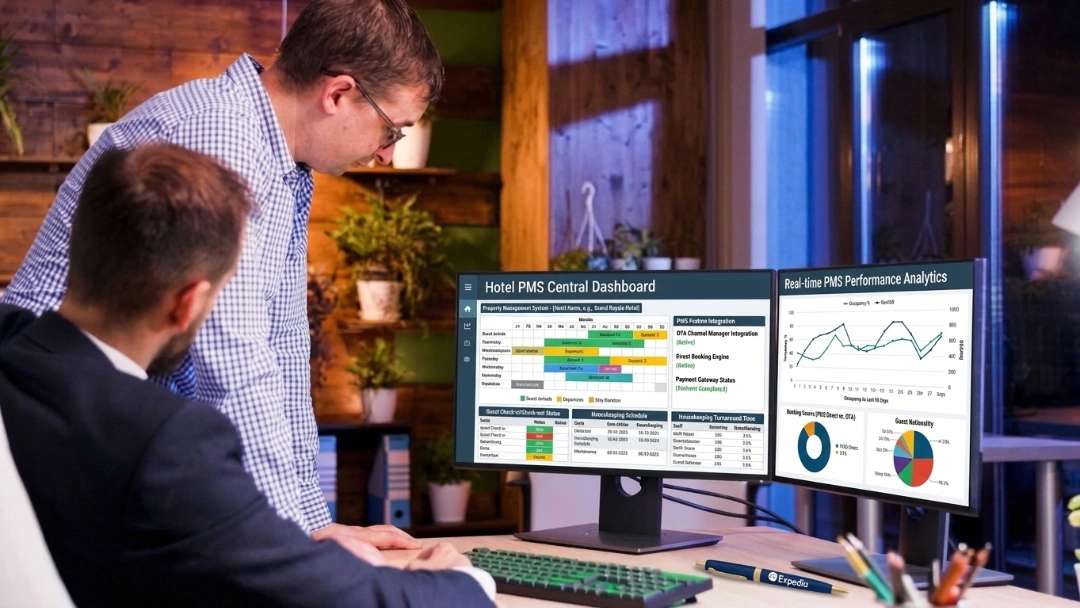
A kiosk is only as good as its PMS connection. Without real-time sync, it can sell a room twice or hand out the wrong key.
The front desk rush is predictable: a wave of afternoon arrivals, a late flight landing after midnight, a weekend when two staff members call in sick. Hotel check-in kiosks were built for exactly those moments. They let guests check themselves in and out, and give your team room to focus on the guests who need a conversation.
What Is A Hotel Check-In Kiosk?
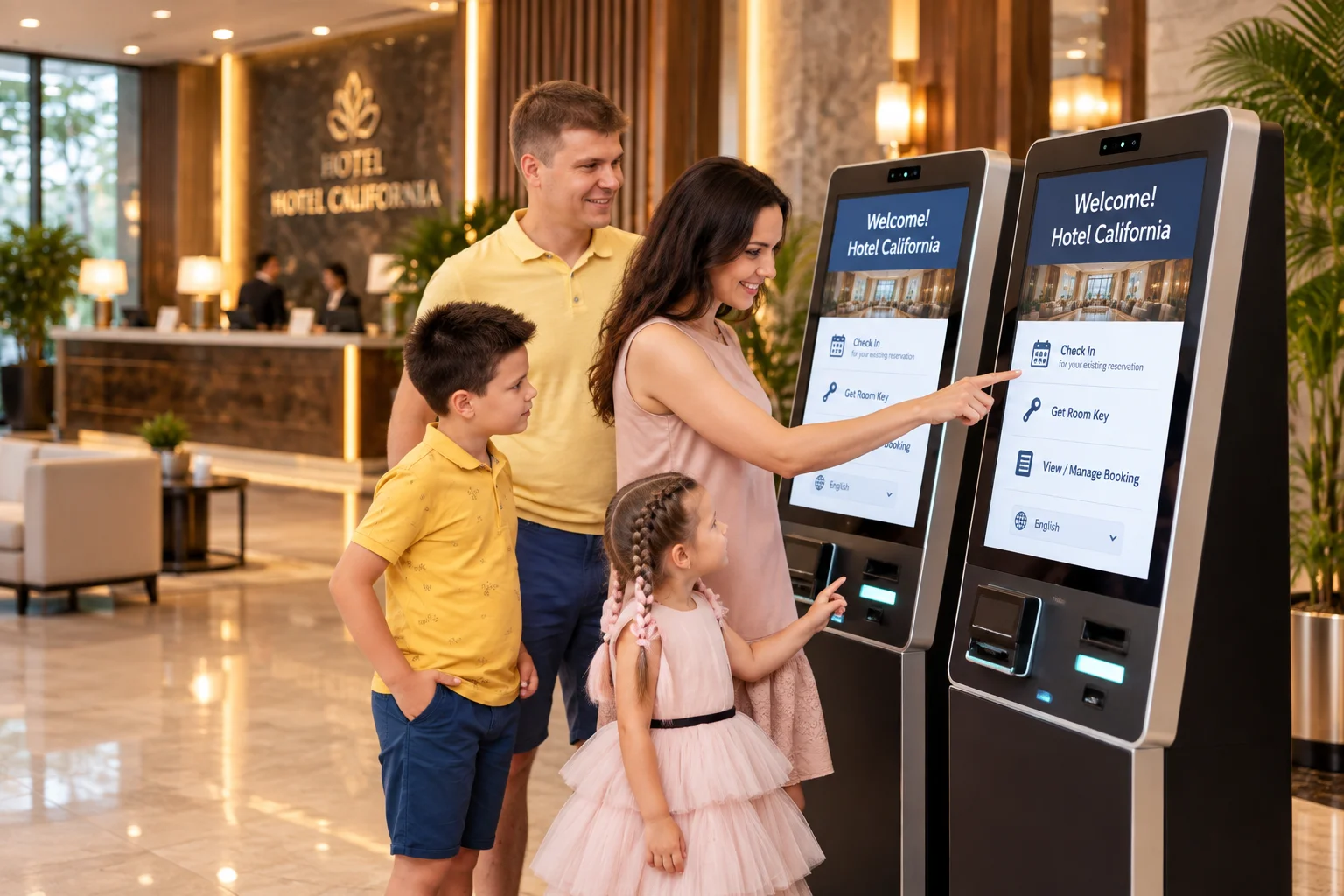
A hotel check-in kiosk is a self-service touchscreen terminal that lets guests check in and check out without a front desk agent. Guests find their reservation, scan their ID, pay or place a deposit hold, and collect a room key card or mobile key, while the kiosk updates the hotel's PMS in real time.
Think of it as a virtual receptionist for routine arrivals. Guests use it during peak check-in hours, late at night, or any time the front desk is short-staffed. The same terminal usually handles check-out too, letting departing guests review their bill, settle incidentals, get an emailed receipt and drop off their key without queuing.
Hotel kiosks are also called hotel self-service kiosks, self check-in kiosks or check-in terminals. Kiosks are most common at properties with real arrival volume: independent hotels with 50 or more rooms, hotel groups, airport and business hotels, and resorts. A five-room bed and breakfast rarely needs one, because the front desk bottleneck a kiosk solves doesn't exist at that scale.
How A Hotel Self Check-In Kiosk Works
A hotel self check-in kiosk works in four steps: find the reservation, verify identity, take payment, and issue a key, with a real-time update to the PMS at the end.
1. Find The Reservation
The guest taps the screen, chooses a language and looks up their booking. They can scan a QR code or barcode from their confirmation email, enter a confirmation number, or search by name. The kiosk searches the PMS and pulls up the room type, dates, rate, outstanding balance and any deposit required. If the guest booked through an OTA, the kiosk finds the reservation the same way, as long as it's already in the PMS.
2. Verify The Guest's Identity
The guest scans a passport, driver's licence or ID card. Optical character recognition reads the name, document number and expiry date, and many kiosks add a facial match that compares a live photo with the ID photo. This step is about security and compliance, not just convenience: the hotel is still responsible for knowing who's staying on the property. If the scan fails or the photo doesn't match, a well-designed kiosk routes the guest to a staff member instead of blocking them, so a valid reservation is never locked out.
3. Take Payment Or A Deposit Hold
The guest pays any balance by card or mobile wallet at the built-in payment terminal, and the kiosk places a pre-authorization hold for incidentals. This is also where upsells appear: a room upgrade, late check-out, breakfast or parking, posted straight to the folio. The guest reviews the registration details and signs on screen to accept the hotel's policies.
4. Issue The Room Key
A key encoder inside the kiosk writes the room number and stay dates onto an RFID or magnetic key card and dispenses it. Newer kiosks can also send a mobile key straight to the guest's phone, which works with compatible smart locks and removes the need for a physical card.
5. Update The PMS In Real Time
A well-integrated kiosk pushes the completed check-in back to the property management system instantly. The room is marked occupied, the guest profile and folio are updated, and the front desk sees exactly what the kiosk did. This step decides whether the kiosk helps your team or creates new problems, which we cover in detail below.
How Kiosk Check-Out Works
At check-out, the guest scans their key card or enters their room number, reviews the final folio, pays any remaining charges and chooses to have the receipt emailed. They drop the key card in the return slot, and the room status updates to vacant dirty so housekeeping can start right away.
A Typical Kiosk Check-In, Start To Finish
A guest arrives at 11 PM after a delayed flight. They scan the QR code from their confirmation email, slide their driver's licence into the scanner, confirm there's no balance due, accept a late check-out offer and collect a key card. Before they reach the elevator, the PMS shows the room as occupied and the late check-out on the folio. Most guests finish in about a minute, and the whole exchange takes under two minutes without a single call to the front desk.
{{guest-app}}
Types Of Hotel Check-In Kiosks
A hotel check-in kiosk is a self-service touchscreen terminal that lets guests check in and check out without a front desk agent. Guests find their reservation, scan their ID, pay or place a deposit hold, and collect a room key card or mobile key, while the kiosk updates the hotel's PMS in real time. It works best for routine arrivals at busier properties, especially during peak hours and late at night, with staff still on hand for complex requests.
Hotel kiosks come in several formats, and the right one depends on your lobby, arrival volume and budget.
Kiosk type
What it is
Best for
Freestanding lobby kiosk
Floor-standing unit with touchscreen, ID scanner, payment terminal and key encoder
Busy hotels with steady arrival volume
Countertop kiosk
Compact unit placed on or beside the front desk
Hotels with limited lobby space
Tablet kiosk
A secured tablet on a stand running check-in software, often without a built-in key encoder
Small hotels and properties using mobile keys
Wall-mounted kiosk
Slim unit fixed to a wall, saving floor space
Boutique hotels and narrow lobbies
Outdoor or 24-hour kiosk
Weather-resistant unit at an entrance for after-hours arrivals
Motels and properties without overnight staff
Key dispenser or express key kiosk
Unit that only issues keys to guests who checked in online
Hotels using mobile or web check-in first
1. Freestanding Lobby Kiosks
These are the classic self-service kiosks you see in large hotel lobbies. They combine every component in one unit and handle the full check-in and check-out flow. They need floor space, power and network access, and they make the strongest visual statement that self-service is available.
2. Countertop And Tablet Kiosks
Countertop kiosks and tablet kiosks sit on or near the front desk and take up very little space. Tablet setups usually rely on mobile keys or a separate key encoder at the desk. They're the lowest-cost way to offer kiosk check-in and work well as an "express lane" next to staffed check-in.
3. Wall-Mounted Kiosks
Wall-mounted units free up floor space and suit boutique hotels or older buildings where lobby layout is tight. They usually offer the same features as freestanding units in a slimmer housing.
4. Outdoor And 24-Hour Kiosks
Outdoor kiosks are built with weather-resistant housings and bright, readable screens. They're common at motels and properties that close reception overnight, letting late arrivals check in at the entrance and go straight to their room.
5. Key Dispensers And Express Key Kiosks
Some hotels move most of the check-in online and use a simple kiosk only to verify the guest and dispense a key. It's a lighter, cheaper option that pairs well with hotel self check-in through a web link or app.
6. Hotel Self-Service Kiosks Beyond Check-In
The same hardware can do more than check-in. Hotels use self-service kiosks for concierge information and local recommendations, wayfinding in large resorts, food and beverage ordering, event badge printing and luggage tags. If you're investing in kiosk hardware, it's worth asking what else it can handle.
Advanced Hotel Kiosk Self Check-In Features
Every hotel kiosk needs four core components. Advanced features are what separate a kiosk guests enjoy from one they avoid.
Feature
Core or advanced
What it does
Document scanner
Core
Reads passports, driver's licences and ID cards
Integrated payment terminal
Core
Takes cards and mobile wallets, places deposit holds
Key encoder
Core
Writes and dispenses RFID or magnetic key cards
Multilingual touchscreen
Core
Guides guests step by step in their own language
Real-time PMS integration
Core
Updates reservations, room status and folios instantly
QR code and barcode lookup
Advanced
Finds the booking in one scan from the confirmation email
Facial recognition and liveness check
Advanced
Matches the guest to their ID photo
Mobile key issuance
Advanced
Sends a digital key to the guest's phone
Upsell engine
Advanced
Offers upgrades, late check-out and extras during check-in
Digital registration card and e-signature
Advanced
Captures policy acceptance without paper
Check-out and folio email
Advanced
Lets guests settle bills and get receipts on departure
Accessibility features
Advanced
Height-adjustable screens, audio guidance and high-contrast modes
Remote monitoring and live video help
Advanced
Lets staff or a remote agent assist guests through the kiosk
Branding and custom flows
Advanced
Matches screens to your brand and check-in rules
Analytics and reporting
Advanced
Tracks completion rates, drop-offs and upsell revenue
A. Core Features Every Kiosk Needs
The document scanner, payment terminal, key encoder and touchscreen do the work of a front desk agent. Make sure the payment terminal supports chip and contactless cards and mobile wallets, and that card data is handled securely. Our guide to hotel payment gateways explains what to look for.
B. Features That Raise Revenue
An upsell engine turns every kiosk check-in into a sales opportunity. Guests see upgrades, late check-out, breakfast or parking offers at the moment they're deciding, and the charge posts straight to the folio. A guest checking in on Friday night might see an offer for a late Sunday check-out or a poolside cabana, a sale that would otherwise depend on a busy agent remembering to mention it.
C. Features That Improve Accessibility And Ease Of Use
The most common kiosk failure isn't a missing feature. It's a screen that assumes guests already know what to do. Look for large buttons, clear step-by-step guidance, multiple languages, audio support and a height that works for wheelchair users. If staff have to stand beside the kiosk explaining each screen, it isn't doing its job.
D. Features That Protect Operations
Remote monitoring lets your team see when a kiosk is offline or out of key cards. Live video assistance lets a remote agent help a guest without leaving the desk. Analytics show where guests abandon the flow, so you can fix confusing steps.
{{channel-manager-one}}
Hotel Kiosk Software Vs Kiosk Hardware
A hotel kiosk system has two parts: the hardware guests touch, and the software that runs the check-in flow and talks to your PMS.
The hardware is the physical terminal: touchscreen, document scanner, payment terminal and key encoder. The hotel kiosk software is the check-in flow on the screen. It pulls reservations, runs identity checks, takes payment, triggers the key encoder, shows upsells and writes everything back to the PMS. Most problems hotels blame on "the kiosk" actually sit in the software layer, especially how it syncs with the PMS.
Some hotels skip dedicated hardware altogether. With hotel check-in software that runs on the guest's own phone or a lobby tablet, guests can verify ID, pay and get a mobile key without a kiosk terminal. That suits properties that want self-service check-in without the upfront hardware cost or the space a kiosk needs.
Enhance The Guest Experience With Self-Service Technology
Hotel self-service kiosks give guests speed, control and around-the-clock access, which shapes their first impression of your property.
A. Shorter Queues At Peak Times
When several flights land at once or a tour group arrives, a kiosk adds an extra check-in lane without adding staff. Guests with straightforward reservations check themselves in while agents handle complex arrivals.
B. Arrivals At Any Hour
A kiosk works at 2 AM for a delayed flight the same way it does at 3 PM. Guests arriving late don't wait for a night auditor to finish a task, and properties without overnight reception can still welcome late arrivals, whatever their standard hotel check-in and check-out times.
C. Language Support For International Guests
Multilingual screens let international guests check in comfortably in their own language, reducing misunderstandings about rates, deposits and policies.
D. Privacy And Control
Some guests simply prefer to handle check-in themselves. They can review their reservation, choose extras and pay without discussing details at a busy counter.
E. Personalized Offers And Information
Kiosks can show offers based on the guest's stay, such as a spa package for a weekend couple or late check-out for a business traveler, along with Wi-Fi details, breakfast times and local recommendations.
F. More Time For Real Hospitality
With routine check-ins handled by the kiosk, staff spend more time welcoming guests, answering questions and solving problems. Many hotels station a "lobby host" near the kiosks to greet guests and help first-time users.
Benefits Of Self Check-In Hotel Kiosks
Beyond guest experience, kiosks deliver clear operational and financial benefits for hotels.
1. Lower Labor Pressure
Kiosks absorb routine check-ins during peaks and overnight, helping hotels manage staffing shortages without lengthening queues. Fewer agents are needed at the desk during busy windows, and the ones on shift can focus on higher-value work.
2. Faster Check-In And Check-Out
Most kiosk transactions take about a minute once the guest has their ID and card ready, compared with waiting in line and completing paperwork at the desk.
3. Fewer Errors And Cleaner Data
Scanned IDs and guest-entered details are more accurate than manual typing. Digital registration cards, policy acceptance and payment records are stored automatically, which helps with compliance and dispute evidence.
4. Automatic Upsell Revenue
Every check-in includes the same upgrade and add-on offers, so upsell revenue no longer depends on who's working the desk. Over hundreds of arrivals a month, small conversion rates add up to a meaningful revenue line.
5. Consistent Service Across Shifts And Properties
Every guest gets the same steps, information and offers, whether they arrive at noon or midnight, and whether your group has one property or ten.
6. Better Insight Into Arrivals
Kiosk analytics show when guests arrive, how long check-in takes, where they drop off and which offers sell, helping you plan staffing and refine your process.
7. Scalable Operations
During conferences, events and peak seasons, kiosks handle extra volume without temporary staff. In quiet periods, they let a smaller team cover the lobby.
Disadvantages Of Hotel Check-In Kiosks
Kiosks aren't right for every property. These are the drawbacks to weigh before you buy.
1. Upfront And Ongoing Cost
Commercial-grade hardware, software subscriptions, installation and PMS integration add up. Payback depends on your arrival volume, labor costs and upsell results, and it can take a couple of years.
2. Technical Glitches And Downtime
Kiosks depend on power, internet and connected systems. A frozen screen, jammed key encoder, empty card stock or network outage can stop transactions entirely, so staff need a clear backup process.
3. A Less Personal Welcome
Some guests, especially at luxury, heritage or boutique properties, expect a personal greeting. A kiosk can feel impersonal if it replaces human contact entirely rather than adding an option.
4. Harder For Some Guests
Guests who aren't comfortable with technology, older travelers and people with visual or physical disabilities may struggle with poorly designed screens. Accessibility features and nearby staff help close this gap.
5. Limited For Complex Requests
Kiosks work best for straightforward, existing reservations. Walk-ins, group check-ins, special requests, room changes and payment problems usually still need a person.
6. Space And Lobby Design
Freestanding kiosks need floor space, power and network access, and they may not suit a historic or design-led lobby.
7. Security And Data Privacy
Kiosks capture ID images and payment data, so they must be secured, updated and connected to PCI-compliant payment systems. Physical security matters too: key card stock and dispensers must be protected from tampering.
8. Why Some Hotels Choose Mobile Check-In Instead
A common question in hotel forums is why kiosks aren't everywhere. The main reason is that mobile check-in has improved fast. Guests can now verify ID, pay and receive a mobile key on their own phone, with no hardware for the hotel to buy, install or maintain. Many hotels now treat kiosks as a complement for guests who don't use mobile check-in, rather than the main self-service channel.
{{channel-manager-two}}
Hotel Kiosk Vs Mobile Check-In Vs Front Desk
Most hotels combine two or three of these options. Here is how they compare.
Factor
Hotel check-in kiosk
Mobile check-in
Front desk
Where it happens
On-site terminal in the lobby
Guest's own phone, before or on arrival
Reception counter
Hotel hardware needed
Yes
No, unless using smart locks
Standard desk equipment
Upfront cost
Medium to high
Low
Staff time
Works for guests without the app
Yes
No
Yes
Personal welcome
Limited
Limited
Strong
24/7 availability
Yes
Yes
Only if staffed overnight
Handles complex requests
Limited
Limited
Yes
Upsell opportunities
Automatic
Automatic
Depends on staff
A common setup is mobile check-in for guests who want it, a kiosk for guests who prefer to check in on arrival, and a staffed desk for everyone who needs help.
How Much Does A Hotel Check-In Kiosk Cost?
Hotel check-in kiosk costs vary widely by hardware type, features and integration needs. Industry estimates suggest anywhere from a few hundred dollars for a basic tablet setup to $15,000 or more for a specialized unit, plus ongoing software and support.
Approximate Hardware Cost By Kiosk Type
Kiosk type
Approximate cost per unit
Tablet kiosk on a stand
Around $150 to $2,000
Standard countertop or freestanding kiosk
Around $2,000 to $8,000
Specialized or outdoor kiosk
Around $4,000 to $15,000 or more
Ranges are general industry estimates for self-service kiosks. Hotel check-in kiosks with built-in ID scanners, payment terminals and key encoders usually sit at the higher end. Always get quotes from vendors for your exact setup.
Software And Ongoing Costs
Most kiosk software is sold as a monthly subscription, from around $20 to $200 or more per kiosk depending on features and support. Budget also for maintenance, replacement parts, card stock and support contracts.
Installation And Setup Costs
Installation, mounting, electrical work and network setup typically add a few hundred to over a thousand dollars per unit, depending on your building.
Costs Hotels Often Miss
PMS integration: connecting the kiosk to your PMS may involve setup or interface fees.
Lock system compatibility: key encoders must work with your door lock system, which may need licensing from the lock vendor.
Payment terminal certification: card terminals must meet payment security standards.
Training and launch support: staff need time to learn the kiosk and help guests in the first weeks.
How To Work Out Payback
Compare the total cost of the kiosk over three to five years with the value it creates: front desk hours saved during peaks and overnight, extra upsell revenue, fewer errors, and the guests you can serve without adding staff. A kiosk that handles a large share of arrivals at a busy hotel pays back much faster than one used by a few guests a day at a quiet property.
What Happens When A Kiosk Isn't Connected To Your PMS In Real Time?
Without real-time PMS integration, a self check-in kiosk creates a second, disconnected version of your property's availability and guest data.
Every kiosk vendor says it integrates with your PMS. That word means very different things depending on whether the connection is real-time or synced in batches every few minutes or hours. Picture a Friday night with three desk check-ins and two kiosk check-ins in the same ten minutes. If the kiosk isn't reading the same room and rate data as the front desk, that's exactly when something goes wrong. Our guide to hotel PMS integration explains how these connections work.
1. A Room Gets Sold Twice
A batch-synced kiosk might not see a room going out of service, or a same-day booking made at the front desk, until the next sync. In that window, it can check a guest into a room that's already occupied or blocked for maintenance, and nobody finds out until both guests are standing at the same door.
2. A Guest Gets A Key To The Wrong Room
The same lag can encode a key for a room number that changed after a late room move, or give access before housekeeping has finished. Real-time sync closes that window, because the kiosk and the PMS read the same data at the same moment.
3. A Guest Gets Charged The Wrong Amount
Payment and folio updates can lag too. A rate change made at the front desk minutes earlier might not reach the kiosk, so the guest pays the old rate and someone has to fix it later. Real-time sync means the kiosk always shows the current folio.
{{pms-one}}
Is Your Hotel A Good Fit For A Check-In Kiosk?
A kiosk makes the most sense when your front desk bottleneck is real and predictable.
A kiosk is a strong fit if:
You have 50 or more rooms and regular arrival peaks.
Your front desk is short-staffed overnight or on weekends.
Many guests arrive late from flights or long drives.
You serve business travelers, airport guests or groups who value speed.
Many guests don't use your app or mobile check-in.
Mobile check-in may be a better first step if:
You run a small hotel, inn or B&B with low arrival volume.
Your lobby has limited space or a design-led look.
Most guests already book direct and are happy to check in on their phone.
You want self-service without upfront hardware costs.
Property type
Kiosk fit
Airport and business hotels
Strong
Large resorts and conference hotels
Strong
Mid-size independent hotels (50+ rooms)
Good
Motels without overnight staff
Good, especially outdoor kiosks
Boutique and luxury hotels
Selective: often better as an optional express lane
Small inns and B&Bs
Usually not needed: mobile check-in fits better
How To Choose A Hotel Kiosk Vendor
The best kiosk is the one that fits your PMS, locks and guests, not the one with the longest feature list.
What problem are you solving? Identify when your front desk is actually overwhelmed. A kiosk bought for an afternoon rush won't fix short overnight staffing, and vice versa.
Is the PMS integration real-time? Ask whether reservations, room status and folios sync instantly or on a delay, and ask for a specific answer.
Does it work with your door locks? Confirm compatibility with your lock system and key card type, or with mobile keys.
Is the payment terminal secure? Check chip, contactless and mobile wallet support and how card data is protected.
Can guests reach a person easily? A kiosk with no visible way to get help turns a small issue into a bad first impression.
Is it accessible? Look for height, screen design, audio and language options that suit all your guests.
What support do you get? Ask about response times, remote monitoring and on-site repair.
What's the total cost over five years? Include hardware, software, installation, integration, maintenance and card stock.
What happens if you change PMS? Check whether the hardware and integration move with you.
Can you speak to similar hotels? Ask for references from properties of your size and type.
How To Roll Out A Hotel Check-In Kiosk
A good launch decides whether guests actually use the kiosk.
Choose the right placement: put kiosks where guests see them as they enter, close to the front desk so staff can help.
Tell guests before they arrive: mention kiosk check-in in confirmation and pre-arrival emails, with a QR code for quick lookup.
Add a lobby host at launch: have a staff member greet guests and guide first-time users for the first few weeks.
Test every scenario: try prepaid bookings, OTA reservations, deposits, upsells, failed ID scans and key encoding before going live.
Set exception rules: decide how staff handle walk-ins, groups, payment failures and rooms that aren't ready.
Watch the data: track completion rates and drop-off points, and simplify any step where guests stall.
Common Hotel Kiosk Mistakes To Avoid
Most kiosk problems come from setup and planning, not the hardware.
Replacing the front desk entirely: guests who need help and can't find anyone leave bad reviews.
Choosing a batch-synced integration: delayed updates cause double bookings, wrong keys and incorrect charges.
Hiding the kiosk: if guests can't see it or don't know it exists, they'll queue at the desk anyway.
Too many screens: long, confusing flows push guests back to reception.
Forgetting maintenance: an empty card dispenser or frozen screen at midnight defeats the purpose.
Ignoring accessibility: screens that are too high, too small or English-only exclude some guests.
How roommaster Supports Hotel Check-In Kiosks
roommaster doesn't sell kiosk hardware, but its real-time PMS is what makes a kiosk work reliably once it's installed.
Real-time PMS sync: the roommaster Hotel PMS updates reservations, room status and folios instantly, so kiosk check-ins never conflict with the front desk.
Kiosk integrations: roommaster connects with self-service kiosk partners through its integrations, so you can choose the kiosk setup that suits your property.
ID scanning: roommaster's ID scanning integration reads passports and US driver's licenses in seconds, giving you document scanning without building it from scratch.
A hardware-free alternative: roommaster's hotel check-in software and Hotel Guest App let guests check in on their own phone, verify ID, pay and receive a mobile key, with no kiosk to buy or maintain.
Whether you add a kiosk, mobile check-in or both, the PMS behind it decides whether self-service actually reduces work for your team. Read our guide to hotel self check-in to compare every option side by side.
{{cta-strip}}
Frequently Asked Questions
1. What is a hotel check-in kiosk?
A hotel check-in kiosk is a self-service touchscreen terminal that lets guests check in and check out without a front desk agent. It finds the reservation, verifies ID, takes payment and issues a room key or mobile key.
2. How does a hotel self check-in kiosk work?
The guest looks up their booking, scans their ID, pays or places a deposit hold, and collects an encoded key card or mobile key. The kiosk then updates the hotel's PMS in real time.
3. How much does a hotel check-in kiosk cost?
Costs vary widely. Industry estimates range from a few hundred dollars for a basic tablet setup to $15,000 or more for specialized units, plus monthly software fees, installation and PMS integration. Hotel kiosks with ID scanners, payment terminals and key encoders usually cost more than basic kiosks, so always get vendor quotes.
4. What are the disadvantages of hotel check-in kiosks?
The main drawbacks are upfront and ongoing cost, technical glitches, maintenance, a less personal welcome, difficulty for some guests, and limited handling of complex requests like walk-ins and group arrivals.
5. What are the different types of hotel kiosks?
The main types are freestanding lobby kiosks, countertop kiosks, tablet kiosks, wall-mounted kiosks, outdoor 24-hour kiosks and express key dispensers. Some hotels also use self-service kiosks for concierge information, food ordering and event badges.
6. Can a hotel kiosk handle check-out?
Yes. Most check-in kiosks also let guests review their bill, pay remaining charges, get an emailed receipt and return their key card.
7. Are hotel self check-in kiosks secure?
They are when set up properly. Secure kiosks use ID verification, encrypted data, PCI-compliant payment terminals and real-time PMS integration, and the hardware itself must be protected from tampering.
8. Do kiosks replace the front desk?
No. Most hotels use kiosks for routine arrivals and keep staff available for guests who want a personal welcome or need help with special requests.
9. Can you check into a hotel without a physical key card?
Yes. Many kiosks and mobile check-in systems can send a mobile key to the guest's phone, which opens compatible smart locks without a physical card.
10. What is hotel kiosk software?
Hotel kiosk software is the program that runs the check-in flow on the kiosk screen. It looks up reservations, verifies ID, takes payment, triggers key encoding, shows upsells and syncs everything with the PMS.
11. What is the difference between a kiosk and mobile check-in?
A kiosk is a shared terminal in the hotel lobby. Mobile check-in happens on the guest's own phone, often before they arrive, and needs no hotel hardware.
12. How long does a kiosk check-in take?
Most guests finish in about a minute once their ID and payment card are ready, and the whole process usually takes under two minutes.
13. Does roommaster sell hotel check-in kiosks?
No. roommaster doesn't sell kiosk hardware. Its real-time PMS and integrations make third-party kiosks work reliably, and its check-in software offers a hardware-free mobile alternative.
Mayela Lozano is a content strategist with a passion for hospitality and technology. She collaborates with roommaster on content creation, highlighting how technology can streamline hotel operations and enhance guest satisfaction. When she’s not creating content, Mayela loves to travel and spend time with her two little ones, discovering new adventures and making memories along the way.
Join Thousands of Hotels Thriving with roommaster
The transition to roommaster is straightforward and efficient. Our implementation team handles data migration including reservations, guest profiles, and historical information.
The transition to roommaster is straightforward and efficient. Our implementation team handles data migration including reservations, guest profiles, and historical information.
How Hotels Can Use AI Assistants In Daily Operations
October 19, 2026
Hotel Management
Connect Your Hotel PMS To AI platforms: ChatGPT, Claude, Copilot & Google Gemini
October 19, 2026
Hotel Management
Best Hotel Management Software in 2027: 10 Top-Rated Tools Compared
October 15, 2026
Hospitality Technology
Hotel Management
Hospitality Trends
Hotel Self Check-In: How It Works, Types, Benefits And Setup
October 1, 2026
Hotel Management
Hospitality Trends
Hotel Check-In & Check-Out Times Explained
October 1, 2026
Hospitality Trends
Hotel Management
Cloud-Based Property Management System: Hotel PMS
October 1, 2026
Hotel Management
Cloud PMS
Hotel Management System (HMS): A Complete Guide
September 23, 2026
Hospitality Trends
Hotel PMS
Cloud PMS
Hotel PMS Integration: How It Works for Hotels
September 23, 2026
Hospitality Trends
Hospitality Technology
Hotel PMS
Hotel Management
Cloud PMS
How Hotel PMS Software Transforms Hospitality Management
September 23, 2026
Hotel Management
Marketing
Pet-Friendly Hotel Amenities & Package Ideas That Drive Revenue
September 22, 2026
Join Thousands of Hotels Thriving with roommaster
See how roommaster's unified platform can work for your property. Our team will walk you through features tailored to your specific needs and operations.



.png)
.png)
.png)