How To List Your Hotel On Expedia And Start Getting Bookings
"roommaster makes running Nuvo Suites so much easier, everything’s in one place, from bookings to housekeeping. It’s extremely customisable – they customised everything according to our needs."
Expedia is a top OTA connecting hotels, vacation rentals, and travelers worldwide.
Listing gives global exposure and access to millions of ready-to-book guests.
One listing can appear across Expedia Group brands like Hotels.com and Vrbo.
Commission ranges 10–30% per booking; additional marketing optional.
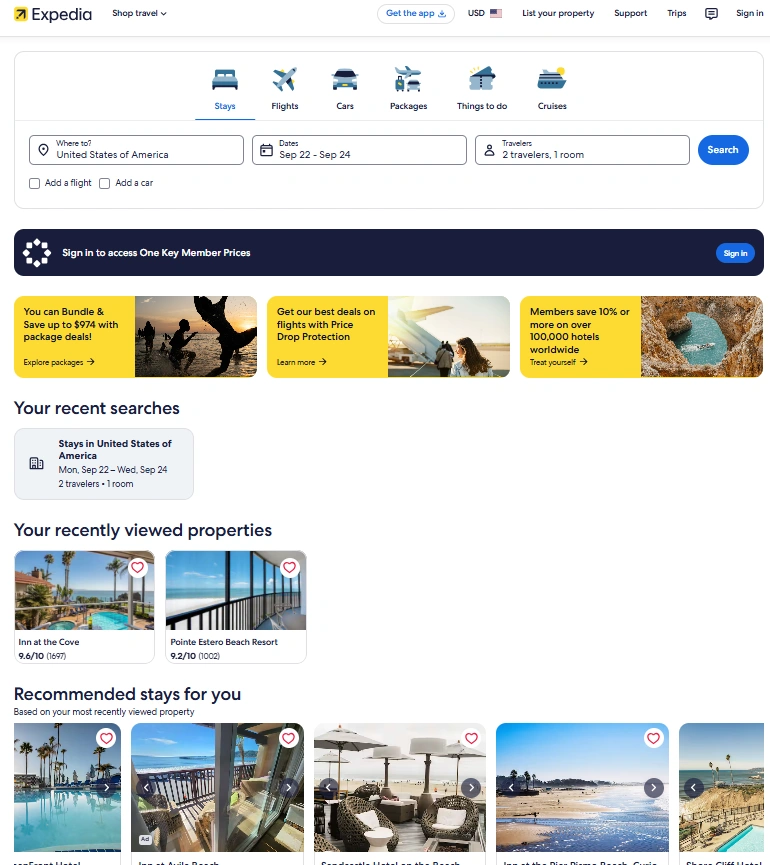
Create an account, add property details, photos, rates, and policies, then publish.
Use instant booking, clear descriptions, and reviews to boost performance.
Channel managers sync rates, availability, and bookings across 300+ platforms.
GDS integration attracts corporate travelers and higher-value booking
As the second-largest online travel agency worldwide, Expedia once focused mainly on hotel bookings, flights, and car rentals. Over time, it expanded to include vacation rentals. Today, you can list your short-term rental on Expedia and reach travelers searching for more than just traditional hotels.
In fact, lodging brings in the highest revenue for Expedia Group. In 2024 alone, hotel and short-term rental bookings generated nearly $11 billion. That number represented about 80% of the company’s total global earnings. The demand exists, and travelers use Expedia every day to book their stays.
If you want to appear on this platform, follow the right steps to create a listing that performs well. In this article, you’ll learn how to add your property to Expedia, use it to drive more bookings, and set it up to attract the right guests.
What is an Expedia listing?
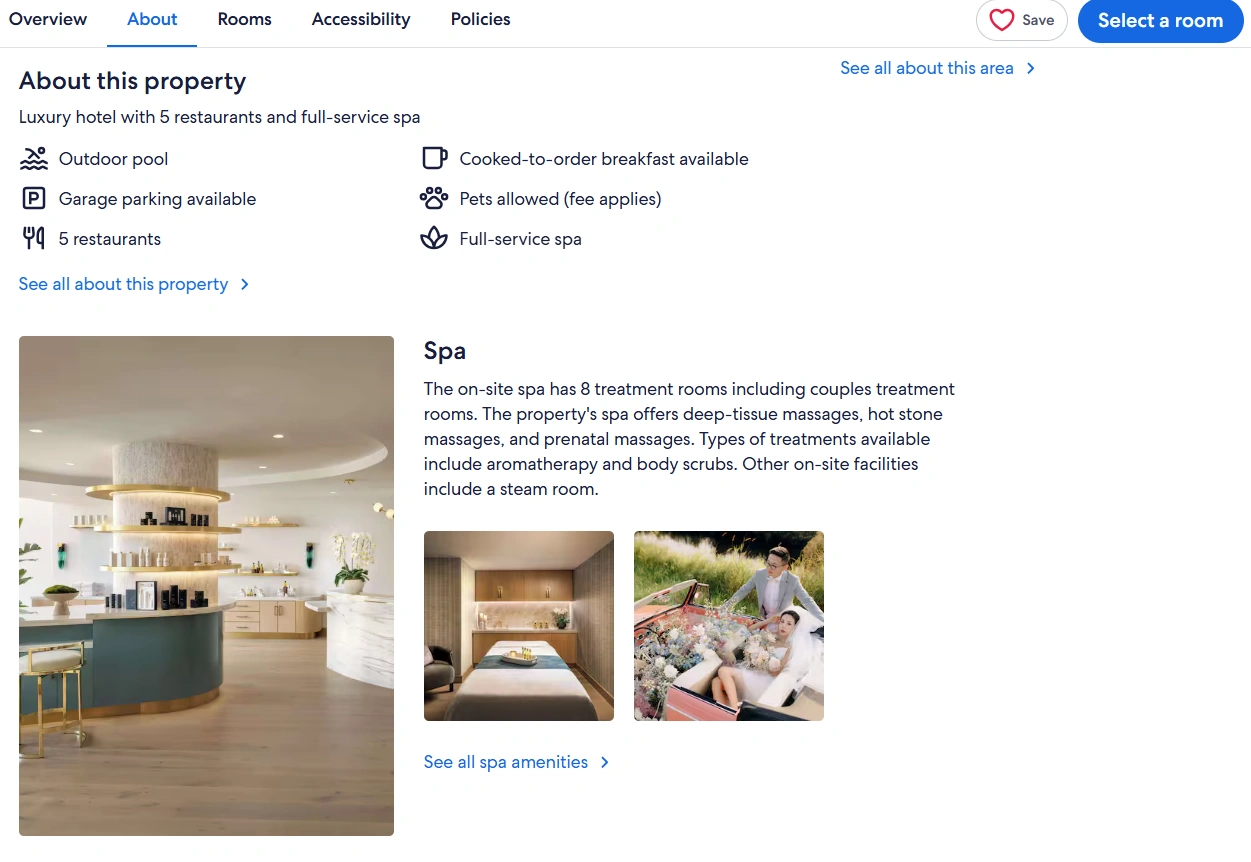
An Expedia listing gives accommodation providers an online profile on Expedia.com to attract and convert travelers into guests. Many small hotel owners also refer to it as an ‘ad on Expedia,’ but the listing does far more than just advertise your property.
Why list hotel on Expedia?
With 10 million+ average daily visitors and 1 billion+ average searches per month, Expedia connects your property to one of the world’s busiest travel marketplaces. Here are some Expedia hotel listing benefits you should know about:
Global exposure: Use Expedia’s network of over 200 booking sites covering 70+ countries. This maximizes hotel reach among international guests who might otherwise miss your website
Higher bookings: The filters and packages on Expedia make your property easier to find for the right audience and
Marketing tools: Use Expedia’s ads, loyalty programs, and hotel SEO. These tools promote your property without spending extra marketing budget
Multi-channel reach: Get visibility on partner OTAs like Hotels.com, Orbitz, Travelocity, and Vrbo. A single listing can multiply your chances of being discovered across platforms
Analytics: Use Expedia’s pricing and visibility tools to make informed decisions and get more bookings
What you need before listing on Expedia
Getting your hotel listed is easier when you know what to list on Expedia. Your approval comes through faster, your listing is more appealing, and bookings come in quicker.
Here is an Expedia property listing requirements checklist to tick off before listing your property on Expedia:
Property details: Your hotel’s name, address, and contact information
High-quality images: Clear photos of rooms, common areas, and the exterior
Room types and amenities: Descriptions of hotel room types, amenities, and other facilities you offer
Pricing strategy: Rates, seasonal pricing, and special offers to stay competitive
Cancellation and house rules: Clear cancellation policies, hotel check-in and check-out, and guest behavior guidelines
Step-by-step guide to listing on Expedia
Once you get all the requirements in order, follow these steps to list your property on Expedia:
Step 1: Creating an Expedia Partner Central account
Here is how to set up Expedia account:
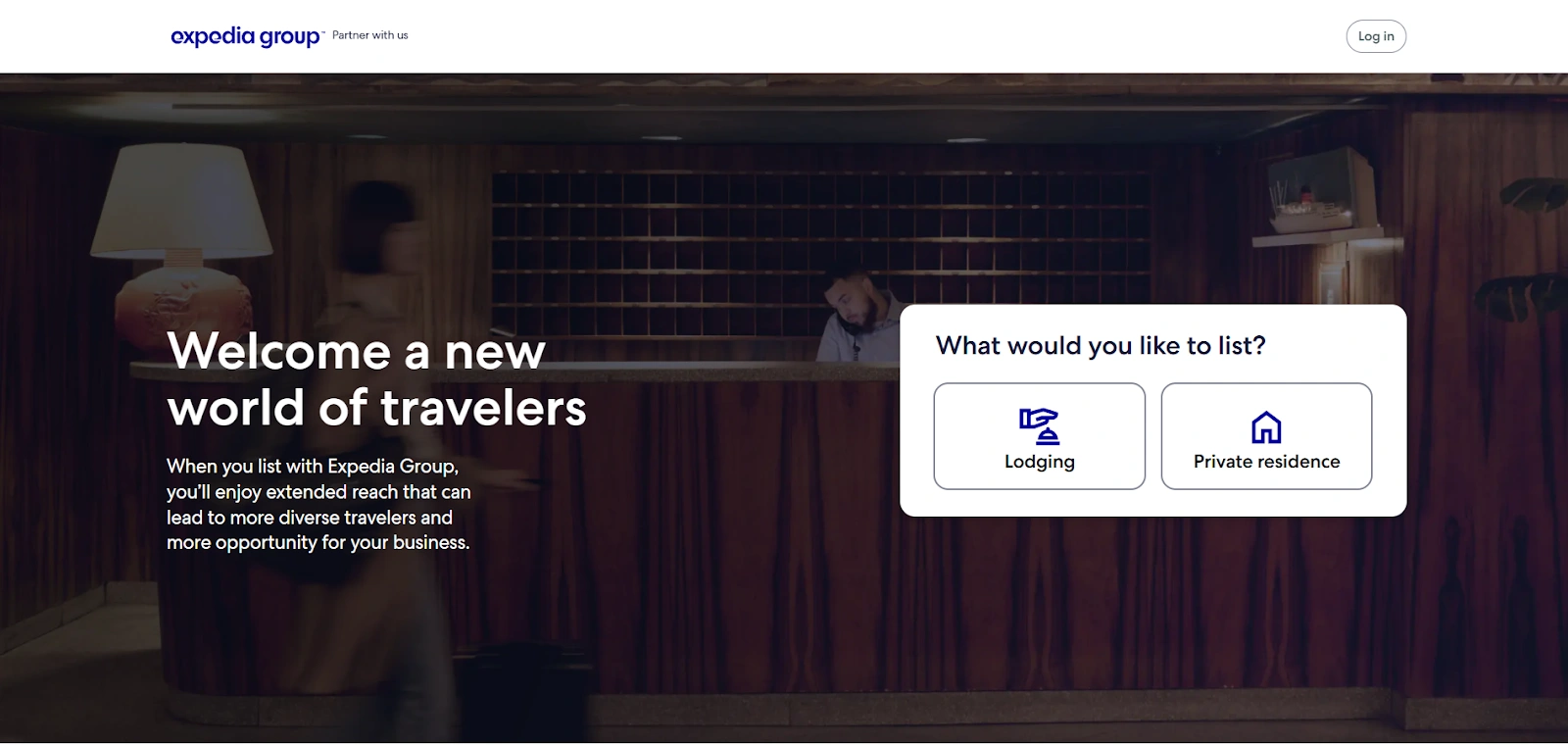
Head to Expedia Partner Central
Choose Lodging under the “What would you like to list?” option
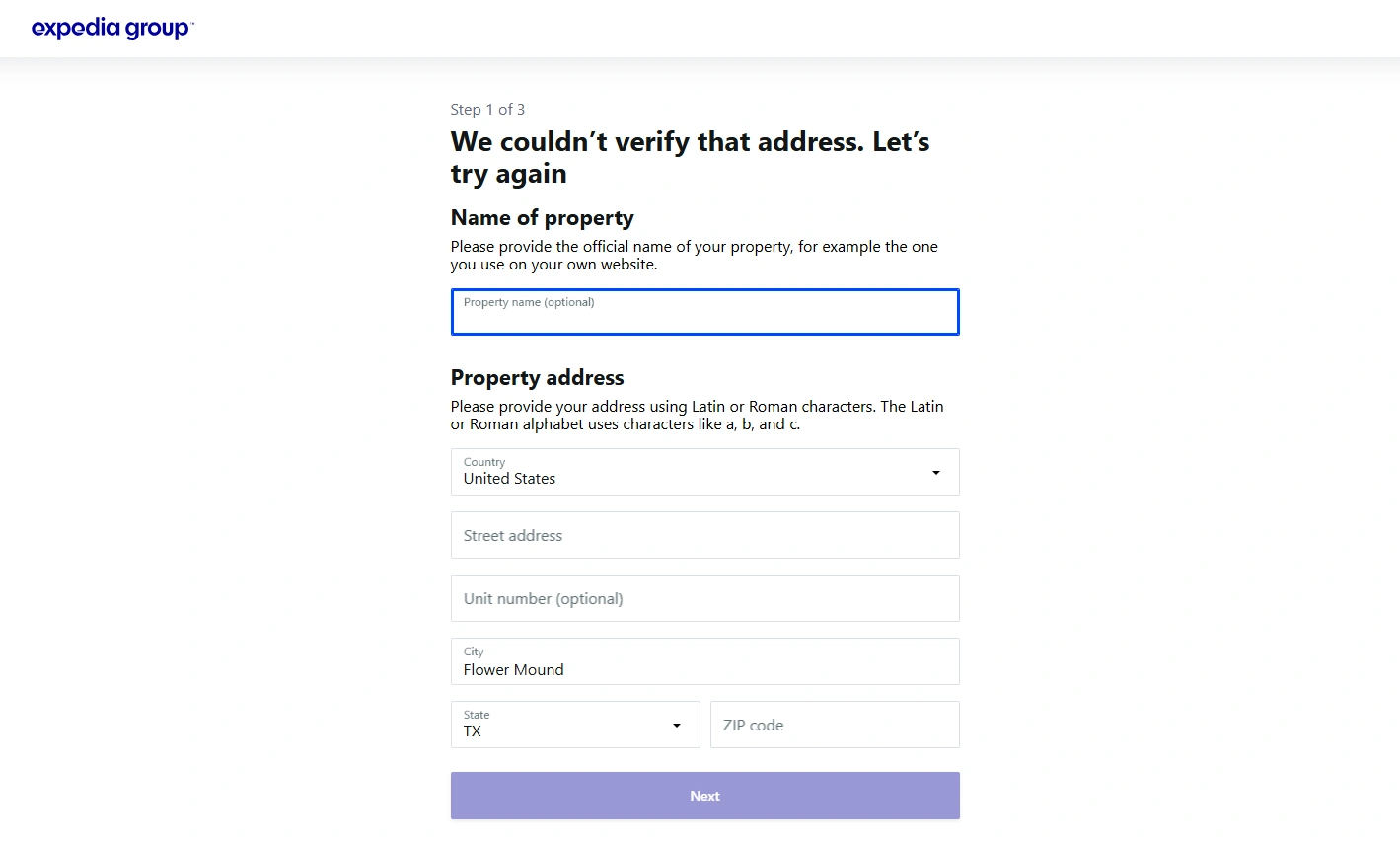
Put in your property’s location
Add your hotel’s name and the address
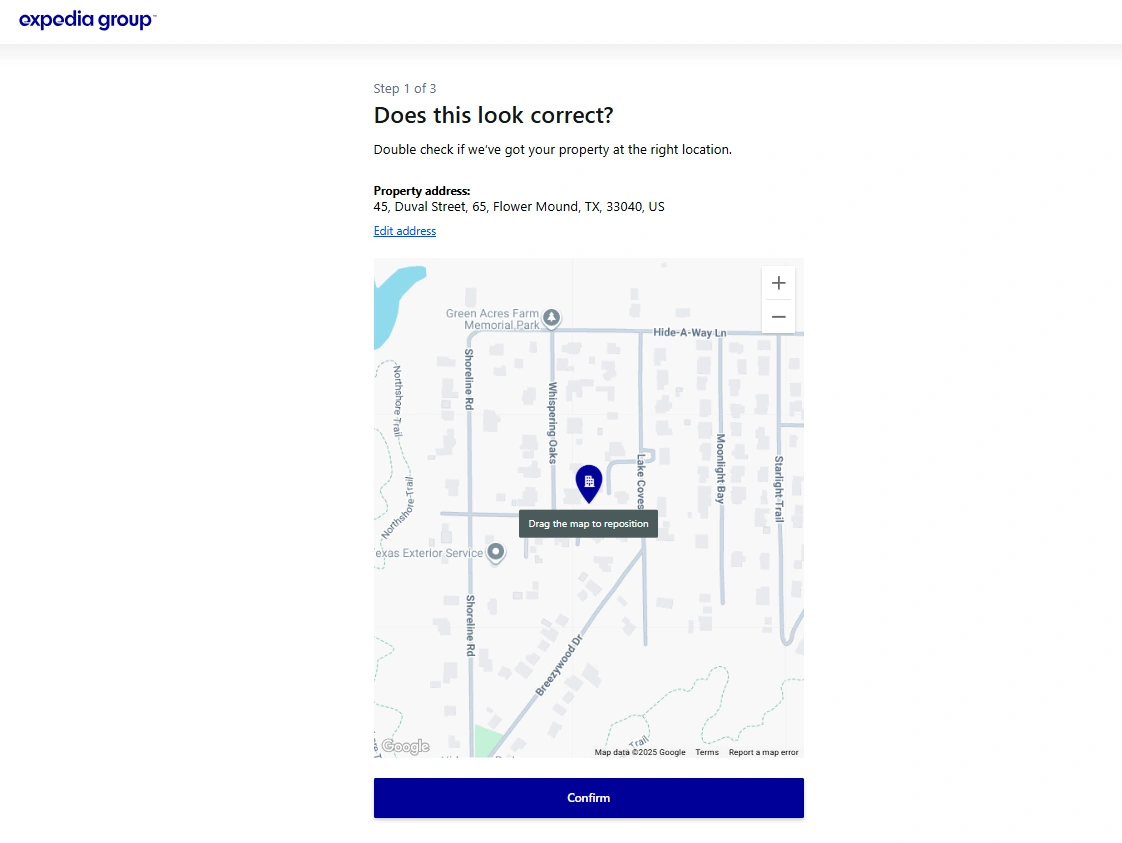
Check the map pin and make sure your location is correct
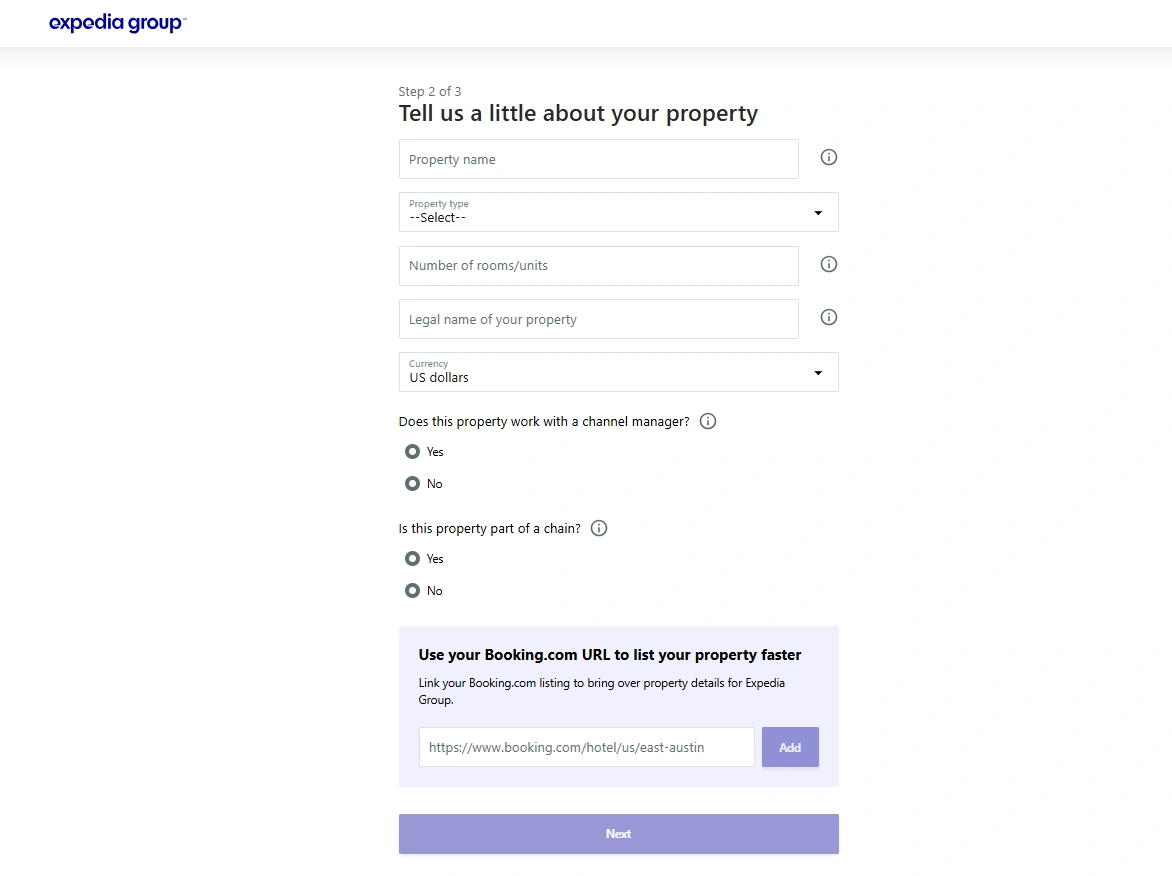
Next, add more details about your property, like:
Property Name
Property type
How many rooms you have
The legal name of your property
Currency you accept
Specify if you work with a hotel channel manager and whether your hotel is a part of a chain
If you already have a listing on Booking.com, you can add the URL and import the listing on Expedia
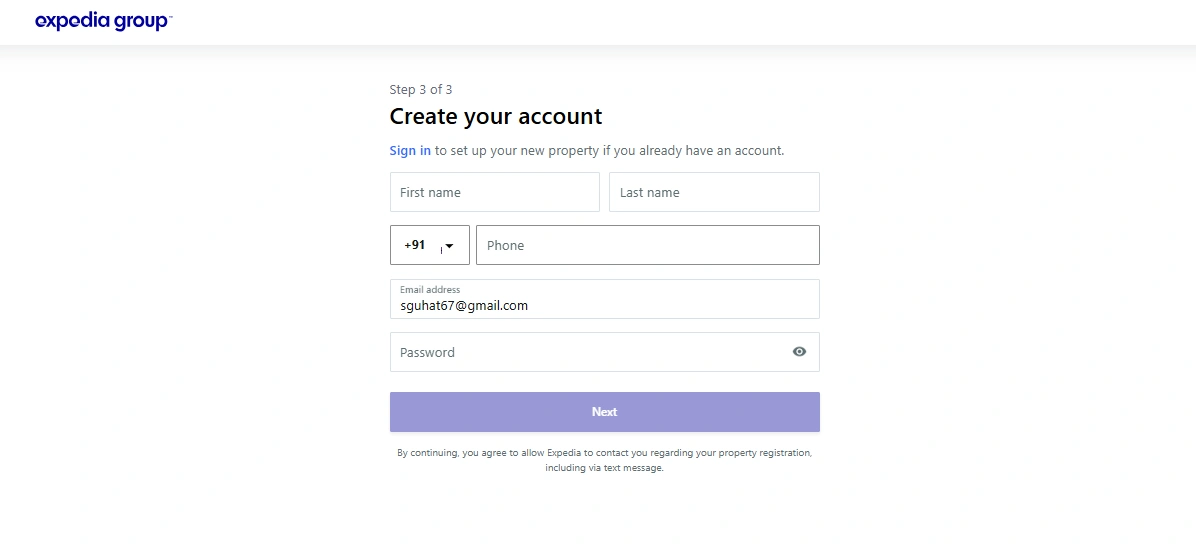
Now, you need to create an account with your name, phone number, and email ID
Verify your email
Step 2: Adding policies and property details
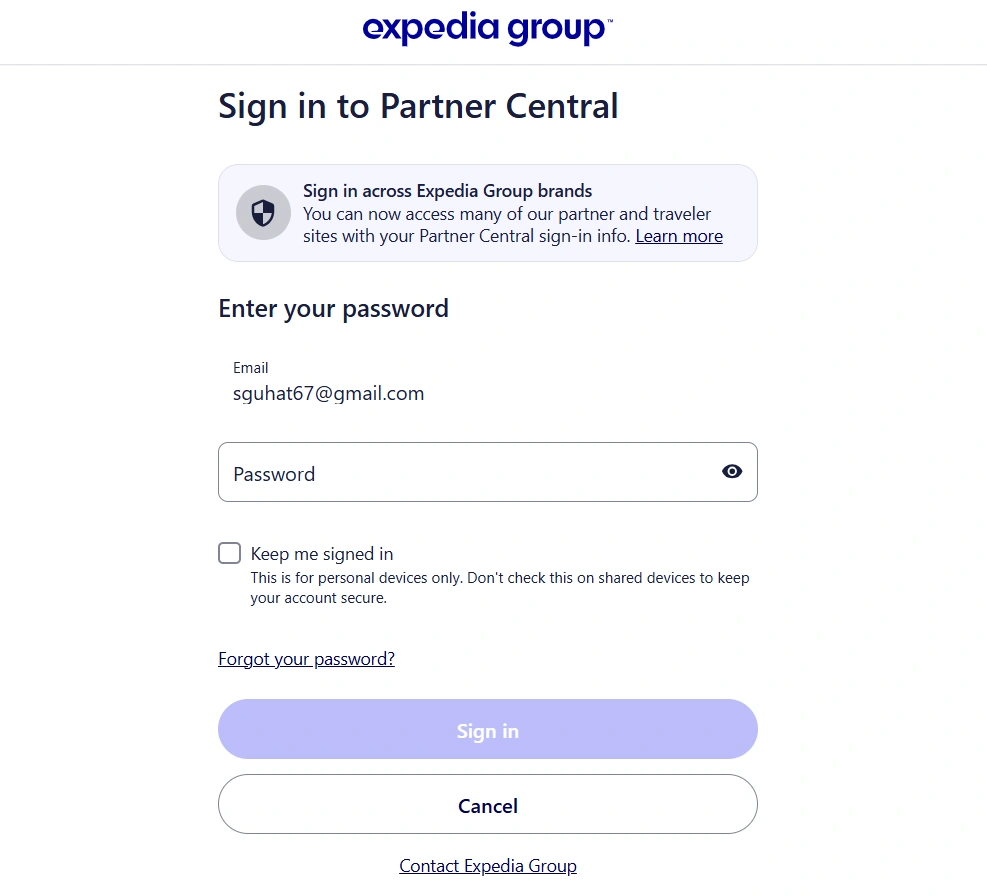
Sign in to Expedia Partner Central with your credentials
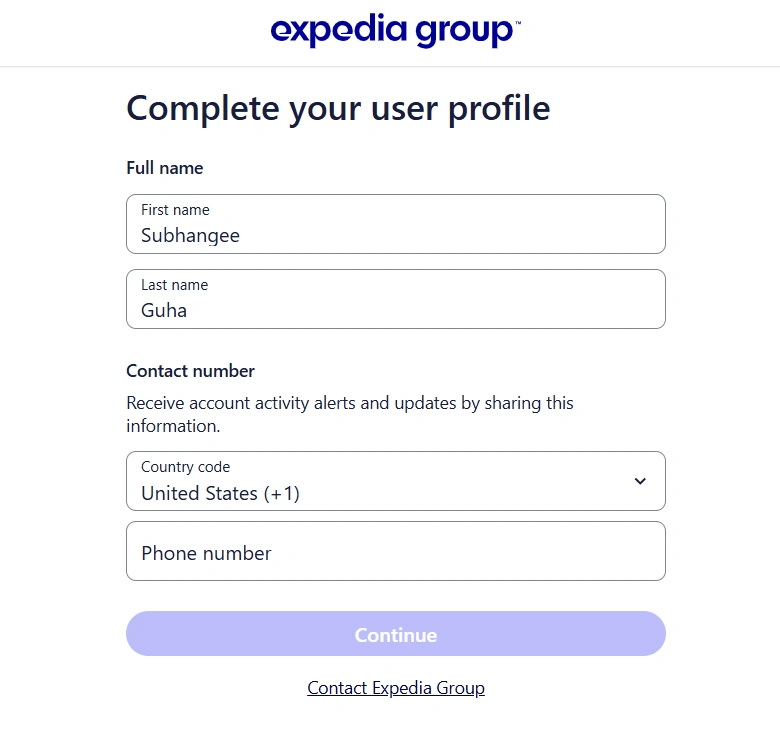
Complete your user profile with contact information
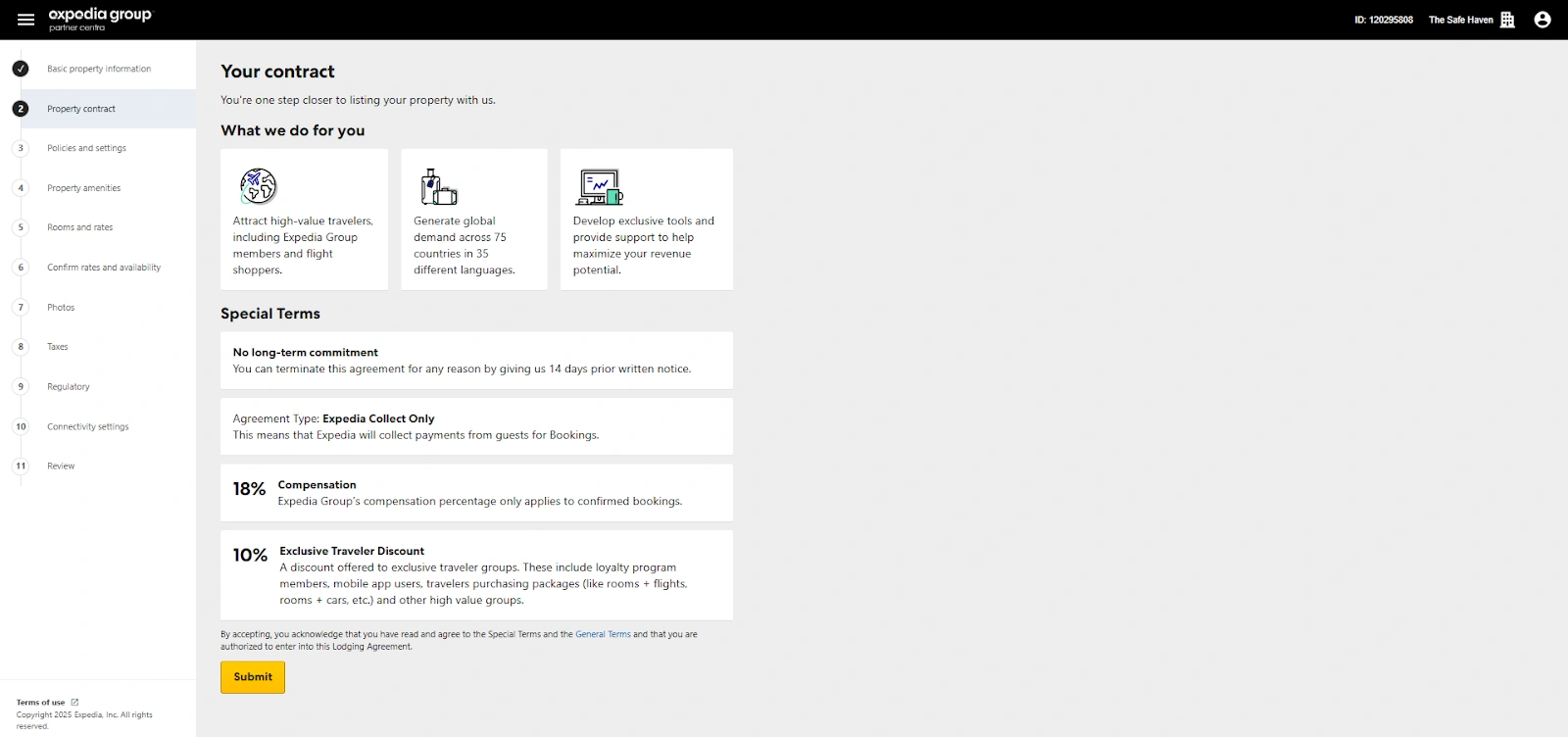
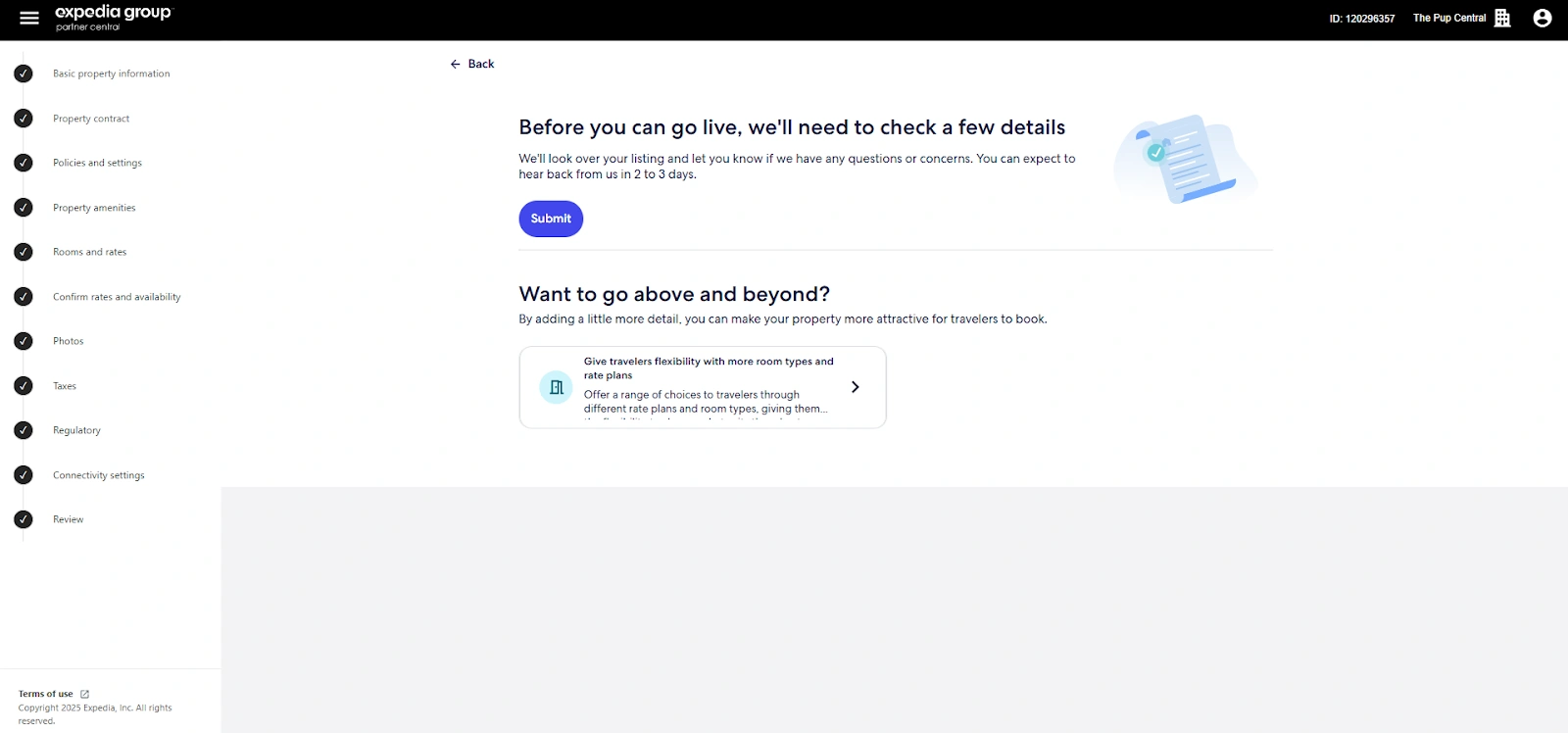
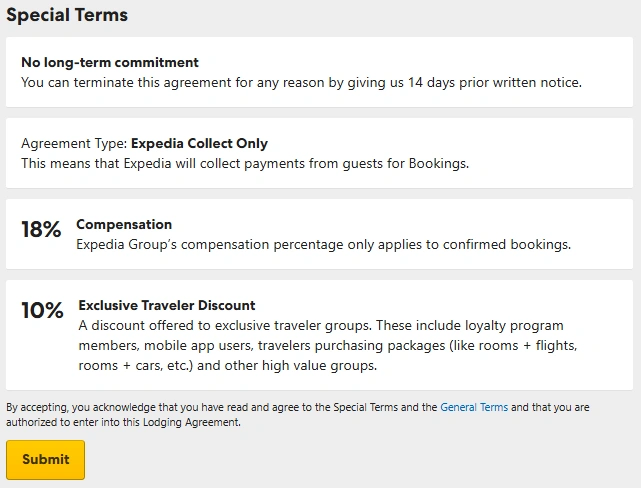
Read through the contract carefully and click on the ‘Submit’ button
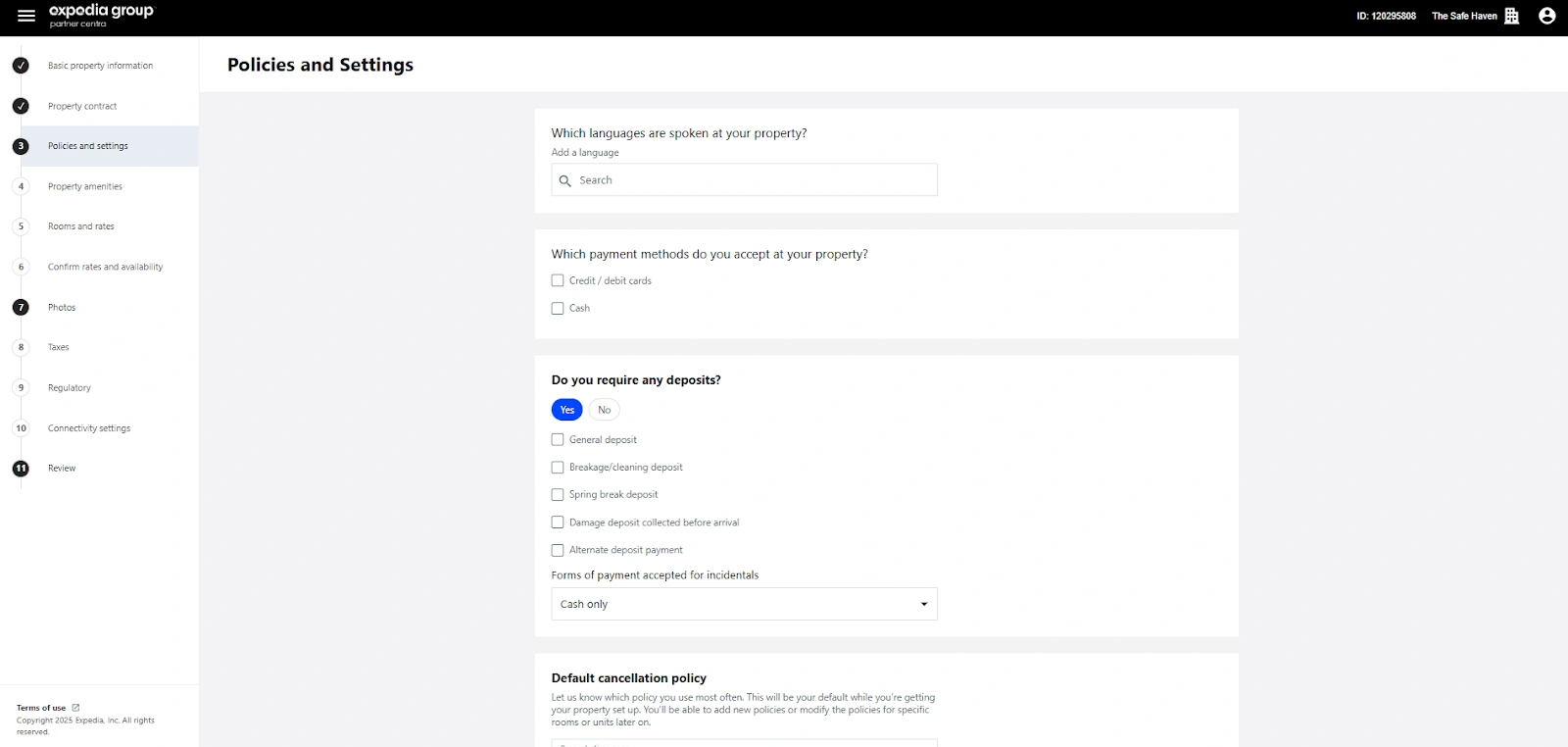
Specify the languages spoken at your property, payment methods and deposits, cancellation policies, and applicable tax and fees
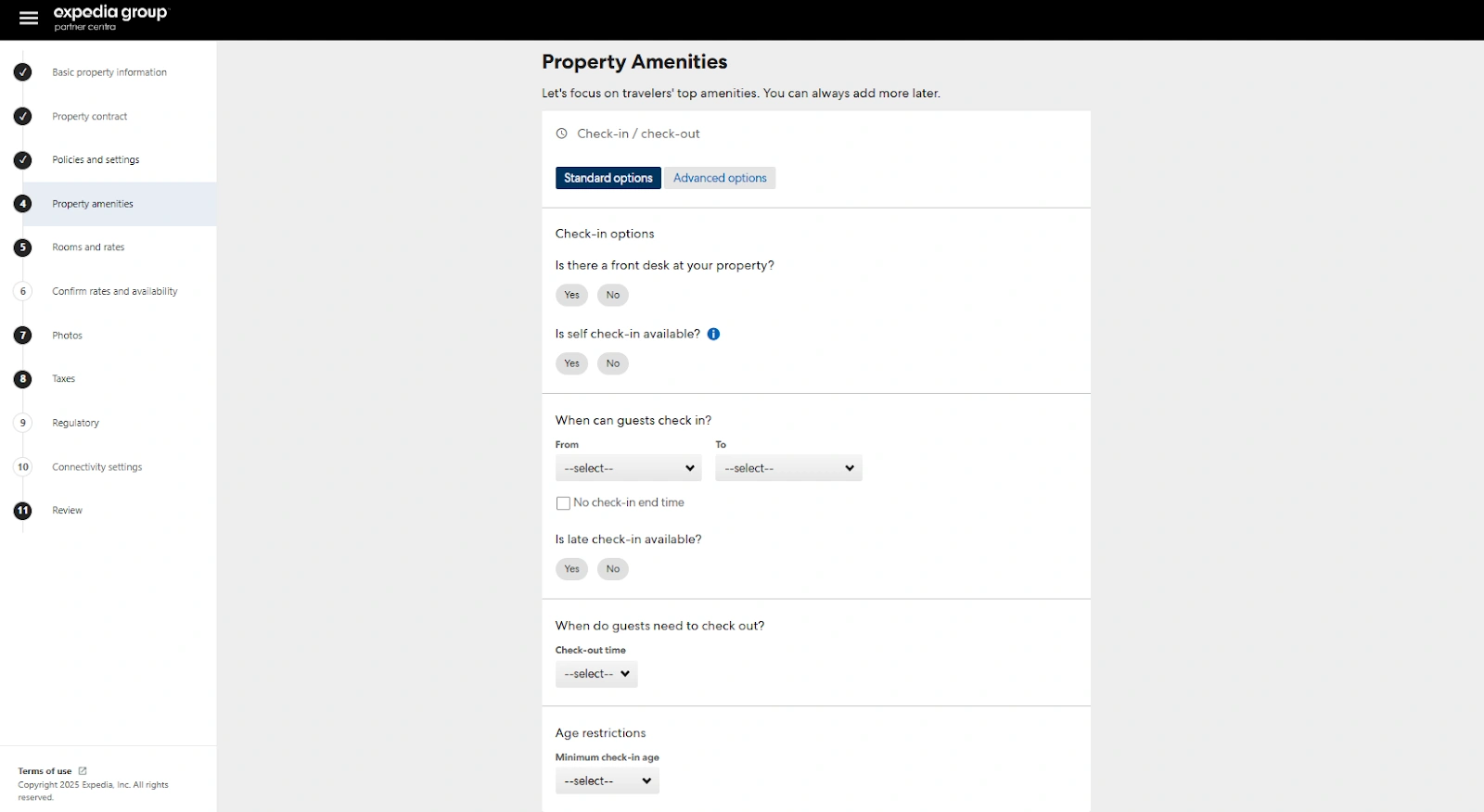
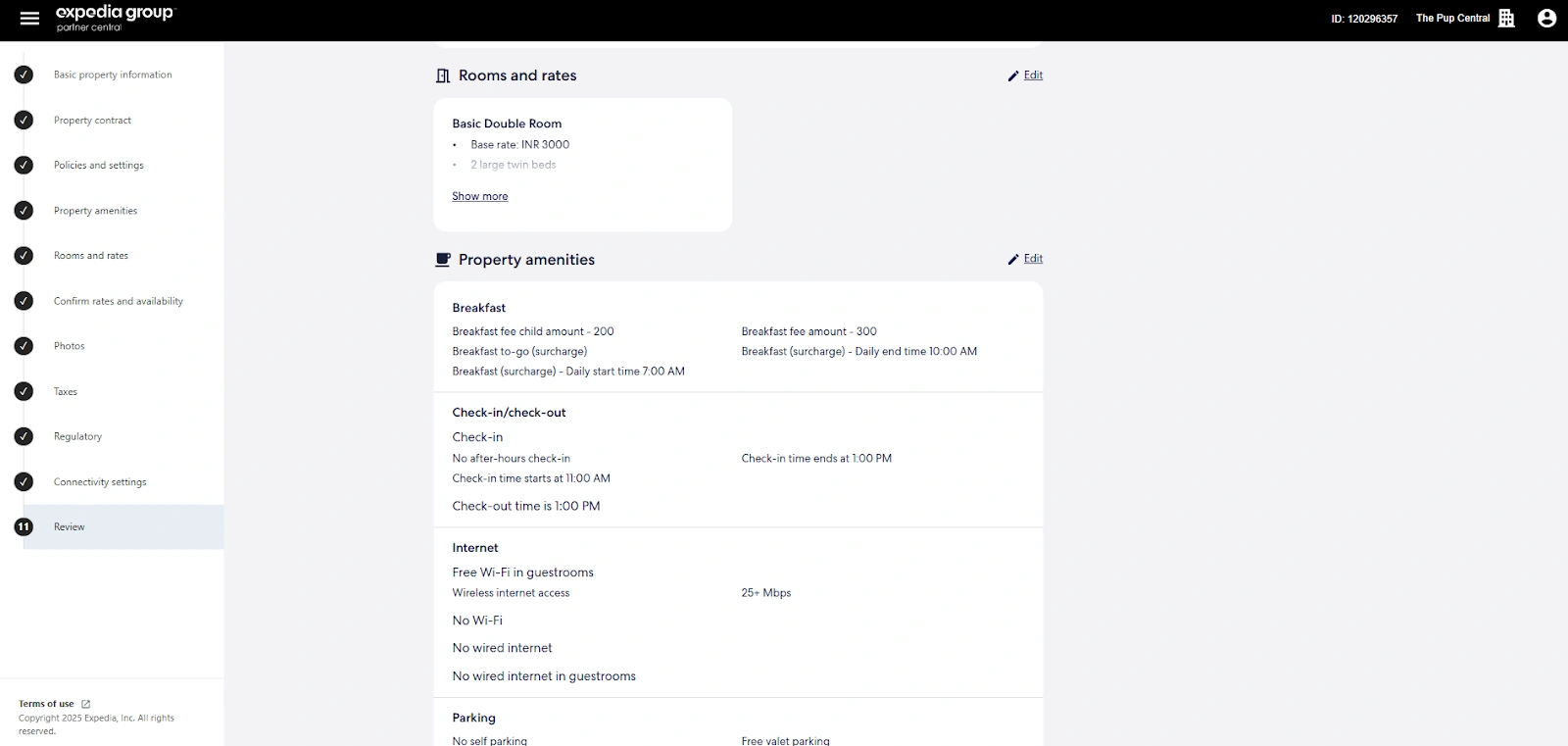
Add the check-in and check-out times, check-in options, age restrictions, and amenities
Step 3: Setting up rates and availability
Now you set rates on Expedia. You will also edit your property’s availability in this step:
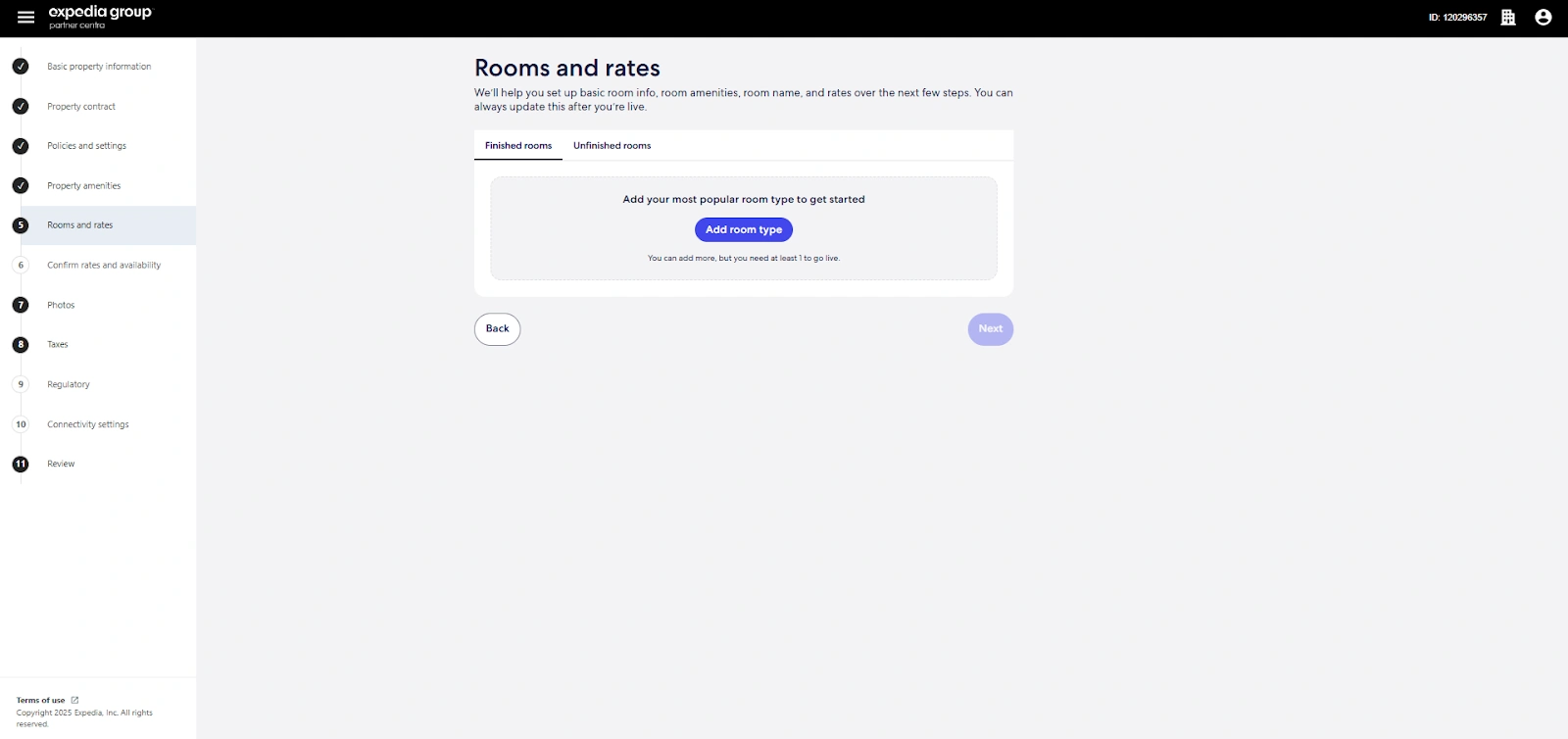
Set up room types, detailed amenities, and rates. Expedia will help you decide your charges
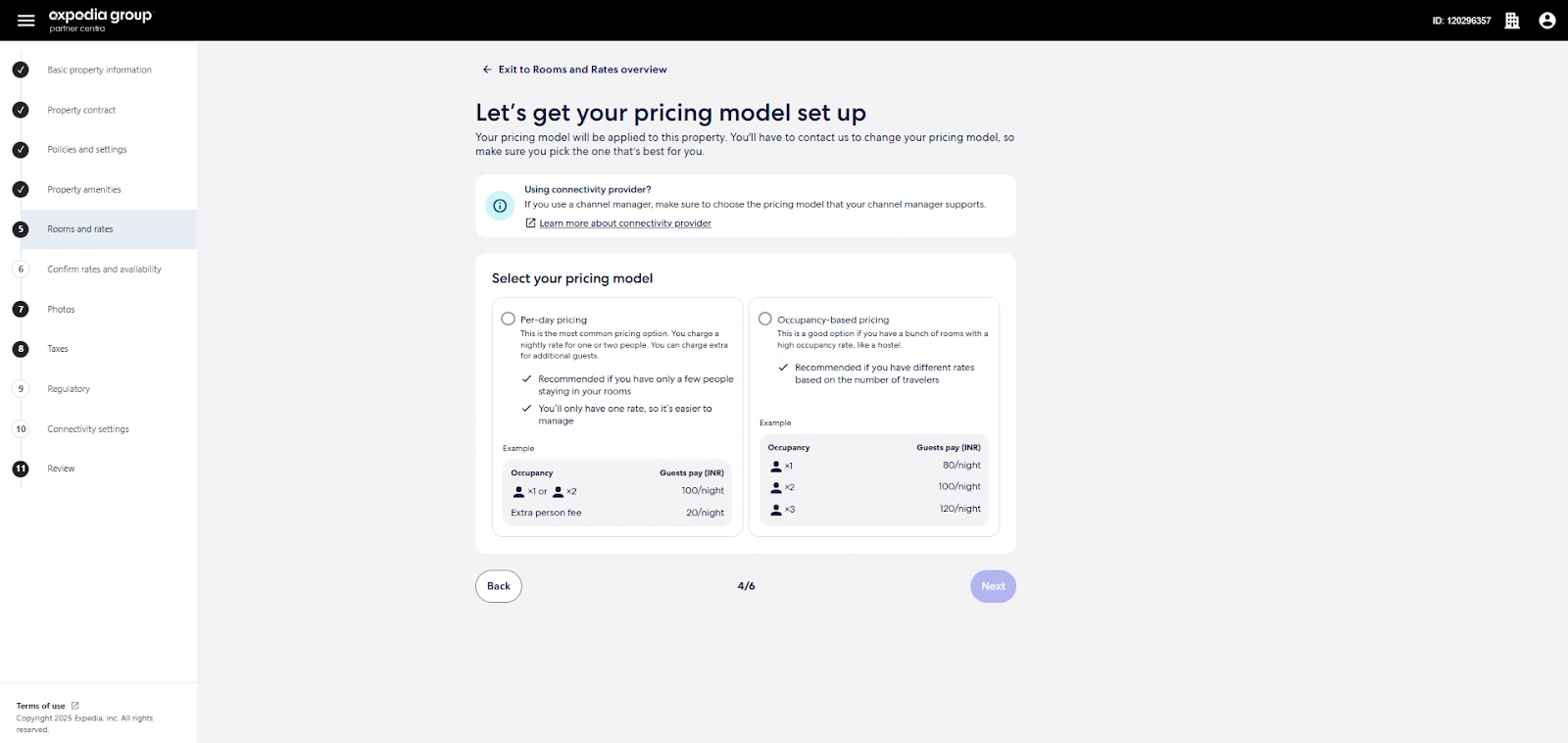
Once you enter all the room details, you can set up your pricing model. You can choose either occupancy-based pricing or standard per-day pricing
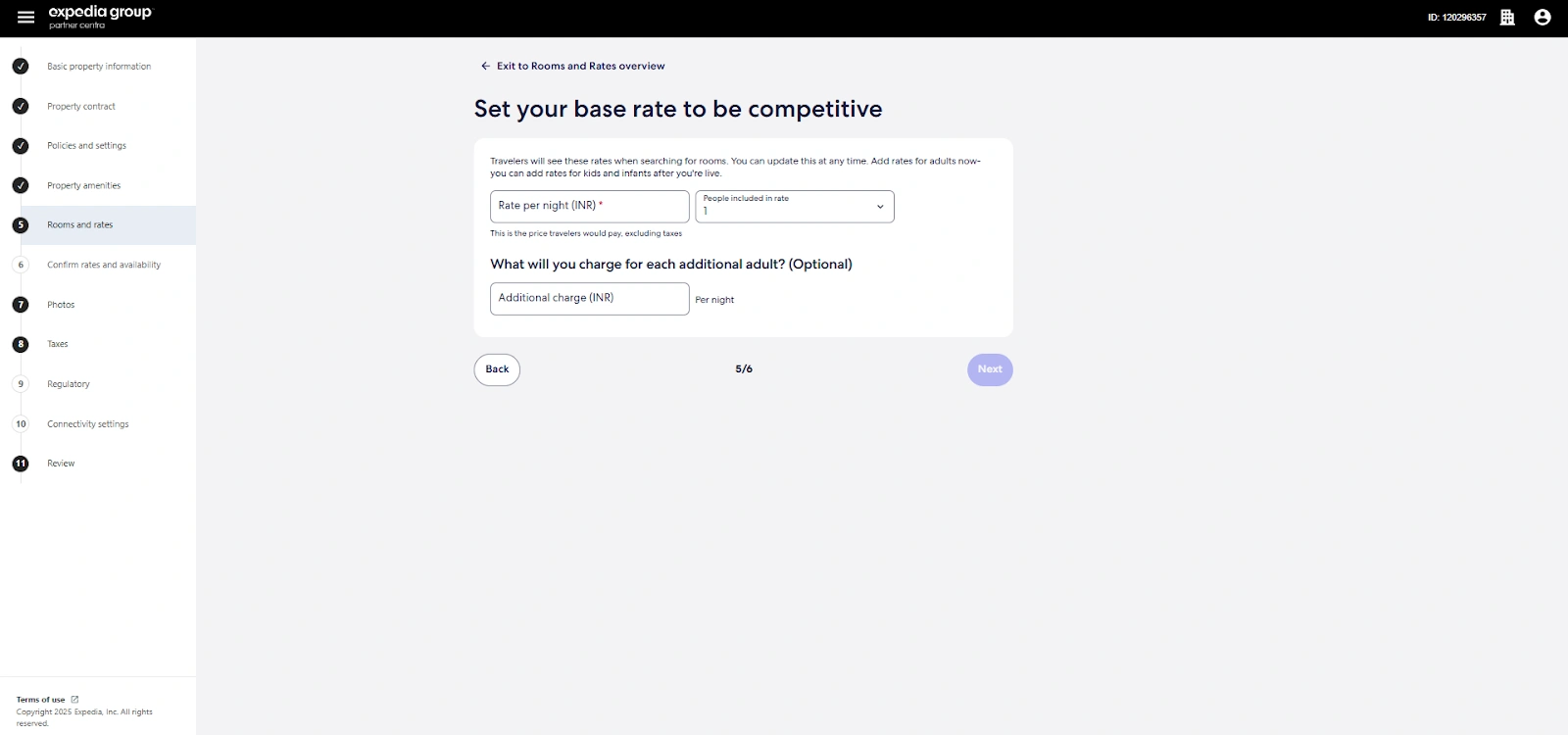
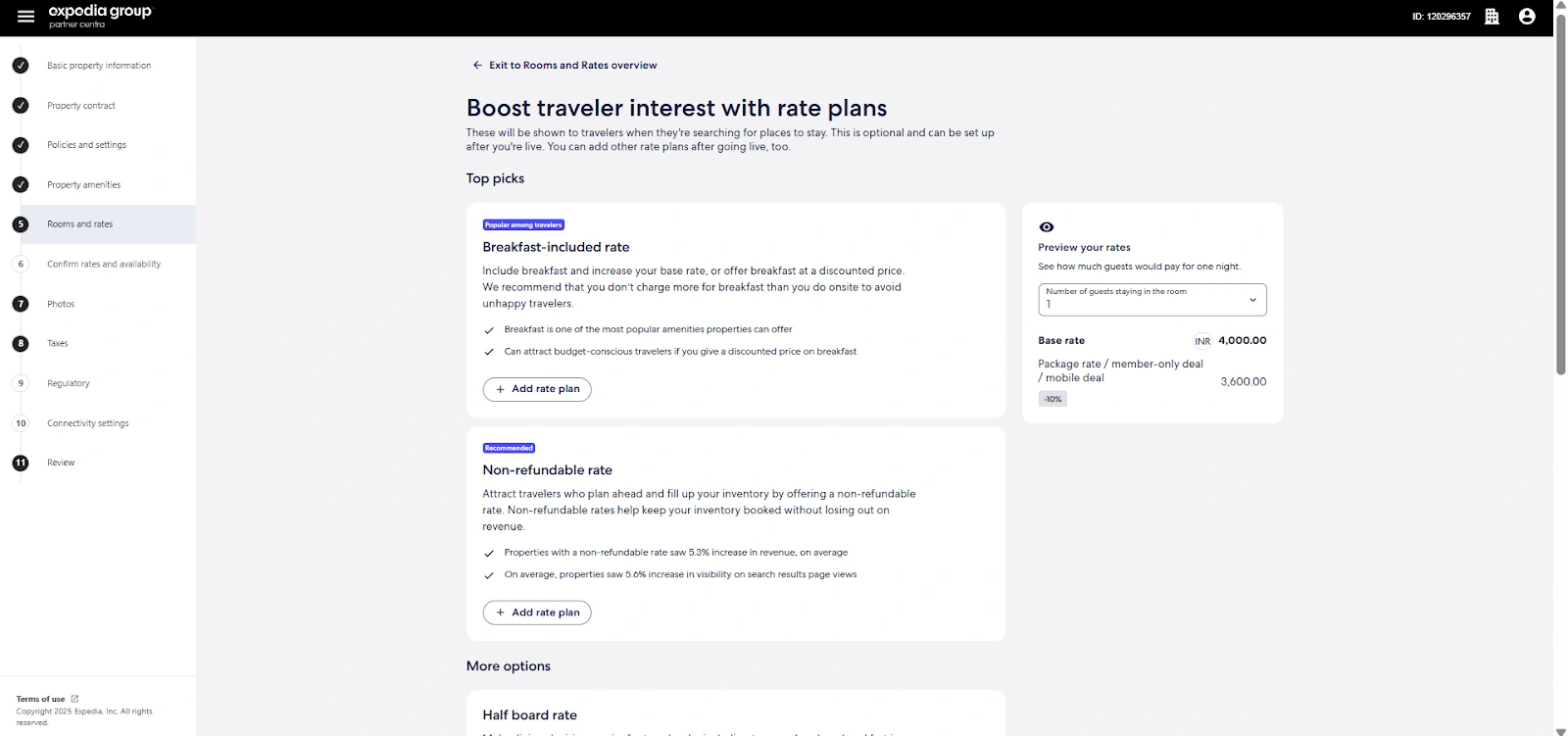
Now set your base rates
Select rate plans like breakfast included packages, non-refundable rate, half and full board rate, and traveler’s discount
Check the pricing and click “Next”
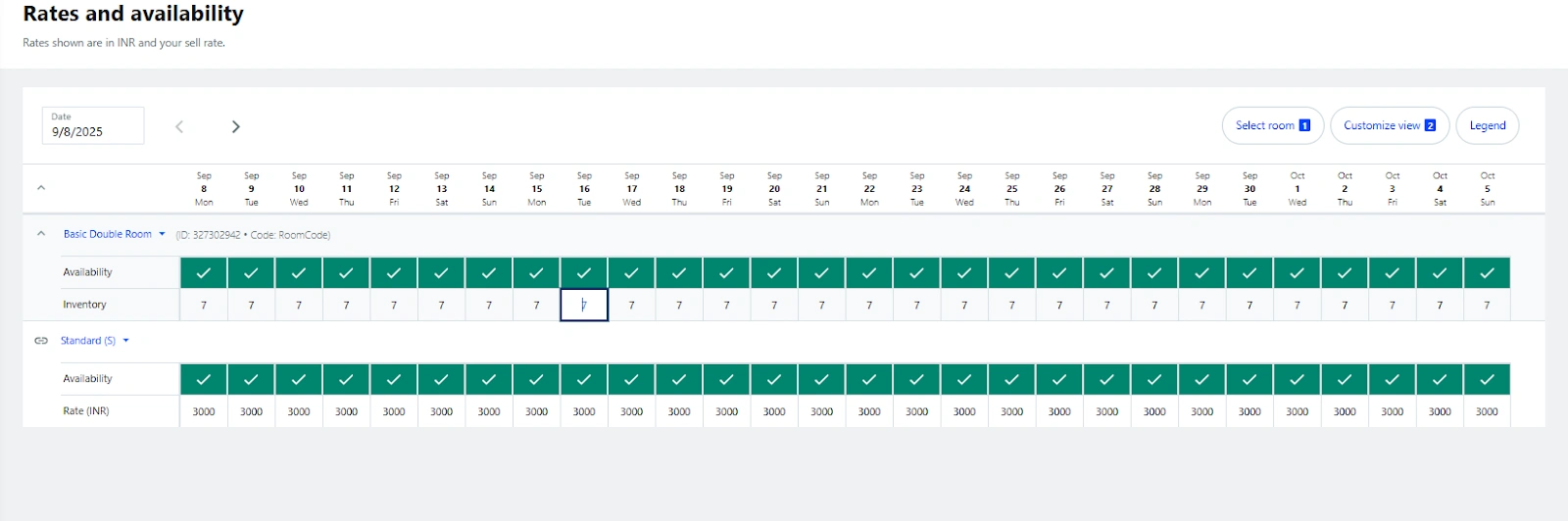
Now set up Expedia price availability on the calendar
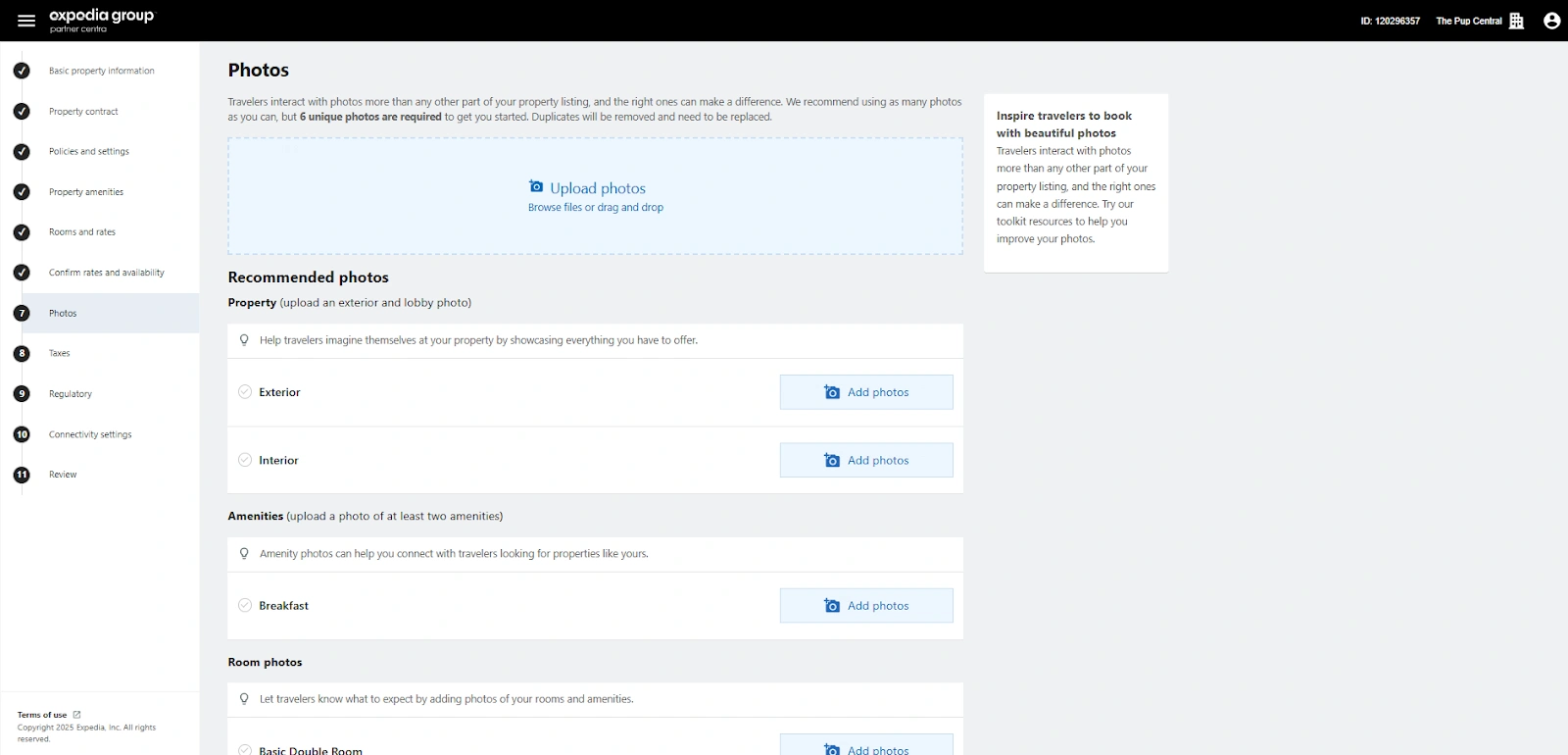
Step 4: Uploading photos
Now you can upload photos on Expedia:
Upload at least 6 photos, label them, and click “Next”
Here are some tips and Expedia image requirements to make your listing look more appealing:
Use high-resolution images of at least 2,000 pixels wide for clear display
Show a variety of rooms, amenities, dining areas, and the exterior
Take photos in natural light for a brighter and more welcoming look
Keep colors and style consistent across all images
Step 5: Sort out tax and registration details
Enter your tax details
Put in your hotel license number if you have it
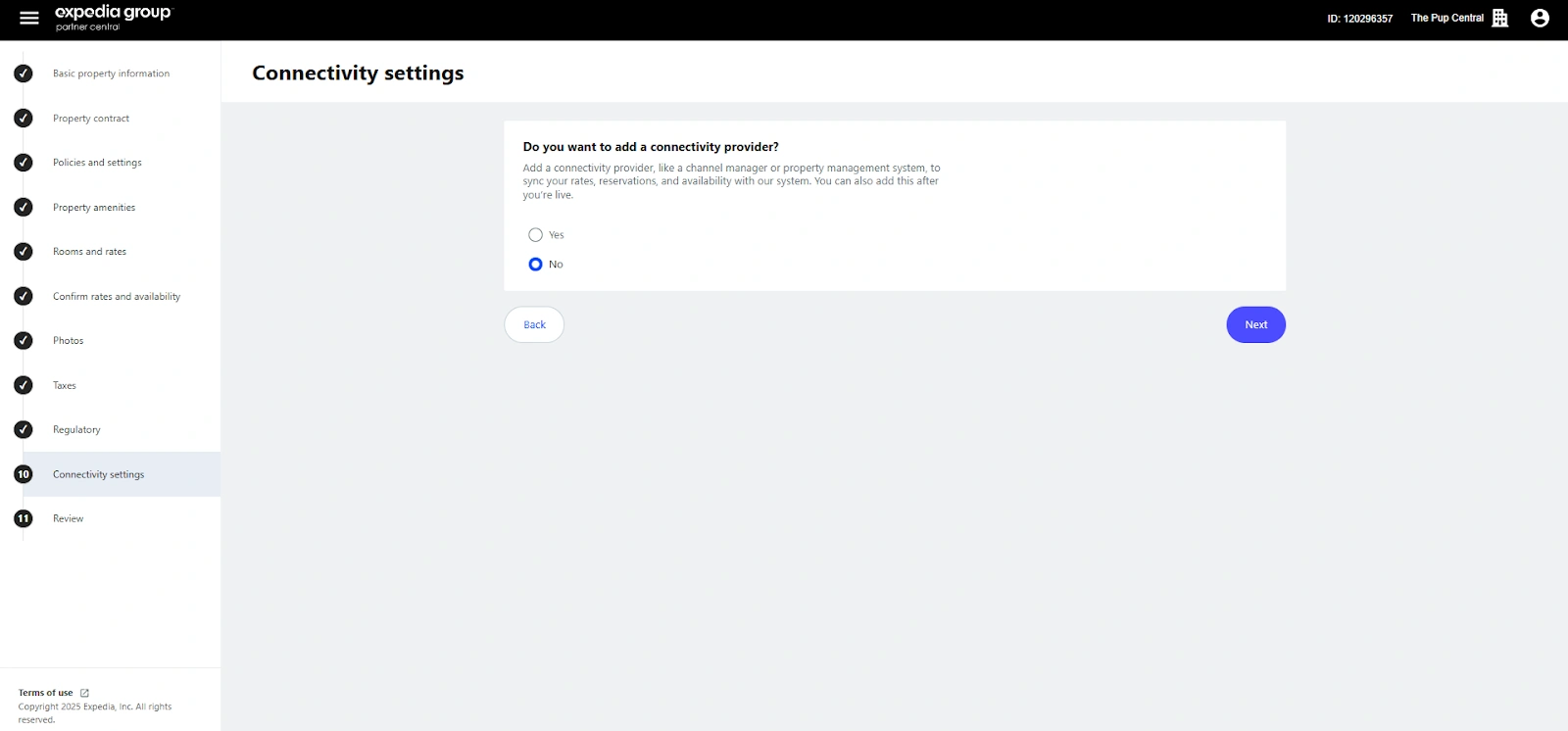
Choose whether you want a connectivity provider to sync rates throughout Expedia channels
Step 6: Publish your listing
Now Expedia will let you review all the details and edit any possible inaccuracies. Make sure you go through each element carefully. Once you are satisfied, click “Next”.
The platform will verify your details, and if everything is correct, it will publish hotel on Expedia. Typically, Expedia listing approval comes through within 24 hours.
Expedia’s commission structure explained
Expedia commission rates are 18% commission on every confirmed booking you get through its platform. You can also opt to pay an additional fee to promote your property directly within the Expedia commission model. These marketing options involve smaller additional charges, but many property owners recover that cost through increased bookings.
Best practices for optimizing your Expedia listing
A listing is just the start. You must optimize your Expedia listing to build trust and stand out. So, here are some Expedia listing tips to make the difference between someone scrolling past and clicking “Book Now.”
1. Writing compelling descriptions
When writing your hotel description, focus on what makes your property unique. Use simple, inviting language that helps guests imagine their stay, and highlight your best features first, such as a prime location, a rooftop view, or a cozy atmosphere. Break text into short sections so it is easy to skim, and include nearby attractions for a more appealing listing.
2. Choosing your main image
Your cover photo creates the first impression. So, choose a bright and high-quality shot of your most attractive space, like a premium room or standout amenity. Natural light is always more inviting than filters and heavy edits, so keep things realistic. For extra impact, refresh your main image seasonally to keep your listing looking current and engaging.
3. Competitive pricing tips
Before setting your rates, research what similar properties in your area are charging and position yourself competitively. Flexible pricing for weekends, holidays, and peak seasons can get you more bookings.
Packages and discounts for longer stays will attract value-conscious travelers. However, review your hotel rack rates often to stay ahead of the competition and avoid missed opportunities.
4. Managing guest reviews
Reviews are one of the strongest factors influencing booking decisions. They give your guests an honest peek into your hotel and its services.
So, make it a habit to respond to every review. Thank guests for positive feedback and acknowledge their highlights. Address complaints with a solution-focused approach. Showing that you care builds trust and reassures potential guests. You can also gently encourage satisfied guests to leave a review at checkout or in follow-up messages to boost your visibility.
Managing your listing via Expedia Partner Central
Think of Expedia Partner Central as your hotel’s dashboard. Here you can keep everything up to date, make quick changes, and see how your property is performing. The more actively you manage listing on Expedia, the better results you get.
1. Updating rates and availability
Your calendar is one of the first things guests rely on. Keeping it accurate helps you avoid double bookings and missed booking opportunities. Use Partner Central to adjust room rates and set seasonal prices. Actively close out dates when rooms are not available. Regular updates also bump up your property more often in traveler searches.
2. Editing content
A hotel listing is never something you set up once and forget. Partner Central makes it simple to refresh your descriptions, swap in new images, and add newly available amenities. Every time you make a small improvement, you give travelers one more reason to choose your property.
3. Monitoring performance metrics
Partner Central gives you access to reports on bookings, cancellations, and guest reviews. Check these numbers regularly so you can spot patterns, adjust your pricing strategy, and improve details that make your listing stand out.
How to get more bookings from your Expedia listing
Once your listing goes live, you must focus consistently on Expedia listing management to attract more guests. These tactics help you boost visibility and convert more lookers into bookers without wasting time or budget.
Turn on instant booking: Expedia favors listings that allow instant confirmation because guests want to book without delays. If you require approval before accepting bookings, Expedia will drop your listing lower in the search results
Invest in professional photography: A professional photographer with the right equipment captures your property in its best form. While phone cameras offer convenience, they rarely produce the sharp, high-quality images that drive clicks and bookings
Ask for reviews and respond to all of them: Guest reviews carry real weight on Expedia and directly impact how your listing performs. Offer an excellent stay, request feedback after checkout, and respond to every review to show you're involved and attentive. Use negative feedback as a chance to reveal how you handle criticism and solve problems
Add complete and clear property information: Give travelers every detail they might need before booking. Include room descriptions, amenities, policies, and highlight nearby attractions or experiences to help guests picture their trip
Stay competitive with your pricing: Keep track of what similar properties in your area charge, and offer better rates where possible. Introduce limited-time offers, seasonal discounts, or exclusive packages to attract guests who compare listings closely
Use property analytics inside Expedia Partner Central: The Property Analytics tool inside your dashboard reveals opportunities for stronger performance. Use it to adjust pricing, improve visibility, and fine-tune details to drive more conversions from your existing traffic
Promote through Expedia ads: Advertising on Expedia places your property in front of more eyes at the right time. Use a mix of sponsored placements and display ads to increase exposure and convert high-intent travelers faster
Strengthen your online presence beyond Expedia: Success doesn’t end with Expedia. Build your brand with a strong website, active social media accounts, and digital ads that lead back to your own booking funnel. The more guests recognize your name, the more they’ll trust your listing when they spot it again
How roommaster can help with your Expedia listing
Expedia Partner Central gives you the tools to manage your listing, view performance data, and make updates that drive bookings. But once you start working with multiple platforms like Booking.com, Airbnb, Kayak, and Agoda, the process quickly becomes complicated. You have to repeat every change to pricing and availability on each site.
Why go through so much hassle when you can just use roommaster Channel Manager? Instead of logging into each platform individually, you can manage all your listings from one dashboard. Update your rates once, and roommaster PMS pushes those changes to Expedia and every connected OTA in seconds. Room availability adjusts automatically the moment you get a booking, no matter where it comes from.
{{channel-manager-one}}
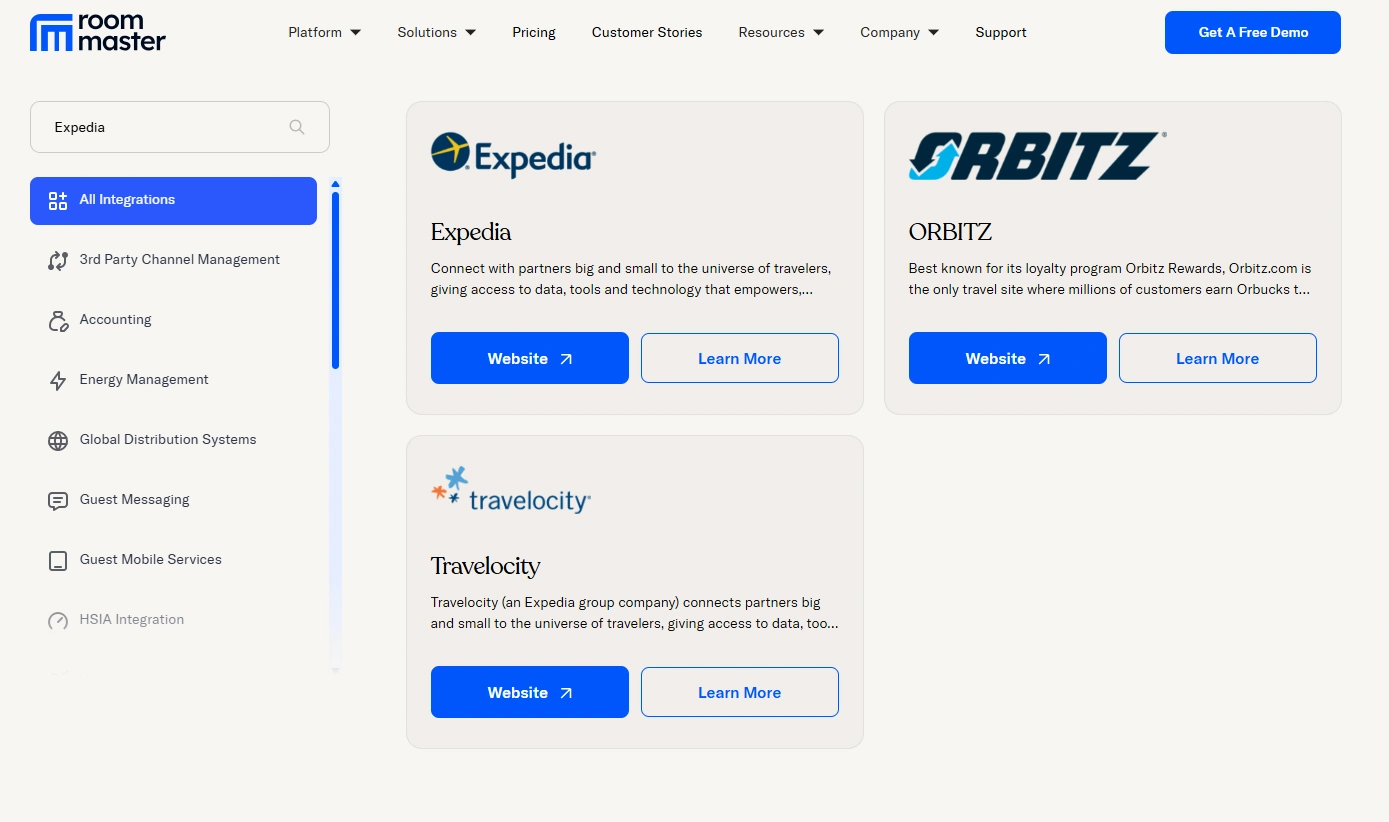
roommaster Expedia integration will keep your reservations, cancellations, and modifications synced in real time. You also get integrations with Expedia’s partner sites like Orbitz and Travelocity.
Plus, with the built-in hotel property management system, you can centralize tasks like rate management, booking restrictions, and closeouts. Once your rooms sell out, roommaster will close your availability automatically.
So, stop wasting time on manual updates. Book a free demo today and make Expedia Partner Central management hassle-free!
FAQs
What is a channel manager and why do I need one?
A channel manager lets you control pricing and availability across every booking platform you use. Instead of logging into each channel separately, you make changes once and the system updates all listings instantly. It saves time, eliminates manual errors, and helps you avoid double bookings.
How important is pricing on Expedia?
Guests compare listings quickly, so your pricing needs to stay competitive. Monitor your competitors, adjust rates for low seasons, and offer packages or deals when needed.
Do reviews really impact my Expedia performance?
Yes. Your review score affects your ranking and credibility. Encourage guests to leave reviews and reply to each one. A thoughtful response, even to a negative review, shows that you care about guest experience.
Do I need to use Expedia Partner Central if I use a channel manager?
No. You don’t need to log into Expedia Partner Central to manage your listing. The channel manager handles all updates for you from one place.
Can roommaster help me get more business travelers?
Yes. Almost 80% of Global Distribution System (GDS) bookings come from corporate travelers. Connecting your hotel to the GDS opens the door to high-value bookings and a higher average daily rate, and the roommaster channel manager can help with that.
What happens if I get a booking through the GDS?
The Global Distribution System updates inventory across all channels automatically and logs the reservation in your hotel management software. You won’t need to worry about double bookings.
How much does Expedia charge in commission?
Expedia typically charges between 10% and 30% commission per booking, depending on your agreement, location, and property type. This fee is only charged after a confirmed stay.
How do I list my property on Expedia?
You can register through Expedia Partner Central. Create an account, add property details and photos, set availability and pricing, and then publish your listing once it’s reviewed.
Who owns Expedia?
Expedia is part of Expedia Group, which also owns Hotels.com, Vrbo, Orbitz, Travelocity, Wotif, and more. It’s one of the largest online travel companies in the world, headquartered in Seattle, Washington.
Can I offer discounts and promotions on Expedia?
Yes. You can create special deals, last-minute discounts, early-bird offers, and more from Partner Central or through your channel manager. Promotions can improve visibility and increase bookings.
How does Expedia handle cancellations?
You can set your own cancellation policies, including flexible, moderate, or strict terms. Guests will see this policy before booking, and cancellations are processed accordingly.
What is Expedia’s virtual credit card (VCC)?
If you're eligible, Expedia pays via a one-time-use virtual credit card. You charge the card at guest check-out. It simplifies the payment process and ensures quicker reimbursements.
Does Expedia support corporate or business travel?
Yes. Through its broad distribution and connection to GDS, Expedia helps attract corporate travelers, especially if you offer business-friendly amenities and competitive weekday rates.
Can I manage multiple properties under one Expedia account?
Yes. Expedia allows property managers to manage multiple listings under a single account, making it easier to track performance, bookings, and availability in one place.
What platforms will my listing appear on?
When listed on Expedia, your property can also appear on Hotels.com, Orbitz, Travelocity, Ebookers, Wotif, CheapTickets, and more, expanding your reach across Expedia’s partner network.
{{cta-strip}}
channel-manager-one
Fill more rooms. Keep more revenue. Hundreds of Channels. One Dashboard.
Mayela Lozano is a content strategist with a passion for hospitality and technology. She collaborates with roommaster on content creation, highlighting how technology can streamline hotel operations and enhance guest satisfaction. When she’s not creating content, Mayela loves to travel and spend time with her two little ones, discovering new adventures and making memories along the way.
Join Thousands of Hotels Thriving with roommaster
The transition to roommaster is straightforward and efficient. Our implementation team handles data migration including reservations, guest profiles, and historical information.
The transition to roommaster is straightforward and efficient. Our implementation team handles data migration including reservations, guest profiles, and historical information.
Cloud Computing In The Hospitality Industry: A Complete Guide For Hotels
October 1, 2026
General
Best Hotels in Montreal: A Complete Guide
September 25, 2026
General
Best Hotels in Edmonton: A Complete Guide
September 25, 2026
General
Best Hotels in Banff: A Complete Guide
September 25, 2026
General
Best Hotels in Calgary: A Complete Guide
September 25, 2026
General
Best Hotels in Whistler: A Complete Guide
September 25, 2026
General
Best Hotels in Victoria BC: A Complete Guide
September 25, 2026
General
Best Hotels in Vancouver: A Complete Guide
September 25, 2026
General
Best Hotels in Niagara Falls: A Complete Guide
September 25, 2026
General
Best Hotels in Ottawa: A Complete Guide
September 25, 2026
Join Thousands of Hotels Thriving with roommaster
See how roommaster's unified platform can work for your property. Our team will walk you through features tailored to your specific needs and operations.








.png)
.png)
.png)