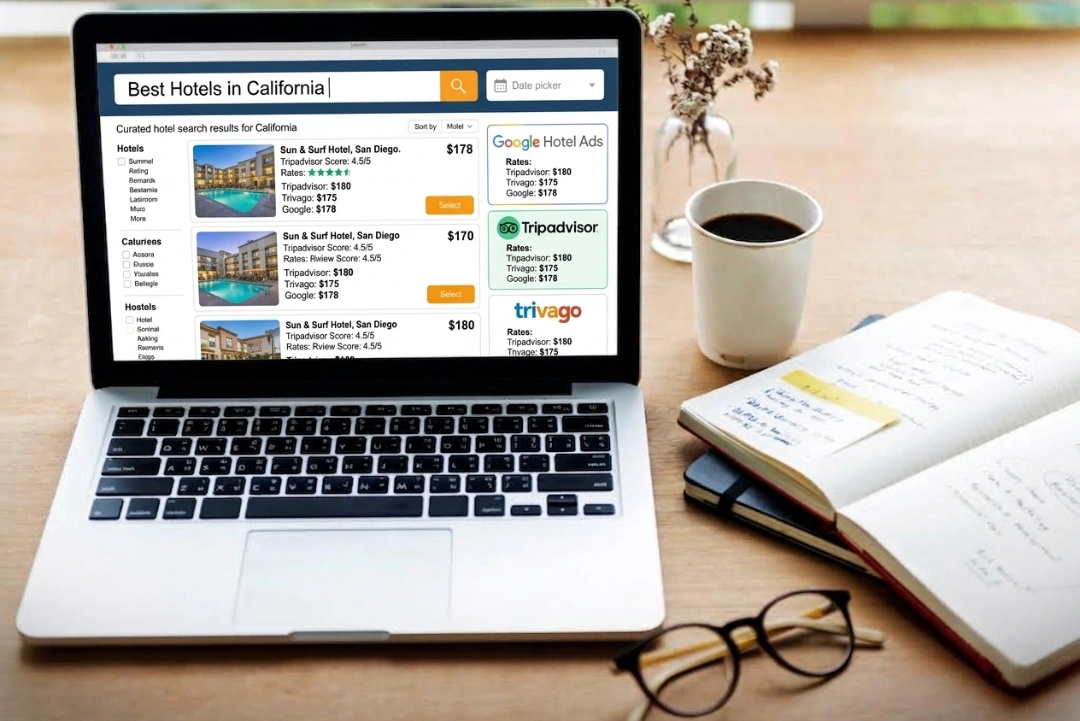
Missing Trip.com means losing access to 400+ million users worldwide, especially travelers from high-value Asian markets looking for international accommodations.
Manual management across booking platforms creates inventory conflicts, pricing errors, and missed promotional opportunities that reduce your property's visibility.
Complete Trip.com registration with proper documentation, high-resolution photos, and accurate room details to access their global traveler network.
Channel managers like roommaster automate Trip.com sync with 100+ other platforms, preventing double bookings and managing rates centrally from one dashboard.
Listing a property on Trip.com is a process that helps owners or managers reach travelers looking for hotels, apartments, and unique stays. Many people search for ways to start listing on different booking sites to increase their occupancy and revenue. Trip.com is one of the major platforms for accommodation providers worldwide.
For those exploring options to expand their property's online presence, understanding how Trip.com operates and what it offers is essential. The following guide explains the process step by step and outlines what to expect at each stage.
Why List Your Property on Trip.com?
Trip.com connects accommodation providers with over 400 million users worldwide. The platform operates in 39 countries and regions, offering services in 24 languages. This global reach means your property can be discovered by travelers from many different backgrounds and locations.
The platform has particular strength in Asian markets, where many users come from China, South Korea, Japan, and Southeast Asia. These travelers often book international trips and seek various accommodation types. Trip.com's mobile-first approach makes it easy for travelers to find and book properties through their smartphones.
Trip.com offers marketing programs for partners, including special promotions, mobile-exclusive deals, and highlighted placements in search results. The Trip.com extranet (their partner management system) provides tools to manage these promotional opportunities and track performance.
What You Need Before Getting Started
Trip.com accepts hotels, apartments, homestays, and unique accommodations that operate legally under local regulations. Properties must follow all local laws and business regulations to be approved for listing.
Required documentation includes:
Business license: Official permission to operate as accommodation
Tax certificates: Registration papers showing compliance with local tax authorities
Property ownership proof: Deed, title, or lease agreement
Safety compliance: Documentation meeting local safety codes for fire exits and security
Trip.com requires high-resolution photos in landscape format for each room type and common area. Photos should be clear, well-lit, and show the actual state of the property. You'll also provide a complete list of amenities like Wi-Fi, air conditioning, breakfast, and accessibility features.
Properties typically need a minimum room count and defined guest capacity, though specific requirements vary by location and property type.
Step-By-Step Trip.com Registration Process
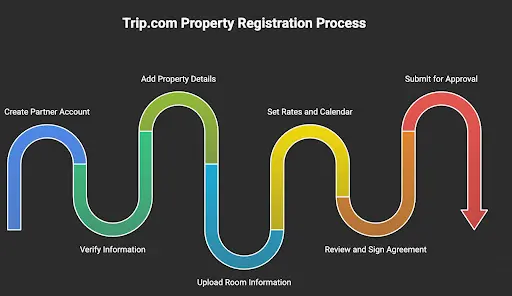
The Trip.com property registration happens through their extranet system. Here's how the process works:
Step 1: Create Your Partner Account
Visit the Trip.com partner registration page and enter your business email and password to set up a new account. The system will guide you through the initial setup process.
Step 2: Verify Your Information
Trip.com sends a verification code to your email address. Enter this code on the registration page. You may also need to verify a mobile phone number for additional security.
Step 3: Add Property Details
Input your property's official name, legal address, and select the property type from their categories. Use the interactive map to drop a pin showing your property's exact location.
Step 4: Upload Room Information and Photos
Add all available room types with details like bed size, room dimensions, and features. Upload high-quality photos for each room and shared spaces following their technical specifications.
Step 5: Set Your Rates and Calendar
Enter pricing for each room type and set any minimum or maximum stay restrictions. Add availability dates to indicate when rooms can be booked.
Step 6: Review and Sign the Partnership Agreement
Read through Trip.com's partnership terms and complete the digital signature process to accept the agreement.
Step 7: Submit for Approval
Once you submit your completed listing, Trip.com's team reviews the information and documentation. Approval timelines vary but typically take a few business days for standard listings.
Understanding Trip.com Commission and Payments
Trip.com uses a commission-based model where they take a percentage of each booking value. The exact commission rate varies based on property type, location, and agreement terms. This rate is established during the contract process and displayed in your extranet account.
Trip.com collects: They process guest payments and transfer the balance (minus commission) after checkout
Property collects: You collect payment directly from guests, and Trip.com invoices separately for commission
Settlement typically occurs monthly or bi-weekly, depending on your arrangement and local banking regulations. You can view all financial records, invoices, and payment statements through the "Finance" section in the Trip.com extranet.
Select your channel manager from Trip.com's supported integrations list
Enter your Trip.com partner account details into the channel manager
Test the connection to confirm data exchange works properly
Map room types, rates, and availability between systems
Enable real-time updates between your PMS and Trip.com
Two-way synchronization prevents overbookings by updating inventory across all platforms when reservations are made. If connection issues occur, check for incorrect room mapping, outdated login credentials, or API version mismatches.
Optimizing Your Listing for Better Visibility
High-quality photos significantly impact your listing's performance. Trip.com accepts images with a minimum size of 2048 pixels on the long side in landscape orientation. Photos should be clear, well-lit, and free from watermarks or heavy editing.
Photo best practices:
Exterior shots: Show the building and surrounding area
Room variety: Include images of each available room type
Common areas: Display lobbies, dining areas, and shared facilities
Details: Highlight unique features or amenities
Room titles should clearly describe the main features and benefits. Examples include "Deluxe King Room with City View" or "Family Suite with Kitchenette." The description section expands on these features, listing what guests receive.
High-impact amenities travelers search for most:
Free Wi-Fi
Air conditioning
Breakfast included
Parking availability
24-hour front desk
Swimming pool
Fitness center
Laundry facilities
Managing Your Live Listing
After your property goes live on Trip.com, ongoing management includes updating rates, controlling availability, and responding to guest feedback.
The extranet calendar allows you to adjust prices for different dates, set seasonal rules, and create minimum stay requirements. You can participate in Trip.com's promotional programs like flash sales and member-exclusive rates through your partner dashboard.
Guest reviews appear publicly on your listing page. You can respond to reviews through the extranet using clear, professional language. Responding to both positive and negative feedback helps with reputation management.
Available support resources:
Help Center: Articles and guides accessible through the extranet
Live chat: Real-time support available 24/7 in multiple languages
Market manager: Dedicated contact for contract and performance questions
Mobile app: Trip.com extranet app for iOS and Android devices
Streamline Operations with Hotel Management Software
Managing multiple online travel agencies can become complex as your business grows. Hotel management software like roommaster platform automates inventory management across Trip.com and 100+ other channels.
The system synchronizes room availability in real time, preventing double bookings when reservations are made on different platforms. Centralized rate management allows you to update pricing across all channels simultaneously, maintaining rate parity and consistency.
For properties looking to streamline their Trip.com management alongside other OTA channels, request a demo to see how integrated tools can simplify operations.
FAQs About Listing Your Property on Trip.com
Can I manage multiple properties under one Trip.com partner account?
Yes, Trip.com allows you to add multiple locations through a single partner account, making it easier to manage a property portfolio from one dashboard.
How long does the Trip.com approval process typically take?
Trip.com usually reviews new property submissions within a few business days, though listings requiring additional documentation may take longer.
What payment collection options does Trip.com offer?
Trip.com provides two models: they can collect guest payments and remit funds to you, or you can collect payments directly from guests depending on your market and agreement.
What types of cancellation policies can I set for my rooms?
You can configure flexible, moderate, or strict cancellation policies through the extranet, allowing you to balance booking flexibility with revenue protection.
Does Trip.com charge any upfront fees to list my property?
No, Trip.com registration is free, and they only earn revenue through commissions on completed bookings.
{{cta-strip}}
pms-two
Hotel Operations Made Simple and Effective with roommaster
Mayela Lozano is a content strategist with a passion for hospitality and technology. She collaborates with roommaster on content creation, highlighting how technology can streamline hotel operations and enhance guest satisfaction. When she’s not creating content, Mayela loves to travel and spend time with her two little ones, discovering new adventures and making memories along the way.
Join Thousands of Hotels Thriving with roommaster
The transition to roommaster is straightforward and efficient. Our implementation team handles data migration including reservations, guest profiles, and historical information.
The transition to roommaster is straightforward and efficient. Our implementation team handles data migration including reservations, guest profiles, and historical information.
Hotel Metasearch Strategy: 8 Tactics That Drive Direct Bookings
September 22, 2026
Marketing
Online Bookings
Hotel Metasearch: The Complete Guide For Hotels
September 22, 2026
Hotel Management
Online Bookings
Hotel SEO Agency vs. Consultant vs. In-House
September 13, 2026
Hotel Management
Online Bookings
Hotel SEO: Boost Your Visibility in AI Search Results
September 13, 2026
Online Bookings
Hotel Management
Unsold Hotel Room Inventory: A Complete Guide For Owners 2026
August 25, 2026
Online Bookings
Hotel Management
Bed Bank: A Complete Guide For Hoteliers 2026
August 25, 2026
Marketing
Online Bookings
Bed and Breakfast Reservation Software: Increase Direct Bookings
August 24, 2026
Online Bookings
10 Best Motel Reservation & Booking Software 2026
August 18, 2026
Online Bookings
10 Best Vacation Rental Software For 2026
August 17, 2026
Online Bookings
10 Best Glamping Booking Software For 2026
August 17, 2026
Join Thousands of Hotels Thriving with roommaster
See how roommaster's unified platform can work for your property. Our team will walk you through features tailored to your specific needs and operations.



.png)
.png)
.png)